Home Appliances / Commercial Kitchen Equipment
User Manual for Trufrost & Butler GDO Series Gas Deck Oven
Comprehensive user guide for Trufrost & Butler GDO series gas deck ovens. Includes installation, operation, safety precautions, troubleshooting, and technical specifications.
Quick answers from the manual
Quick answer
- The Trufrost & Butler GDO series gas deck ovens are commercial units requiring a 220V power supply, LPG gas with a low-pressure valve, and proper ventilation. Operation involves setting the digital temperature controller and ensuring the flame is stable through the observation window. p. 2, 9, 10
Key actions
- Installation p. 6, 7
- Ignition p. 9, 10
- Cleaning p. 9, 10, 11
First start
- Bake a plate of onions first to remove manufacturing odors. p. 10
Problems and fixes
Non-ignition
Replace igniter, solenoid valve, or ignition needle; adjust needle position; reduce air intake.
p. 11
Sudden flameout
Reduce air intake, replace gas cylinder, or replace igniter/solenoid valve.
p. 12Error codes
| Code | Meaning | Action | Pages |
|---|---|---|---|
| HHH | Temperature exceeds instrument range or thermocouple issue. | Adjust temperature, tighten thermocouple wiring, or replace thermocouple/controller. | p. 12 |
Technical specifications
| Parameter | Value | Meaning | Pages |
|---|---|---|---|
| Gas Pressure | 2.8 Kpa | Required pressure for LPG. | p. 5 |
| Temperature Range | 0-400°C | Operating temperature range. | p. 5 |
Where to find it in the PDF
- Structural Diagrams p. 3, 4
- Technical Specifications p. 5
- Installation & Precautions p. 6, 7, 8
- Operation Instructions p. 9, 10
- Troubleshooting p. 11, 12
- Circuit Diagrams p. 14, 15
Table of contents
Manual images
Click an image to enlargeQuick guide from the manual
This manual provides essential instructions for the safe installation, operation, and maintenance of the Trufrost & Butler GDO series gas deck ovens. Key safety requirements include ensuring proper ventilation, using a low-pressure gas valve, and connecting the unit to a stable power supply with a voltage stabilizer. Never leave the appliance unattended while in use.
Product Overview
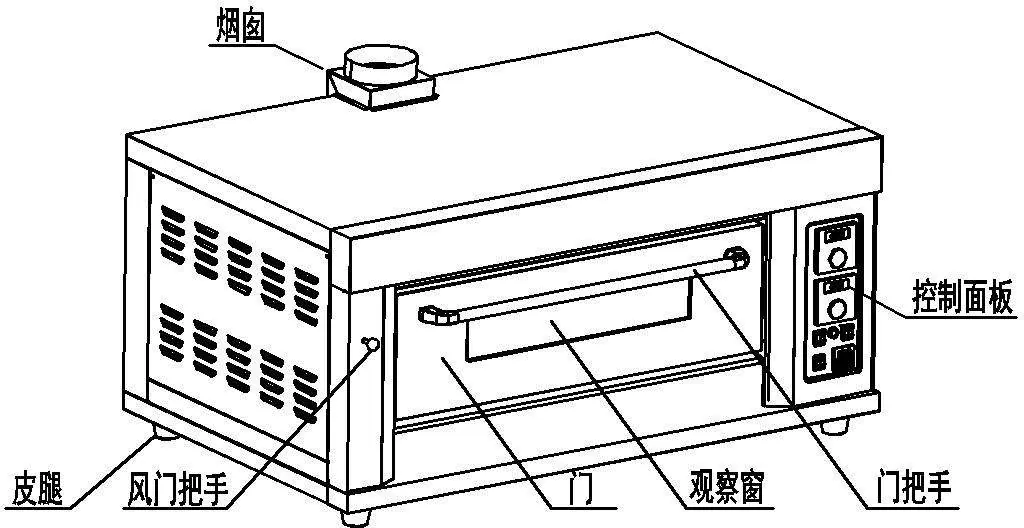
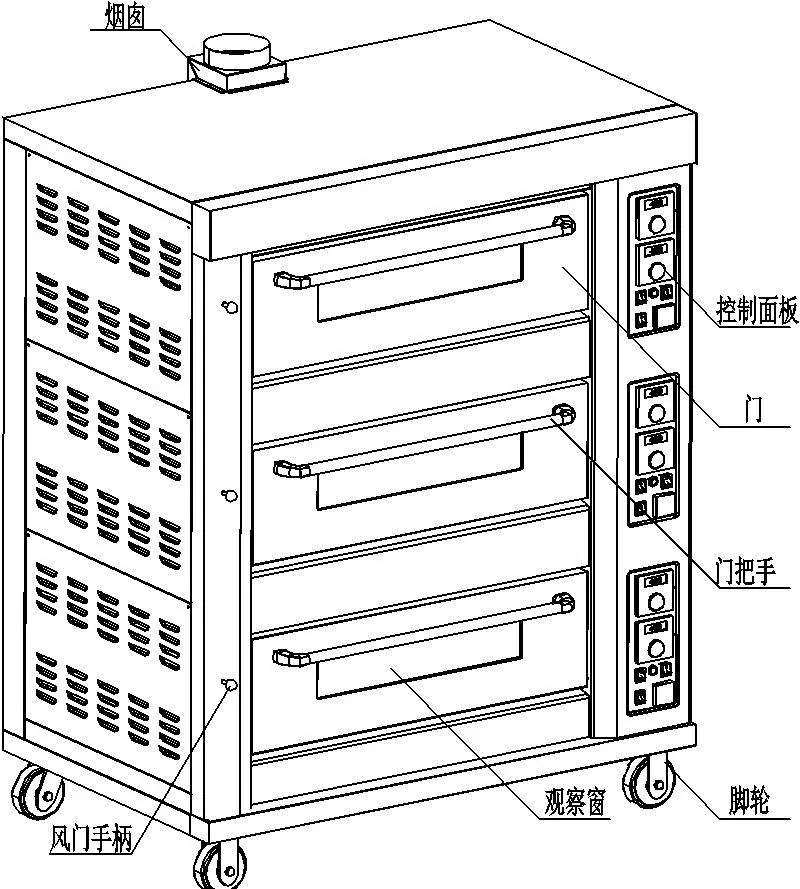
The GDO series ovens are commercial gas deck ovens designed for uniform heating. They feature digital temperature control, flameout protection, and tempered glass windows for monitoring food. Models are available in one, two, or three-deck configurations.
Installation and Safety
- Ventilation: The oven must be installed in a well-ventilated area. Keep the left and right sides at least 30cm away from combustible materials, and the back at least 50cm away.
- Gas Connection: Use only liquefied petroleum gas (LPG). A low-pressure regulating valve is required. Ensure all connections are firm and check for leaks using soap foam before initial use.
- Electrical: Connect to a 220V power supply with a leakage protection switch. The unit must be properly grounded. Use a voltage stabilizer to prevent damage from fluctuations.
- Placement: The oven must be placed on a level surface. Lock the casters to prevent movement.
Operation Instructions
First-time use: It is recommended to bake a plate of onions to remove any manufacturing odors before cooking food.
- Ensure all gas valves are closed.
- Connect the power and gas supply.
- Switch on the power and set the desired temperature using the digital controller.
- The pulse igniter will automatically ignite the burner. If ignition fails, wait 5 minutes before retrying to allow gas to dissipate.
- Adjust the damper if the flame is unstable or yellow.
- After baking, turn off the gas valve first, then the power.
Maintenance and Cleaning
- Clean the stainless steel surfaces regularly. Do not use water jets to rinse the oven.
- Clean the baking tray at least once a day.
- Inspect the gas cylinder, hose, and relief valve for damage or leaks regularly.
- If the oven is not in use, ensure it is turned off.
Troubleshooting
If the oven fails to ignite, check for igniter damage, solenoid valve issues, or incorrect ignition needle positioning. If the display shows "HHH", the temperature has exceeded the instrument range or there is a thermocouple issue. Always turn off the gas and power supply before performing any repairs.
Practical help
Common problems
Non-ignition
Check for igniter damage, solenoid valve failure, incorrect ignition needle position, or insufficient gas pressure. Ensure the fan is running and air intake is not too large.
Sudden flameout during work
Check if the gas cylinder is empty, the air intake is incorrect, or the igniter/solenoid valve is damaged.
Display shows 'HHH'
The temperature exceeds the range or there is a thermocouple issue. Check thermocouple wiring or replace the thermocouple/controller.
After ignition, the flame goes out
Adjust the induction needle position so it contacts the flame, or check for excessive wind.
Before use
- Ensure the gas source is liquefied petroleum gas (LPG).
- Verify the use of a low-pressure regulating valve.
- Check all gas connections for leaks using soap foam.
- Ensure the power supply is 220V and properly grounded.
- Confirm the oven is placed on a level surface and casters are locked.
- Ensure adequate ventilation and exhaust facilities are installed.
Specs in practice
- Gas Pressure
- 2.8 Kpa (Requires low-pressure valve).
- Temperature Control Range
- 0 to 400°C.
Images and diagrams
- Structural Schematic: Shows the location of the chimney, control panel, door, and damper handle.
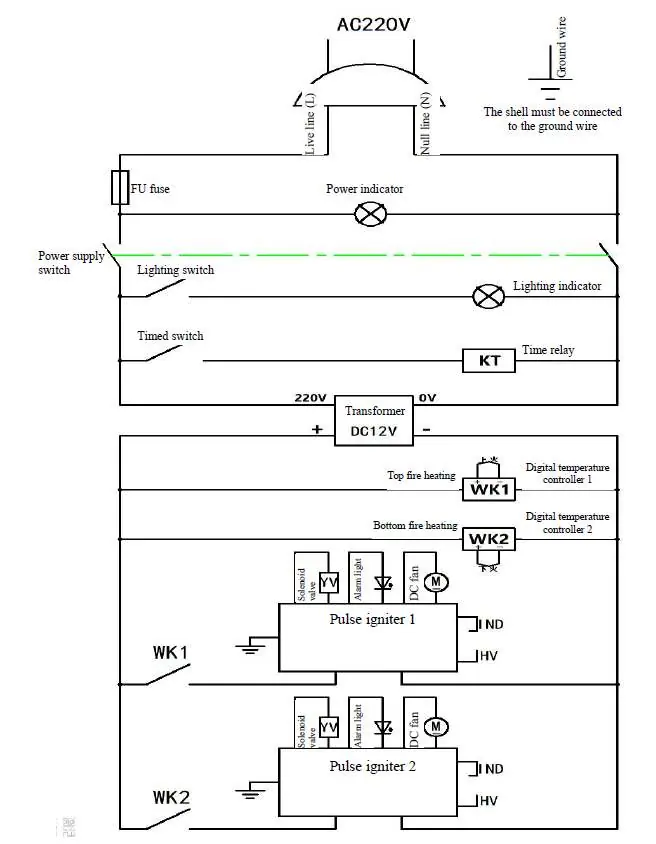
- Circuit Diagram: Illustrates the electrical connections for the power supply, timer, temperature controllers, and pulse igniters.
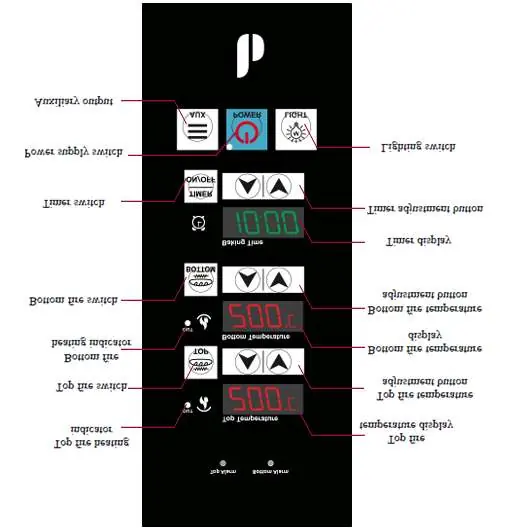
- Computer-controlled operation panel: Details the buttons for top/bottom fire, timer, and power.
Model compatibility
- Requires a low-pressure gas regulating valve.
- Requires a voltage stabilizer for unstable power grids.
- Not for use with high-pressure gas valves.

Manual page author
David Miller
Documentation analyst
Organizes user manual content into clear summaries, with attention to model details, product context, and everyday usability.