HVAC / Heaters & Fireplaces
Ufesa CF Alpha Fan Heater User Manual
Quick guide for the Ufesa CF Alpha fan heater. Includes setup, safety instructions, operation, thermostat settings, and maintenance.
Table of contents
Manual images
Click an image to enlargeQuick guide from the manual
The Ufesa CF Alpha is a portable fan heater designed for well-insulated spaces or occasional use. Before operating, ensure the unit is placed on a stable, vertical surface with adequate clearance from furniture and curtains. The heater features an adjustable thermostat and multiple power settings.
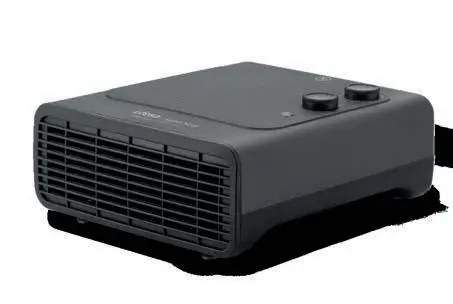
Description of the device
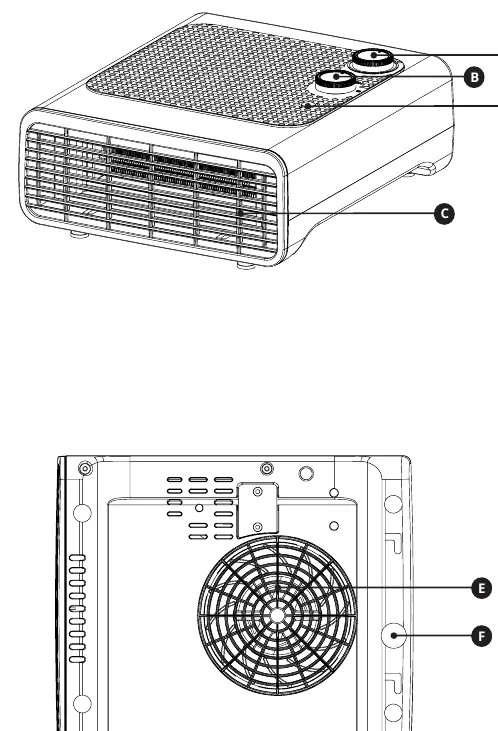
- A: Adjustable thermostat
- B: Power select switch
- C: Air outlet
- D: Indicator light
- E: Air inlet
- F: Tip-over switch
Safety instructions
Important: To prevent overheating, never cover the heater. Do not use the heater in rooms smaller than 4m² or in the immediate vicinity of a bath, shower, or swimming pool. Keep textiles, curtains, and other flammable materials at least 1 meter away from the air outlet.
Children under 3 years old should be kept away unless constantly supervised. Children aged 3 to 8 years may only switch the appliance on/off if it is installed in its normal operating position and they are supervised or instructed on safe use.
Installation and usage
- Remove all packaging and place the heater in the desired location.
- Ensure a safety clearance of 50 cm on the top and sides, and 120 cm in front of the unit.
- Unwind the power cord and plug it into a power outlet.
- Turn the thermostat knob to the maximum position.
- Turn the switch knob clockwise to the desired setting:
- Fan: Cool air
- I: Low power
- II: Maximum power
- To turn off, turn the switch knob to 'O'.
The unit is equipped with a safety tip-over switch that automatically shuts off the heating element if the heater is not in an upright position.
Auto safety shut-off
If the heater overheats (e.g., due to obstructed grilles), the safety device will turn it off. To reset:
- Turn the control setting to 'O'.
- Unplug the heater and wait 5-10 minutes for it to cool down.
- Ensure there are no obstructions at the air inlet or outlet.
- Plug the unit back in and operate normally.
Cleaning and maintenance
Always unplug the device and let it cool down before cleaning. Clean only by hand using a soft, slightly damp cloth with mild soap. Do not use abrasive products, brushes, solvents, or alcohol. Never immerse the appliance in water. Ensure the air inlet and outlet are free from dust and obstructions.
Technical data
The heater is rated for 1.6-1.8 kW nominal heat output. It is IPX1 rated, meaning it can be used in rooms with a risk of splashing from above, provided it is not placed directly above a bathtub or within 60 cm of one.
Practical help
Common problems
Unit shuts off unexpectedly
The safety shut-off may have triggered due to overheating. Unplug, check for obstructions, let cool for 5-10 minutes, and restart.
Unit does not turn on
Ensure the unit is on a flat, stable surface. The tip-over safety switch will prevent operation if the unit is tilted or knocked over.
Before use
- Remove all packaging materials.
- Ensure the unit is on a stable, vertical surface.
- Check that the mains voltage matches the label on the product.
- Verify a safety clearance of 50 cm on top/sides and 120 cm in front.
- Ensure the air inlet and outlet are not obstructed.
Specs in practice
- Pnom (1.6-1.8 kW)
- Nominal heat output of the device.
Images and diagrams
- The unit features a top-mounted control panel with a thermostat knob and a power selector switch.
- The tip-over switch (F) is a safety feature located on the base to cut power if the unit falls.
Model compatibility
- Suitable only for well-insulated spaces or occasional use.
- Not for use in rooms smaller than 4m².

Manual page author
David Miller
Documentation analyst
Organizes user manual content into clear summaries, with attention to model details, product context, and everyday usability.