HVAC / Heaters & Fireplaces
User Manual for Sealey CH30110VS Ceramic Heater with Telescopic Tripod Stand
Quick guide for the Sealey CH30110VS ceramic heater. Includes assembly instructions, operation steps for the 7-day timer and thermostat, maintenance procedures, and safety warnings.
Table of contents
Manual images
Click an image to enlargeQuick guide from the manual
This heater is designed for indoor use only. Before operating, ensure the unit is placed on a stable, level surface and maintains a minimum clearance of 2 meters from flammable materials and objects. The heater features a tilt safety switch that automatically shuts off the unit if it is tilted beyond 25 degrees. Always disconnect the power supply before performing any maintenance or cleaning.
Assembly
The tripod stand is supplied assembled. To set up the heater:
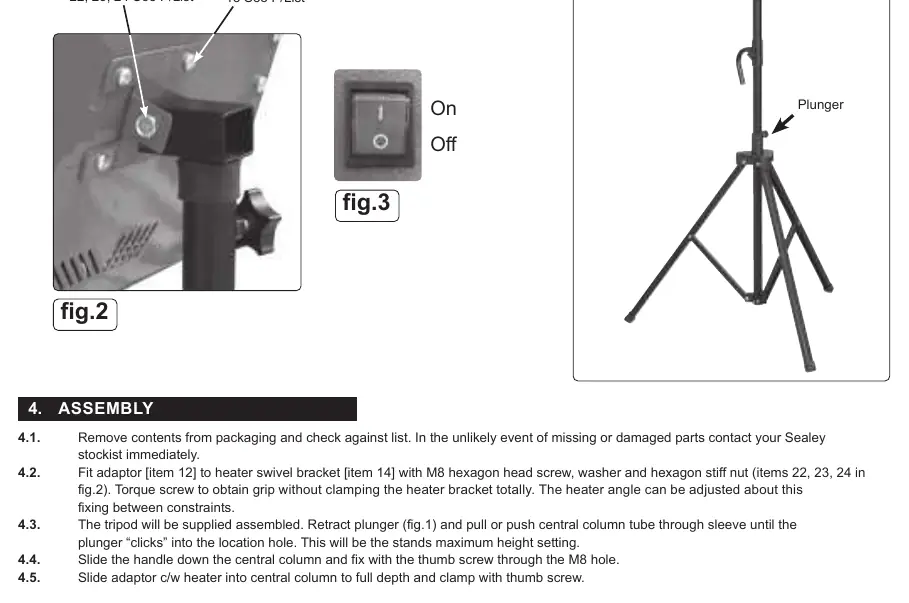
- Attach the adaptor (item 12) to the heater swivel bracket (item 14) using the provided M8 screw, washer, and nut.
- Adjust the tripod height by retracting the plunger and sliding the central column until the plunger clicks into the desired location hole.
- Slide the handle down the central column and secure it with the thumb screw.
- Attach the heater/adaptor assembly to the central column and secure it with the thumb screw.
Operation
Power On/Off: Connect to the mains and turn on the red rocker switch. The screen will show 'OF' in standby. Press the power button to start. Press again to return to standby.
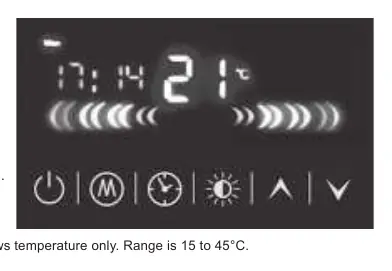
Temperature Control: The default temperature is 30°C. Use the arrow buttons to adjust between 15°C and 45°C. The heater only operates when the ambient temperature is lower than the set temperature.
Power Settings: Select between three power settings by pressing the power button: 1 (top element), 2 (bottom element), or 3 (both elements).
Timer and Scheduling: The unit features a 7-day timer with 3 working modes per day. Use the clock button to set the current date and time. Use the timer button to configure daily programs, including power-on/off times and temperature settings.
Open Window Detection: If the ambient temperature drops by more than 5°C within 10 minutes, the heater will automatically power off and sound 3 alarm beeps.
Maintenance
Always ensure the unit is unplugged and cooled down before maintenance. Clean the reflector and guard with a damp cloth and mild detergent; do not use abrasives. If the element needs replacement, remove the front grille, ease the sprung sockets back, and pull the element forward. Do not touch the element glass directly with fingers.
Manufacturer information
Sealey Group
Practical help
Common problems
Heater turns off automatically
Check if the tilt switch is activated (tilted >25°) or if the Open Window Detection function is triggered (temp drop >5°C in 10 mins).
Heater will not turn on
Ensure it is plugged in, the red rocker switch is on, and the ambient temperature is lower than the set temperature.
Timer settings not working
Ensure the weekly working time mode is activated (week and time symbols must be displayed on the screen).
Before use
- Ensure the heater is at least 2m away from flammable materials.
- Check that the power cable and plug are undamaged.
- Place the heater on a horizontal, stable, and level surface.
- Ensure the grille is fitted correctly.
- Verify the power supply is 110V - 32A.
Specs in practice
- Thermostat Range
- 15°C to 45°C.
Images and diagrams
- Fig 1: Tripod height adjustment using the plunger.
- Fig 2: Assembly of the heater swivel bracket and adaptor.
- Fig 3: Power switch and control panel layout.
Model compatibility
- Requires 110V 32A power supply.
- Indoor use only.

Manual page author
Emily Carter
User documentation editor
Prepares concise manual descriptions and highlights the most useful setup, operation, and maintenance information for readers.