Power / Power Banks
User Manual for Ugreen 25000mAh 200W Power Bank PB722
Quick guide for the Ugreen 25000mAh 200W Power Bank (PB722). Learn how to operate buttons, charge devices, use trickle charging mode, and troubleshoot common issues.
Quick answers from the manual
Quick answer
- The Ugreen 25000mAh 200W Power Bank (PB722) is a high-capacity portable charger. It supports fast charging for laptops, tablets, and phones, and features a trickle charging mode for low-current devices like Bluetooth headphones. p. 1
Key actions
- Manually turn on the power bank p. 1
- Manually turn off the power bank p. 1
- Activate Trickle Charging Mode p. 1
First start
- Charge the power bank fully before first use. p. 1
Problems and fixes
Overvoltage protection
Unplug all cables, hold the button for 6 seconds, then restart.
p. 1
Overheating protection
Unplug all cables and wait 30 minutes.
p. 1Maintenance and reset
- Reset the device by holding the button for 6 seconds if an error occurs. p. 1
Technical specifications
| Parameter | Value | Meaning | Pages |
|---|---|---|---|
| Capacity | 25000 mAh | Total battery capacity | p. 1 |
| Max Output | 200 W | Maximum combined output power | p. 1 |
Where to find it in the PDF
- Product Overview and Operations p. 1
Table of contents
Quick Guide
The Ugreen 25000mAh 200W Power Bank (PB722) is designed for high-speed charging of multiple devices, including laptops, tablets, and phones. It features a digital display, manual button controls, and a specialized trickle charging mode for low-current devices like Bluetooth headphones.
Product Overview
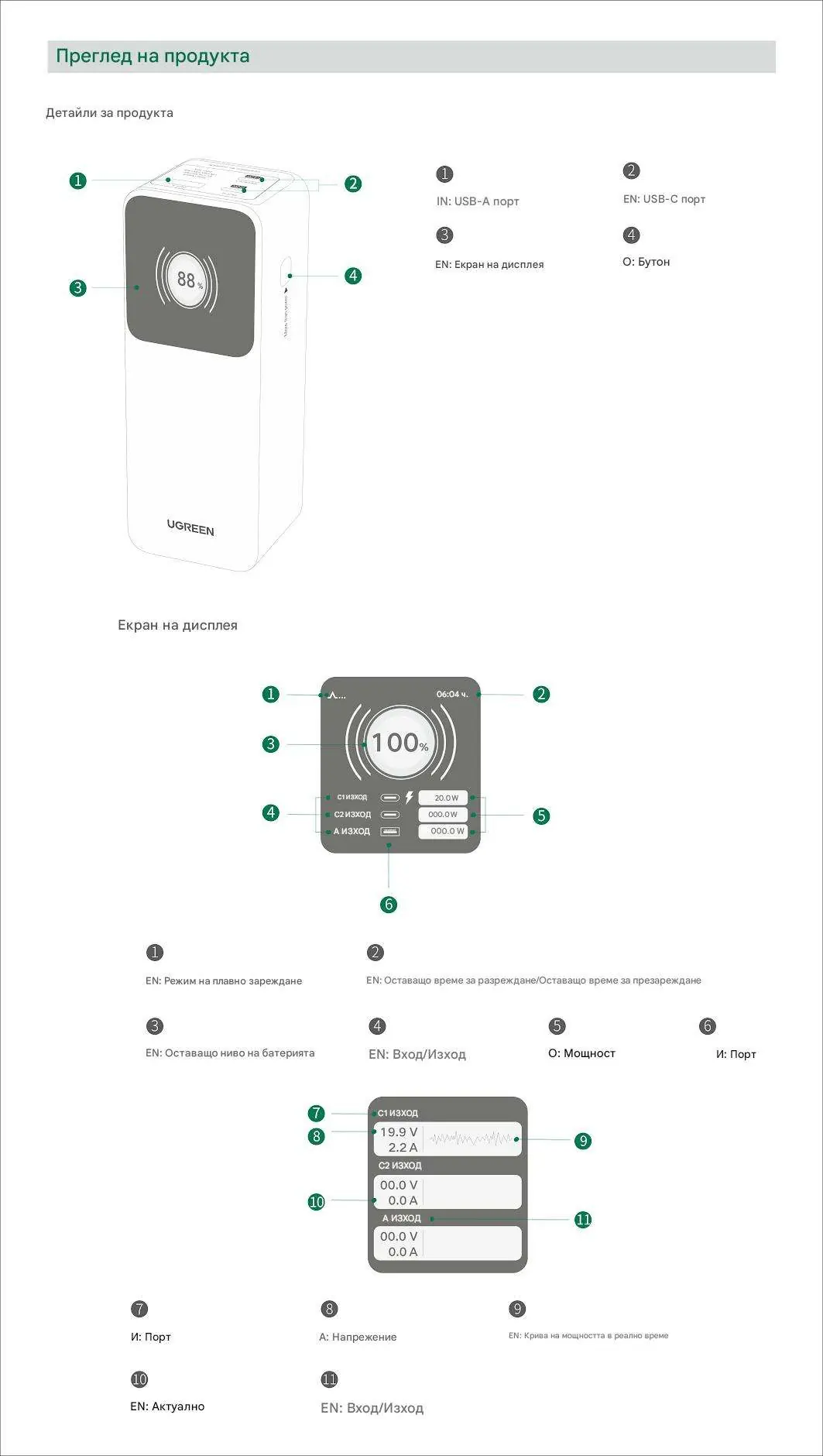
The device includes a USB-A port, two USB-C ports, a power button, and a digital display screen. The display provides real-time information on battery level, input/output status, and power curves.
Button Operation
The power button controls various functions:
- Manual Power On: Single click.
- Manual Power Off: Press and hold for 6 seconds.
- Display On: Single click.
- Display Off: Double click.
- Trickle Charging Mode (On/Off): Press and hold for 3 seconds.
Charging Your Devices
The power bank automatically detects connected devices and begins charging. If charging does not start automatically, click the button once. To stop charging, disconnect the device. The power bank will automatically turn off after 3 minutes of inactivity.
Trickle Charging Mode: Recommended for low-current devices like Bluetooth headphones or watches. Activate by holding the button for 3 seconds until the icon appears in the top left corner of the display. Deactivate by holding the button for 3 seconds again or wait 3.5 hours for automatic deactivation.
Power Distribution
The power bank supports various output configurations:
- Single Port: Up to 140W (USB-C1) or 100W (USB-C2).
- Dual Port: Up to 200W total output when using USB-C1 and USB-C2 simultaneously.
- Triple Port: Up to 160W total output when using USB-C1, USB-C2, and USB-A simultaneously.
Recharging the Power Bank
To recharge the power bank, connect it to a power source using a USB-C cable. It is recommended to use a charger with at least 65W PD (Power Delivery) for the fastest charging speed. Always charge the product fully before its first use.
Troubleshooting
- Overvoltage Protection: If triggered, unplug all charging cables, press and hold the button for 6 seconds, then restart the device.
- Overheating Protection: If triggered, unplug all charging cables and wait 30 minutes before attempting to use the device again.
Specifications
The power bank has a total capacity of 25000mAh (5 x 5000mAh). It supports various voltage and amperage outputs across its ports, with a maximum total output of 200W. Operating temperature is 0°C to 40°C.
Manufacturer information
UGREEN
Practical help
Common problems
Overvoltage protection triggered
Unplug all cables, press and hold the button for 6 seconds, then restart the device.
Overheating protection triggered
Unplug all cables and wait 30 minutes before using the power bank again.
Device not charging automatically
Click the power button once to manually initiate charging.
Before use
- Charge the power bank fully before its first use.
- Use a 65W or higher PD charger for optimal recharging speed.
- Identify the correct port for your device (USB-C1/C2 for high power, USB-A for standard).
Specs in practice
- Trickle Mode
- A low-current charging mode specifically for small devices like Bluetooth earbuds or watches.
Images and diagrams
- The display shows battery percentage, remaining time, input/output status, and real-time power curves.
- The button is located on the side of the unit for easy access.
Model compatibility
- Compatible with USB-C and USB-A devices.
- Trickle charging mode is required for low-current devices to prevent automatic shutdown.

Manual page author
Emily Carter
User documentation editor
Prepares concise manual descriptions and highlights the most useful setup, operation, and maintenance information for readers.