Lighting / Fixtures
User Manual for PT23 Bluetooth Pedal Multimedia Controller
Quick guide for the PT23 Bluetooth pedal controller, covering pairing, mode switching, operation, and charging instructions for Android, iOS, and Windows devices.
Table of contents
Manual images
Click an image to enlargeQuick guide from the manual
The PT23 is a Bluetooth pedal multimedia controller designed for hands-free navigation of music, e-books, presentations, and short-video apps like TikTok. It is compatible with Android, iOS, HarmonyOS, and Windows. Ensure the device is charged and follow the pairing instructions to begin.
Device Overview
The device features a power switch, a Type-C charging port, a connection/mode button, and an LED indicator. The LED remains on during charging, turns off when fully charged, and flashes when the battery is low.
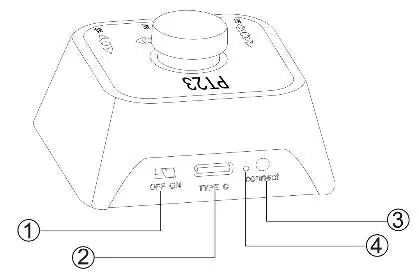
Setup and Pairing
- Turn the power switch to the ON position.
- Press and hold the connect button for three seconds to enter Bluetooth pairing mode.
- Search for the device named PT23 on your smartphone or computer and select it to connect.
- For iOS users: Navigate to Settings, then Accessibility, then Touch, and enable Assistive Touch. Adjust the sensitivity to one-third of the position for optimal performance.
Operation and Modes
Click the connect button to switch between the four available modes. Each mode offers different functions based on button presses:
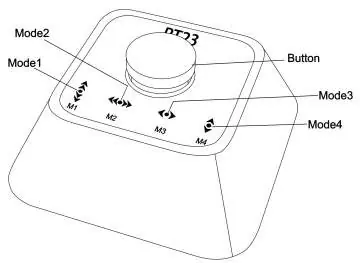
- Mode 1: Simulates hand flipping (Up/Down).
- Mode 2: Simulates hand flipping (Left/Right).
- Mode 3: Turns pages or scrolls (Left/Right).
- Mode 4: Turns pages or scrolls (Up/Down).
Each mode supports single press, double press, press and hold, and double press and hold actions to trigger specific navigation commands.
Technical Specifications
- Bluetooth Version: 5.3
- Coverage Radius: 10 meters or more
- Battery: Built-in rechargeable lithium battery (230mAh)
- Dimensions: 55 x 52 x 30 mm
- Weight: 37g
Practical help
Common problems
Device not working properly on iOS
Ensure Assistive Touch is enabled in Settings > Accessibility > Touch and set to one-third sensitivity.
Bluetooth connection issues
Ensure the device is within 10 meters and that you have held the connect button for three seconds to enter pairing mode.
Before use
- Charge the device using the Type-C port.
- Ensure the power switch is set to ON.
- For iOS, configure Assistive Touch settings.
- Verify Bluetooth is enabled on your host device.
Specs in practice
- Bluetooth 5.3
- Latest standard for stable, low-energy wireless connection.
- 230mAh Battery
- Internal rechargeable capacity for portable use.
Images and diagrams
- 1: Power switch (ON/OFF)
- 2: Type-C charging port
- 3: Connect/Mode switch button
- 4: LED status indicator
Model compatibility
- Supports Android, iOS, HarmonyOS, and Windows.
- Requires specific accessibility settings on iOS devices.

Manual page author
Michael Turner
Technical manual editor
Reviews PDF manuals for structure, safety notes, and practical product details so readers can find the right information quickly.