Power / Power Banks
Valore 130W-PD 20000mAh Power Bank User Manual
Quick guide for the Valore 130W-PD 20000mAh Power Bank. Learn how to charge your devices, understand the digital display, and troubleshoot common power issues.
Table of contents
Manual images
Click an image to enlargeImportant Information
Before using your Valore 130W-PD 20000mAh Power Bank, please note the following requirements:
- First Use: Fully charge the power bank for at least 14-16 hours before first use to maximize battery performance.
- Maintenance: Recharge the power bank once every three months if it is not in use or seldom used.
- Charging Requirements: Use a 5V supply with at least 800mAh for charging the power bank.
Product Overview
The power bank is equipped with a digital LCD display and multiple output ports to charge up to three devices simultaneously.
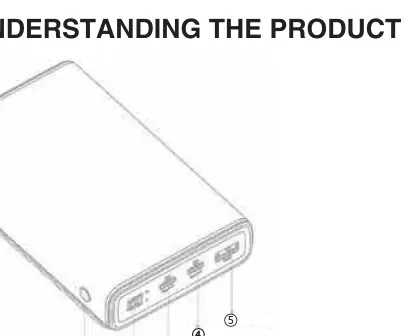
- Power button: Used to activate the display.
- LCD display: Shows remaining battery percentage (100% to 0%).
- USB-C 1 & 2: Input/output ports for high-speed charging.
- USB output: Standard USB-A output port.
Charging Devices
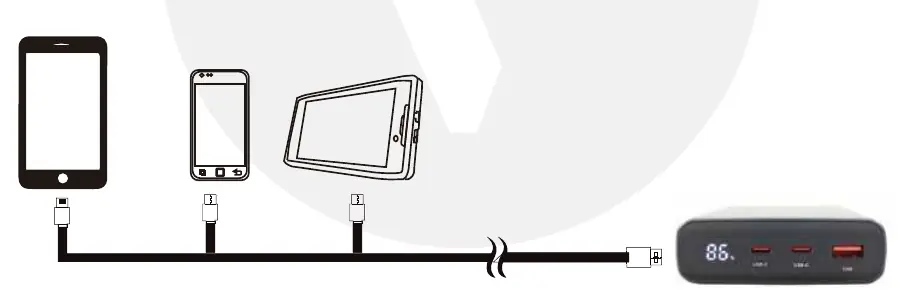
To charge your mobile devices, connect them to the power bank using an 8-pin, Micro USB, or USB-C cable. The LCD display will indicate the remaining power level. When the display shows near 0%, the power bank requires recharging.
Troubleshooting
If you encounter issues, refer to these solutions:
- Power bank unable to charge mobile device: Ensure the power bank battery is fully charged.
- Power bank drains quickly: Running multiple applications on your mobile device consumes extra energy due to heat. Close background applications while charging.
- Power bank not charging: Ensure the power adapter provides at least 5V/800mAh. Check that the cable is well-connected or replace it if damaged.
Safety Precautions
Follow these safety guidelines to ensure proper operation:
- Do not dismantle or open the power bank.
- Do not subject the unit to mechanical shock, such as crushing, bending, or puncturing.
- Keep away from water, liquids, fire, and direct sunlight.
- Do not insert foreign objects into the ports.
- Use only the provided charger or a compatible adapter.
Practical help
Common problems
Power bank is unable to charge your mobile device
Ensure the power bank is fully charged.
Power bank drains off quickly
Turn off all running applications on the mobile device while charging.
Power bank is not charging (indicator not flashing)
Use a 5V supply with at least 800mAh and check that the cable is connected properly.
Before use
- Fully charge the power bank for 14-16 hours before first use.
- Verify you have a compatible charging cable (8-pin, Micro USB, or USB-C).
- Ensure your power adapter provides at least 5V/800mAh.
- Check the power bank for any physical damage.
Specs in practice
- Battery Capacity
- 20000mAh-76Wh
- Total Output Power
- 130W
- Operating Temperature
- 0 - 55°C
Images and diagrams
- 1: Power button
- 2: LCD display
- 3: USB-C 1 input/output
- 4: USB-C 2 input/output
- 5: USB output
Model compatibility
- USB-C charging laptops requiring up to 100W power input are supported.

Manual page author
David Miller
Documentation analyst
Organizes user manual content into clear summaries, with attention to model details, product context, and everyday usability.