Power / Wireless Chargers
User Manual for Scosche PowerUp Torch PBJF600
Comprehensive user guide for the Scosche PowerUp Torch PBJF600. Includes instructions for jump-starting vehicles, charging the power supply, using the flashlight modes, and understanding LED status indicators.
Table of contents
Manual images
Click an image to enlargeQuick Guide from the Manual
The Scosche PowerUp Torch PBJF600 is a multi-function device serving as a flashlight, power bank, and jump starter. Important: Before attempting to jump-start a vehicle, ensure the Power Supply is charged to at least 50% capacity. Always follow the specific connection sequence to avoid damage or injury.
Device Overview
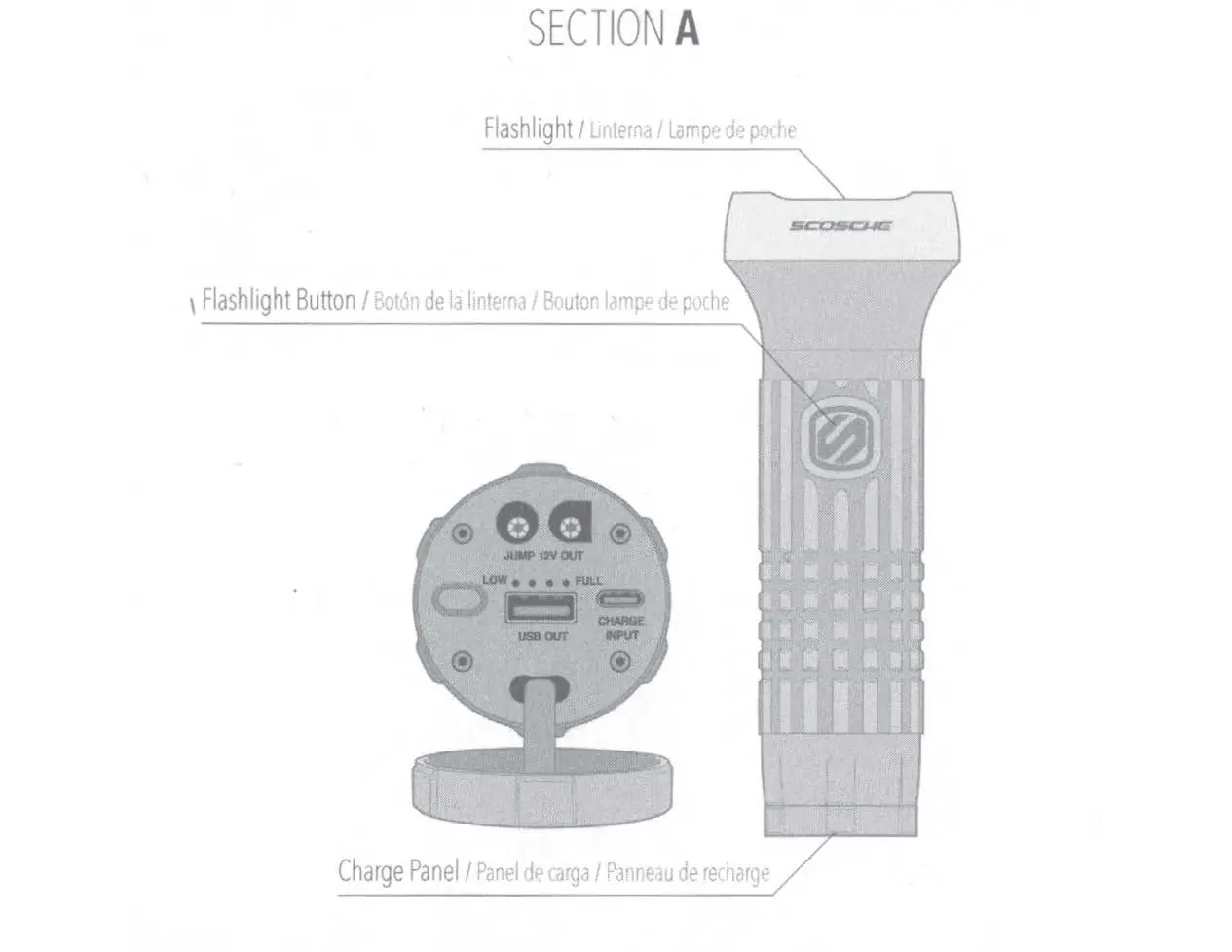
The device features a flashlight head with a control button. The rear panel contains the charge status LEDs, a check charge level button, a USB-A output port for charging mobile devices, and a USB-C input port for charging the PowerUp unit itself.
Charging the Power Supply
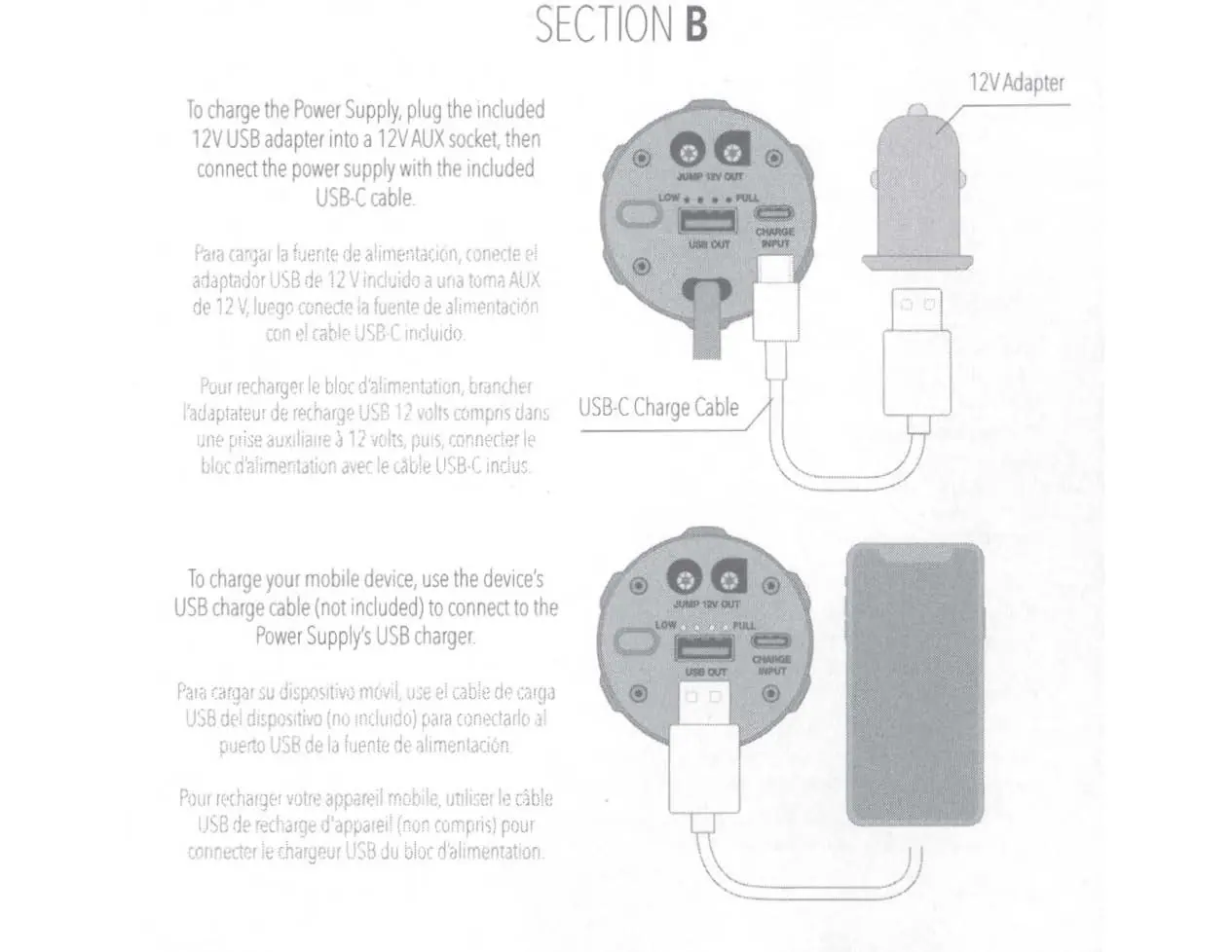
To charge the PowerUp Torch, use the included 12V USB adapter plugged into a 12V AUX socket, or use a standard USB power source. Connect the power supply using the included USB-C cable. The charge level LEDs will indicate the current battery status.
Charging Mobile Devices
You can use the PowerUp Torch as a power bank. Connect your mobile device's USB charging cable (not included) to the USB-A output port on the PowerUp unit to begin charging.
Jump Starting Procedure
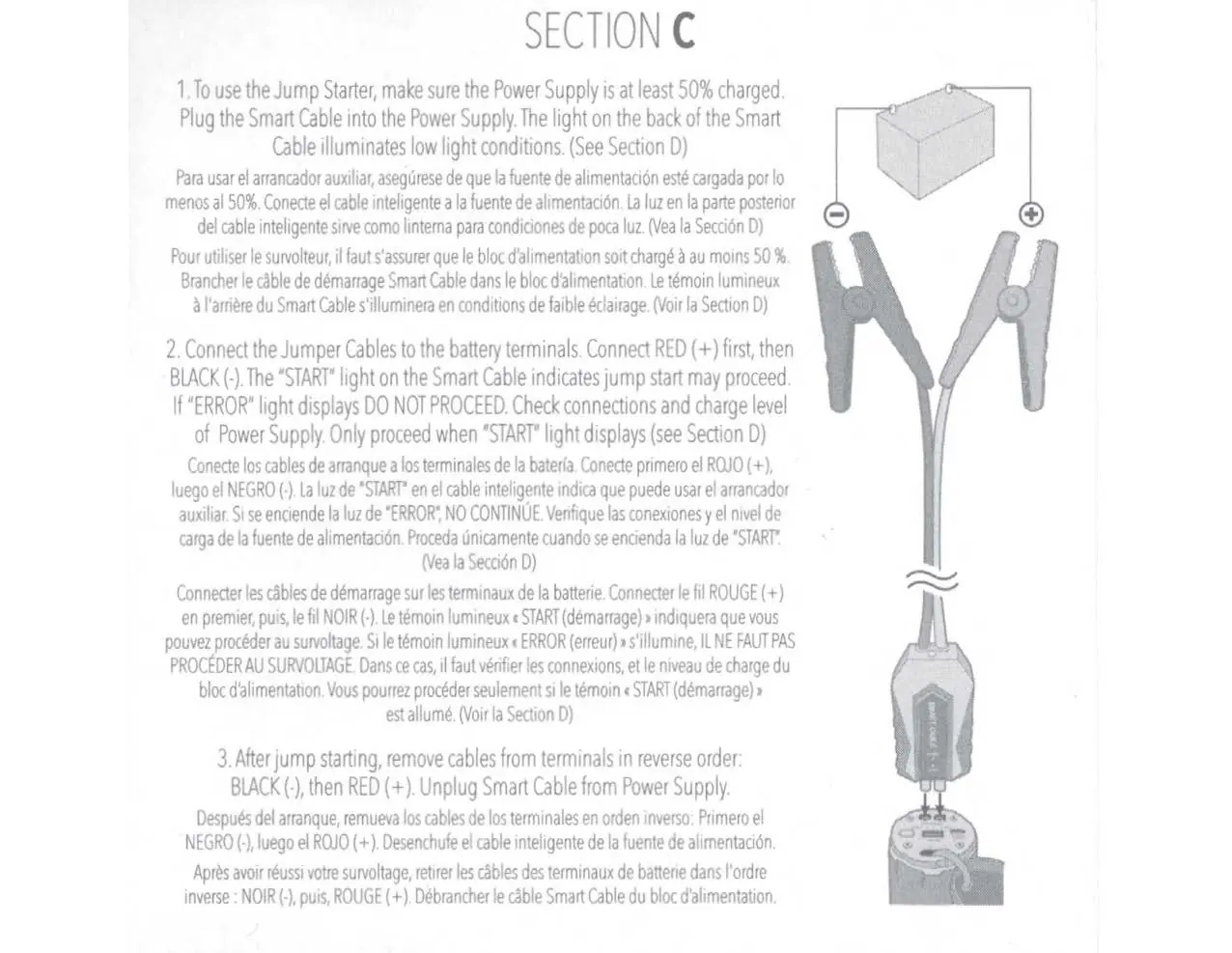
- Ensure the Power Supply is at least 50% charged.
- Plug the Smart Cable into the Power Supply.
- Connect the Jumper Cables to the battery terminals: Connect the RED (+) cable first, then the BLACK (-) cable.
- Observe the Smart Cable lights. If the START light is illuminated, you may proceed with the jump start.
- If the ERROR light displays, do not proceed. Check your connections and the charge level of the Power Supply.
- After the vehicle has started, remove the cables in reverse order: disconnect the BLACK (-) cable first, then the RED (+) cable.
- Unplug the Smart Cable from the Power Supply.
LED Indicators
The device uses two sets of indicators:
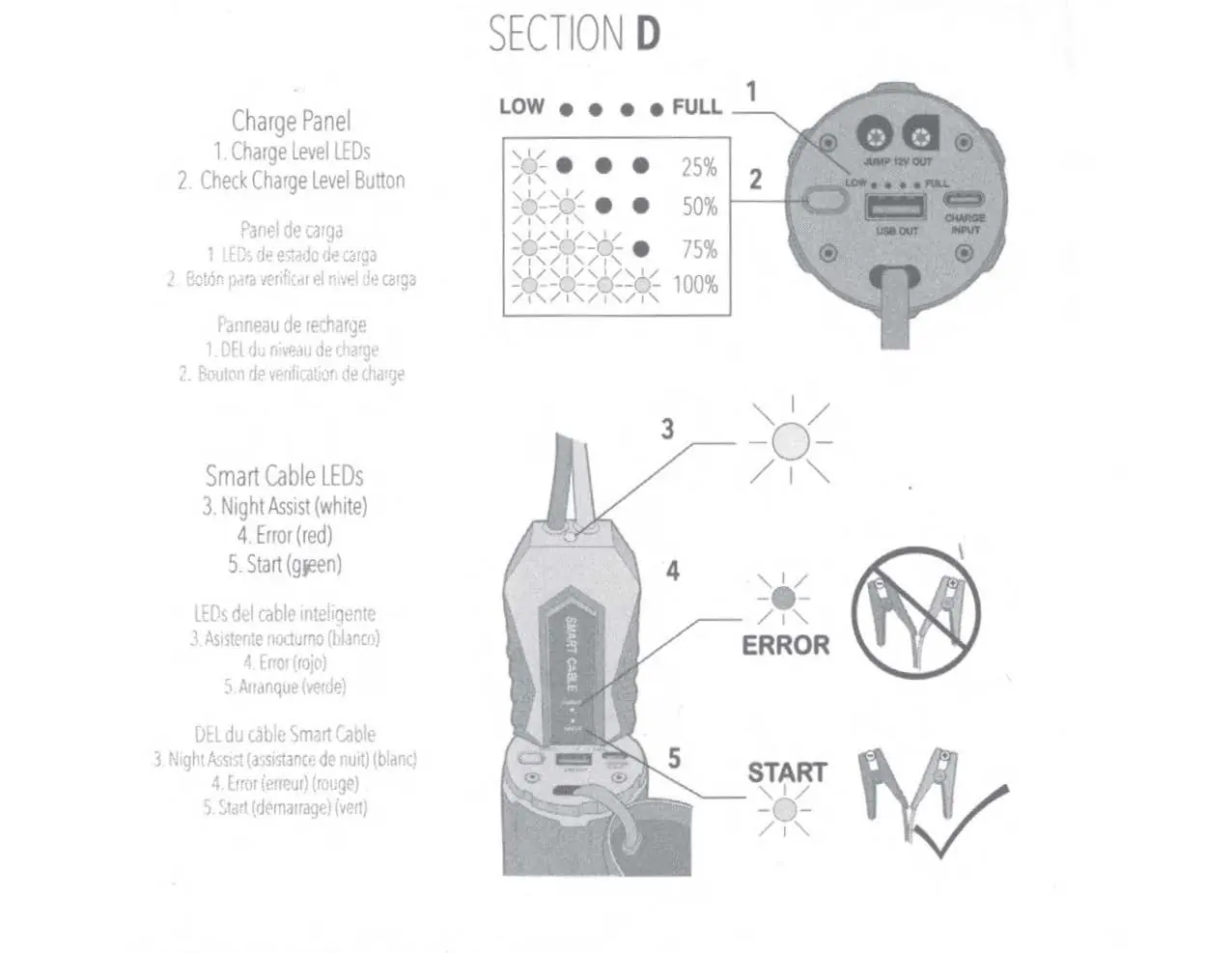
- Charge Level LEDs: Indicate the remaining battery capacity (25%, 50%, 75%, 100%).
- Smart Cable LEDs: Provide status updates. The white light acts as a Night Assist. The red light indicates an error, and the green light indicates it is safe to start.
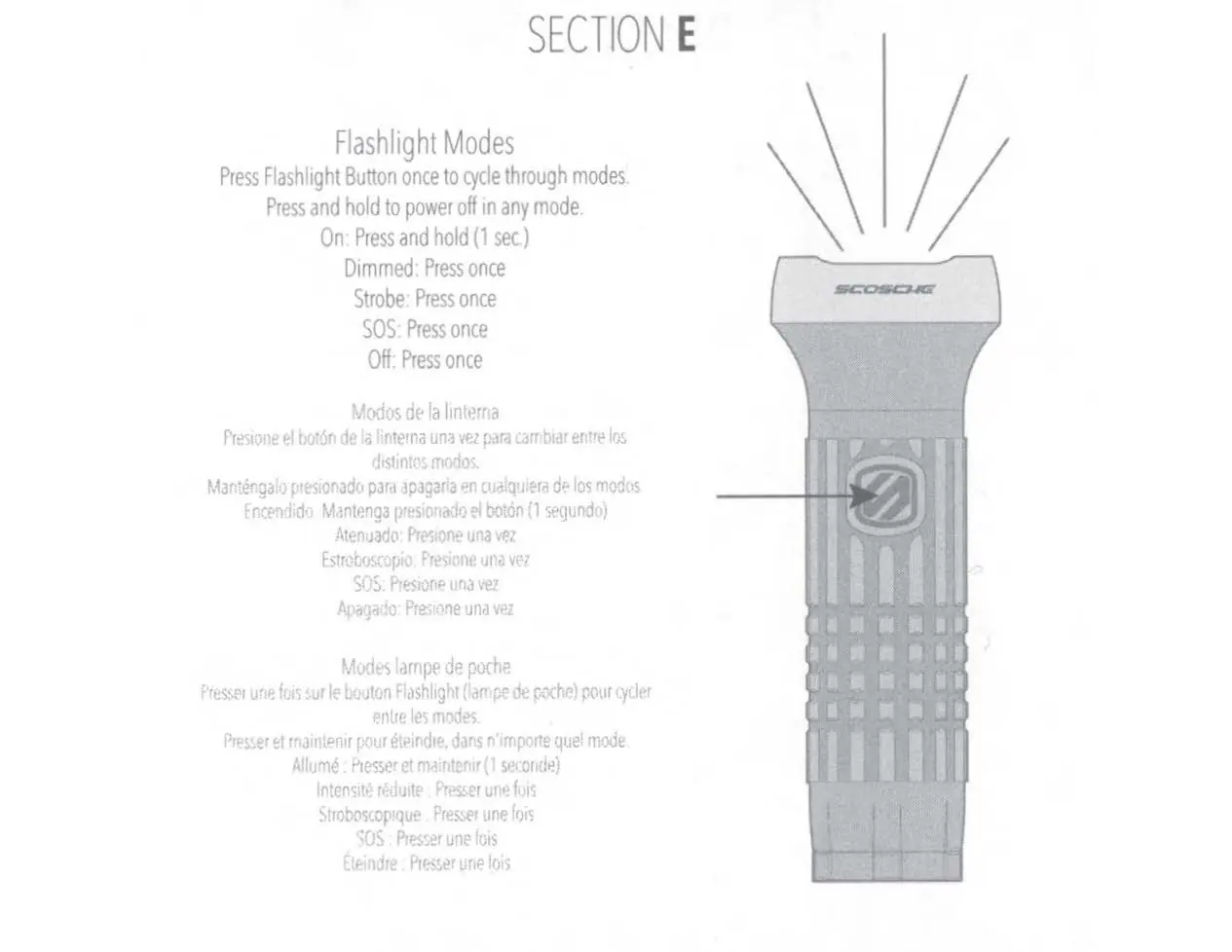
Flashlight Modes
Press the Flashlight Button once to cycle through the available modes. To power off the flashlight from any mode, press and hold the button for 1 second. The cycle includes: On, Dimmed, Strobe, SOS, and Off.
Specifications
- Battery Capacity: 2000 mAh, 29.6 Wh
- Jump Start Capacity: Gas engines up to 5.0L, Diesel engines up to 2.0L
- Jump Starter Output: 12V, 600A (0.1 sec) / 200A (5 sec)
- Charging Temperature: 32°F to 104°F (0°C to 40°C)
- Discharging Temperature: -4°F to 140°F (-20°C to 60°C)
Manufacturer information
Scosche Industries, Inc.
Practical help
Common problems
Jump starter will not start the vehicle
Ensure the Power Supply is charged to at least 50%. Check that the Smart Cable is properly connected to the Power Supply and the battery terminals.
Smart Cable displays an 'ERROR' light
Do not attempt to jump start. Check the battery connections and ensure the Power Supply has sufficient charge.
Before use
- Ensure the Power Supply is at least 50% charged.
- Verify the Smart Cable is securely plugged into the Power Supply.
- Ensure battery terminals are clean and free of corrosion.
- Confirm the vehicle engine size is within the jump start capacity (Gas up to 5.0L, Diesel up to 2.0L).
Specs in practice
- Jump Start Capacity
- Maximum engine size the device can start: 5.0L for Gas, 2.0L for Diesel.
- Battery Capacity
- 2000 mAh, 29.6 Wh total energy storage.
- Jump Starter Output
- Provides 600A peak current for 0.1 seconds or 200A for 5 seconds.
Images and diagrams
- The Charge Panel diagram identifies the location of the USB-A output, USB-C input, and the charge level LEDs.
- The Smart Cable diagram illustrates the connection sequence to the battery terminals and the location of the status LEDs.
Model compatibility
- Compatible with 12V vehicle batteries.
- Not suitable for engines larger than 5.0L (Gas) or 2.0L (Diesel).

Manual page author
Michael Turner
Technical manual editor
Reviews PDF manuals for structure, safety notes, and practical product details so readers can find the right information quickly.