HVAC / Air Purifiers
User Manual for VEVOR 2400W Smart Battery Pack Q2400BP
Quick guide for the VEVOR 2400W Smart Battery Pack (Q2400BP). Learn about parallel connection with Q2400PRO, charging methods, safety precautions, and technical specifications.
Quick answers from the manual
Quick answer
- The Q2400BP is a 2400W Smart Battery Pack designed for parallel expansion of the VEVOR Q2400PRO energy storage system. It features a 2160Wh LiFePO4 battery, USB-A/Type-C outputs, and supports solar and car charging. p. 3, 4
Key actions
- Parallel Connection p. 8
- Solar Charging p. 9
- Car Charging p. 10
First start
- Fully charge the product after unpacking as it leaves the factory with less than 30% power. p. 2
Show 4 more answers Show less
Problems and fixes
Overload/Short circuit
Remove the load and press the switch in the corresponding area to clear the alarm.
p. 7
Temperature too high/low
Remove from charging/load, turn off, and wait for the unit to return to a suitable operating temperature.
p. 7Maintenance and reset
- If idle for a long time, consume the battery to an uncharged state, then recharge to about 50% every three months. p. 3
Technical specifications
| Parameter | Value | Meaning | Pages |
|---|---|---|---|
| Battery Capacity | 2160Wh | Total energy storage capacity | p. 11 |
| XT60 Input | 12-48V 200W max | Solar charging input limits | p. 11 |
| Operating Temperature | -10~40°C | Safe operating range | p. 11 |
| Weight | 12kg | Product weight | p. 11 |
Where to find it in the PDF
- Safety Precautions p. 3
- Parallel Connection p. 8
- Solar Charging p. 9
- Car Charging p. 10
- Specifications p. 11
Table of contents
Manual images
Click an image to enlargeQuick guide from the manual
The VEVOR 2400W Smart Battery Pack (Q2400BP) is a portable power pack designed primarily for parallel expansion of the Q2400PRO energy storage system. It features a 2160Wh LiFePO4 battery, USB-A and Type-C PD3.0 outputs, and supports solar and car charging. Important: The unit leaves the factory with less than 30% power; please fully charge it before first use.
Product Introduction
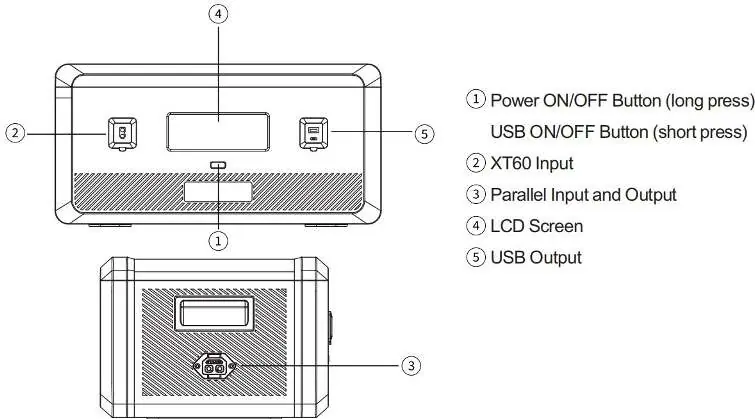
This device is a portable power pack with charging and discharging functions. It is designed to increase the capacity of the Q2400PRO energy storage power supply. It includes a USB DC output interface, an XT60 solar charging input port, and a parallel input/output port.
Button Function Introduction
The device features a power button, XT60 input, parallel input/output port, LCD screen, and USB output ports. To wake up the system and turn on the LCD display, press and hold the power button for 3 seconds. Press and hold again for 3 seconds to turn it off.
Battery Pack Connection
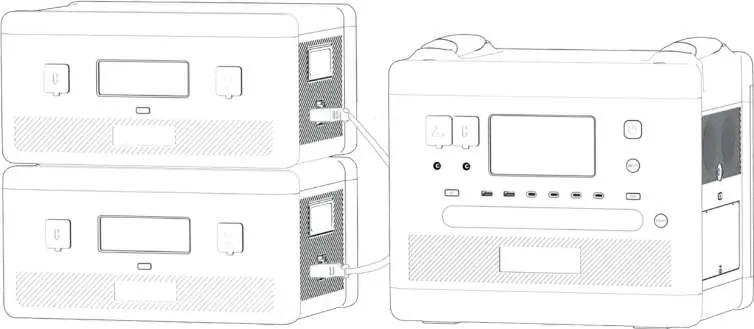
The host can connect up to two battery packs through the parallel line, providing a maximum capacity of up to 11520Wh. Important: Always connect or disconnect the product when both the host and battery pack are turned off. It is forbidden to plug or unplug the parallel cable while the product is working. After a successful connection, S1 and S2 indicators will appear on the display.
Charging Methods
Solar Panel Connection
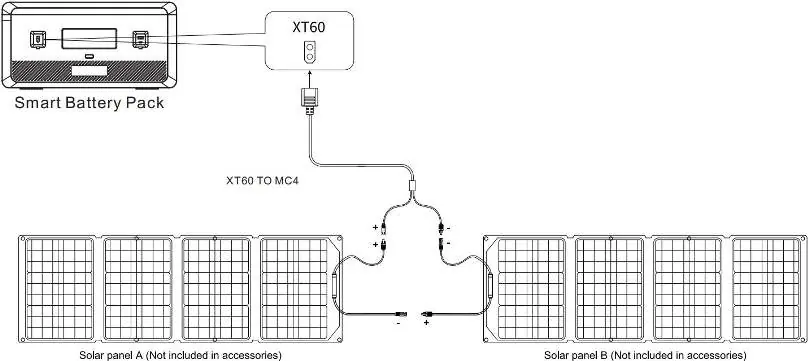
The product can be charged via solar panels under sunlight. It supports solar panel input within 200W, and the input voltage must not exceed 48V. Exceeding this voltage may cause damage not covered by the warranty.
Car Charging
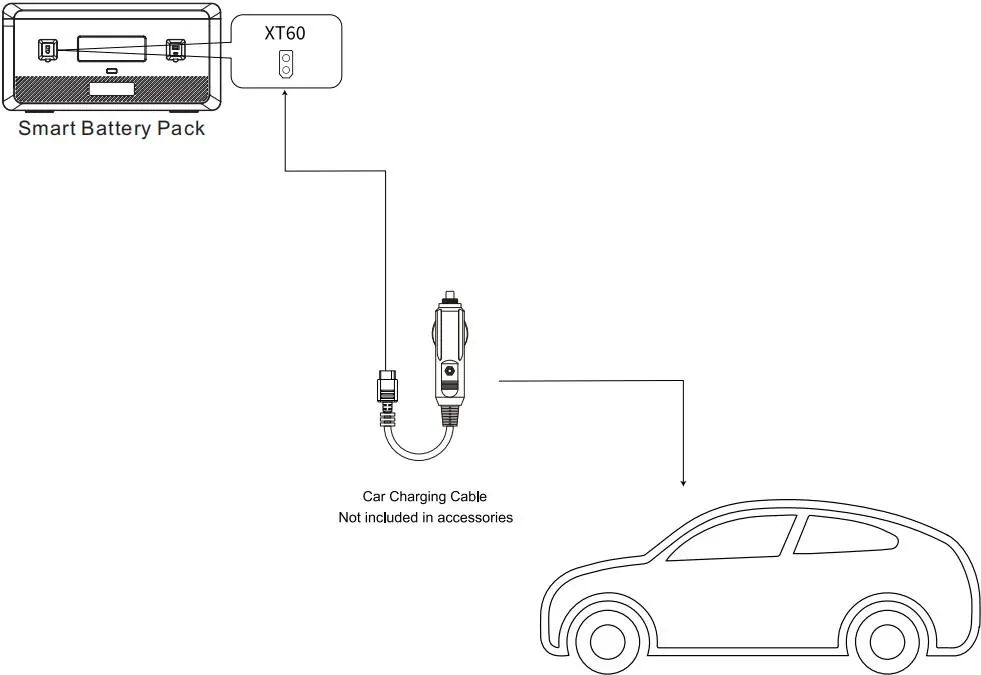
The product supports 12V or 24V car charger input. Connect the car charger port on the vehicle to the battery pack using a car charging cable. Important: Only perform car charging when the car is started to avoid exhausting the car battery. Charging power is typically 90W-120W, resulting in longer charging times compared to AC wall sockets.
Safety Precautions
- Avoid long-term storage in high temperature, humidity, or direct sunlight.
- Do not disassemble or modify the product.
- Keep out of reach of children.
- Use only original accessories.
- Do not use extension cords or cable taps for charging; plug directly into a wall socket.
- If the product is idle for a long time, consume the battery to an uncharged state, then recharge to about 50% every three months.
Troubleshooting
The LCD screen provides alarm prompts for various issues:
- Overload/Short circuit: Output icons blink and beep. Remove the load and press the switch in the corresponding area to clear the alarm.
- Temperature warning: Temperature icon flashes and beeps. Remove the product from charging/load, turn it off, and allow it to return to a suitable operating temperature.
- Parallelism failure: Parallel icon blinks. Charge the low battery unit or discharge the high battery unit until the difference is less than 80%, then reconnect.
Manufacturer information
VEVOR
Practical help
Common problems
Output icons blink and beep
Overload or short circuit detected. Remove the load and press the switch in the corresponding area to clear the alarm.
Temperature warning icon flashes and beeps
Temperature is too high or too low. Remove from charging/load, turn off, and wait for the unit to reach a suitable operating temperature.
Parallel icon blinks
Parallelism failure. Charge the low battery unit or discharge the high battery unit until the difference is less than 80%, then reconnect.
Before use
- Fully charge the product after unpacking.
- Ensure the host and battery pack are turned off before connecting.
- Verify solar input voltage does not exceed 48V.
- Use only original accessories.
- Ensure the car is started before initiating car charging.
Show more Show less
Specs in practice
- Battery Capacity
- 2160Wh (LiFePO4 cells)
- Type-C Output
- PD3.0, 100W Unidirectional
- Operating Temperature
- -10 to 40°C
Images and diagrams
- Parallel connection diagram shows how to link the battery pack to the host.
- Solar panel connection options illustrate how to connect panels to the XT60 port.
- Car charging diagram shows the connection between the car charger port and the battery pack.
Model compatibility
- Designed for parallel expansion of Q2400PRO energy storage power supply.
- Supports 12V and 24V car chargers.
- Solar panel input must be within 200W and under 48V.

Manual page author
Emily Carter
User documentation editor