Automotive / Motorcycle Accessories
User Manual for VEVOR 12T Shop Press
Get started with your VEVOR 12T Shop Press. This guide covers safety instructions, assembly, operation, maintenance, and troubleshooting for your hydraulic press.
Table of contents
Manual images
Click an image to enlargeImportant Information
This manual provides instructions for the VEVOR 12T Shop Press (Model ZX0201). Before operating, ensure you read all safety warnings and instructions carefully. The press is designed for automotive, truck, and industrial repair shops for pressing, bending, straightening, and forming tasks. Important: Always bolt the press to the floor before use to ensure stability. If you have questions or need technical support, contact [email protected].
Safety Information
Failure to follow these instructions may result in personal injury or property damage. The operator must use common sense and caution.
- Keep hands away from arbor plates and press pin during use.
- Do not move the workpiece while it is under compression.
- Release the load before performing any service or maintenance.
- Bolt the press to the floor before use.
- Keep the area under arbor plates clear of debris to prevent uneven pressure and potential breakage.
- Avoid off-center loads; do not operate if the workpiece tilts or binds.
- Stop and release compression immediately if you suspect structural failure.
- Do not compress springs or other elastic objects.
- Wear ANSI-approved safety goggles, heavy-duty work gloves, and steel-toe boots.
- Keep bystanders out of the work area and do not leave the press unattended when loaded.
- Do not operate the hydraulic jack beyond its rated capacity.
- Inspect the unit before every use; do not use if parts are loose or damaged.
Main Specifications
- Capacity: 12T
- Max working distance: 705mm
- Min working distance: 40mm
- Stroke: 125mm
- Packing size: 1350*235*120mm
- Net weight: 42kg
Main Construction
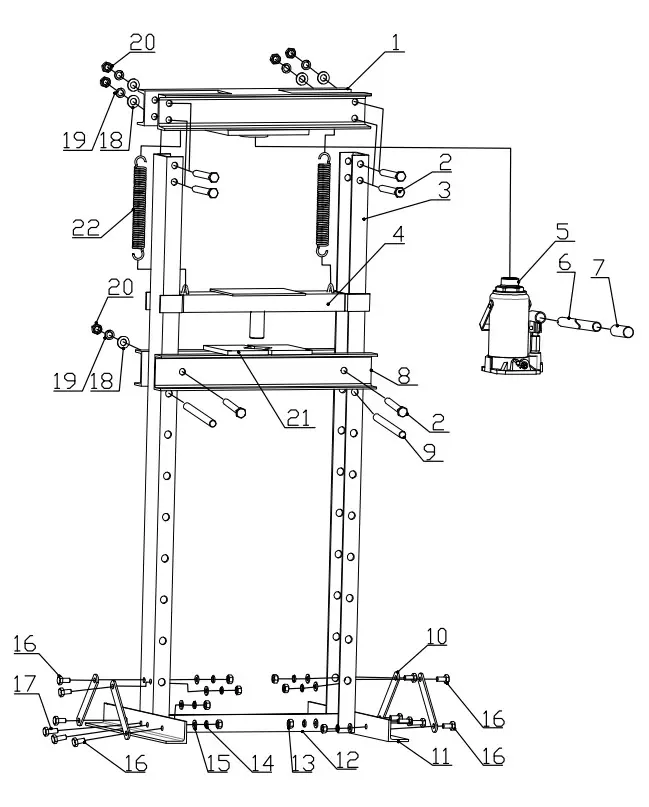
The shop press consists of a press frame, a hydraulic jack, arbor plates, and support components. Refer to the parts list and diagram for assembly details. Ensure all bolts and washers are securely fastened according to the provided parts list.
Operation Instructions
- Arbor Plates: The press comes with two arbor plates. Use them individually or connected by the arbor lock.
- Setting Height: Slide the two pins through the adjustment holes on the press frame legs and secure them with the two R-clips.
- Positioning: Place the arbor plate onto the press apron, ensuring it is centered.
- Jack Operation: Insert the narrower jack handle into the larger handle and engage the pin into the T-slot. Use the slotted end to tighten the relief valve (clockwise). Insert the handle into the jack connector and pump up and down to extend the jack.
- Finishing: When finished, remove the handle and loosen the relief valve (counter-clockwise).
Bleeding the Hydraulic Jack
If the jack feels spongy or does not lift properly, it may need bleeding:
- Remove the oil fill plug on the back of the jack.
- Open the release valve on the front.
- Insert the jack handle into the pump core and pump slowly to force air out of the oil fill hole.
- Once oil comes out, stop pumping, replace the plug, and close the release valve.
- Check that the oil level is just below the fill hole; refill with high-quality hydraulic oil if necessary.
Maintenance
- Always release the load before inspection, maintenance, or cleaning.
- Inspect the press before each use for structural failure, loose parts, or binding.
- Coat all exposed surfaces with a light-weight oil to prevent rust.
- Keep the arbor plates and press apron area clean and free of oil/lubricants.
- Clean the unit with a clean, damp cloth.
- Store the press covered with a clean drop cloth in a cool, dry location.
Troubleshooting
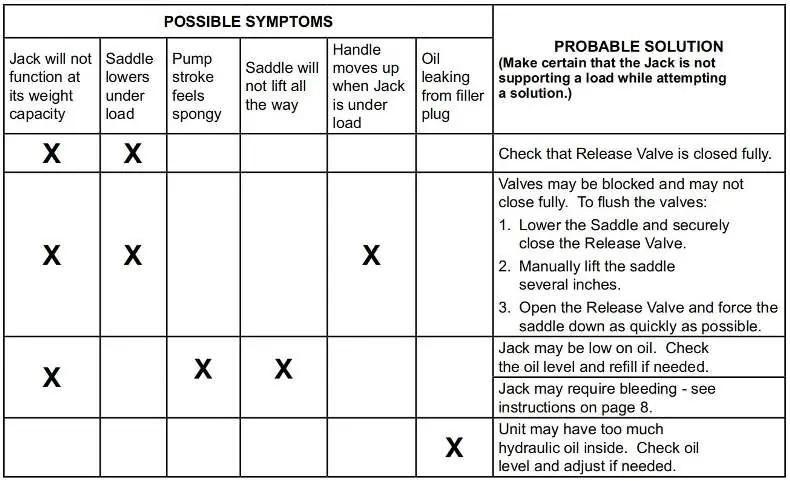
If the jack malfunctions, do not use it. If the troubleshooting guide does not resolve the issue, have a qualified technician inspect the unit. After repair, test the jack without a load by raising and lowering it fully before returning it to service.
Manufacturer information
VEVOR
Practical help
Common problems
Jack will not function at weight capacity
Check that the release valve is closed fully.
Saddle lowers under load
Valves may be blocked. Lower the saddle, close the valve, manually lift the saddle, then open the valve and force the saddle down quickly to flush the valves.
Pump stroke feels spongy
Jack may be low on oil. Check the oil level and refill if needed, or bleed the system.
Oil leaking from filler plug
Unit may have too much hydraulic oil. Check the oil level and adjust if needed.
Before use
- Bolt the press to the floor.
- Inspect for loose, cracked, or damaged parts.
- Ensure the work area is clean and well-lit.
- Wear safety goggles, heavy-duty gloves, and steel-toe boots.
- Check that the arbor plates are centered and not resting on obstructions.
Specs in practice
- Capacity: 12T
- The maximum force the press can exert.
- Max working distance: 705mm
- The maximum vertical opening available for workpieces.
- Stroke: 125mm
- The total travel distance of the hydraulic jack piston.
Images and diagrams
- The parts diagram illustrates the assembly of the press frame, including the placement of bolts, washers, and the hydraulic jack.
- The troubleshooting table provides a matrix of symptoms and solutions for common hydraulic jack issues.
Model compatibility
- Use only the bottle jack included with this press.
- Use only accessories rated to handle the forces exerted by this tool.

Manual page author
Emily Carter
User documentation editor
Prepares concise manual descriptions and highlights the most useful setup, operation, and maintenance information for readers.