Home Appliances / UV Sterilizers
User Manual for VEVOR 208A Tool Sanitizer
Quick guide for the VEVOR 208A Tool Sanitizer. Learn how to operate, maintain, and troubleshoot your UV sterilizer safely.
Quick answers from the manual
Quick answer
- The VEVOR 208A is a tool sterilizer. To use it, plug it in, load dry tools vertically, close the door, turn on the power, and set the timer (5-60 minutes). p. 3, 5, 7
Key actions
- Run an empty cycle for 20 minutes before first use. p. 3
- Unplug the device before cleaning or maintenance. p. 3, 6
First start
- Run an empty load cycle for 20 minutes to eliminate odors. p. 3
Show 4 more answers Show less
Problems and fixes
Device is not powered on
Plug the matching power source provided.
p. 6
Device is not functioning
Adjust the time adjustment knob.
p. 6Maintenance and reset
- Regularly wipe off stains from the surface and unplug before cleaning. p. 6
Technical specifications
| Parameter | Value | Meaning | Pages |
|---|---|---|---|
| Input | AC 110V 60Hz(US), AC 220-240V 50Hz(EU&AU) | Voltage requirements | p. 4 |
| Max. Power | 5W | Power consumption | p. 4 |
Where to find it in the PDF
- Safety Instructions p. 2, 3
- Model and Parameters p. 4
- Operation Method p. 5
Table of contents
Manual images
Click an image to enlargeQuick Guide
The VEVOR 208A Tool Sanitizer is designed for disinfecting tools using UV light. Before first use, it is essential to run an empty load cycle for 20 minutes to eliminate any manufacturing odors. Always ensure tools are dry and placed vertically in the basket for optimal sterilization. Wait 10 minutes after the cycle completes before opening the door to allow tools to cool.
Safety Instructions
- UV Light Warning: Do not expose eyes or skin to UV light.
- First Use: Operate in an empty load mode for one working cycle, then open the door for 20 minutes to remove odors.
- Preparation: Drain all water from utensils before placing them in the sterilizer.
- Loading: Do not stack utensils; place them vertically one by one.
- Operation: Wait 10 minutes after the cycle finishes before opening the door to avoid burns.
- Environment: Do not install near flammable materials or in areas prone to moisture/water splashes.
- Maintenance: Unplug the power cord before cleaning or maintenance. Do not immerse the machine in water.
- Abnormalities: If you notice unusual noise, smoke, or odors, unplug immediately and contact the manufacturer.
Product Overview
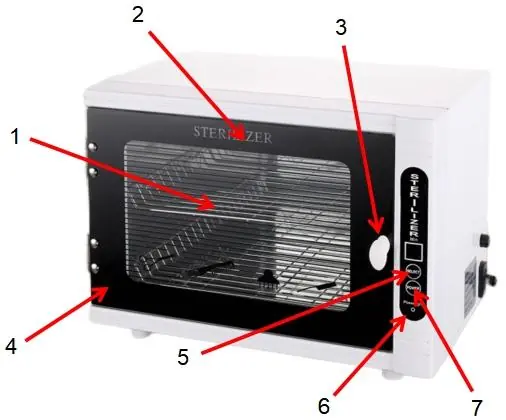
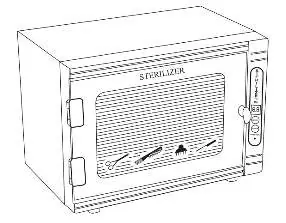
The device features a tempered glass door, a steel basket for holding tools, and a control panel with a power button and time selector.
Operation Method
- Insert the plug into a power supply that matches the device's voltage.
- Place the tools requiring disinfection into the sterilizer.
- Close the door securely and switch on the power button.
- Click the time button to select the appropriate working duration (range: 5 to 60 minutes).
- Once the cycle stops, remove the tools.
- Unplug the device when not in use.
Maintenance
Regular maintenance ensures the longevity of the device:
- Always unplug the power cord before cleaning.
- Wear gloves during maintenance to prevent cuts from sharp edges inside the cabinet.
- Wipe stains from the surface regularly using a cloth with a small amount of neutral detergent.
- Use a clean, damp cloth to remove any detergent residue.
- Do not rinse the cabinet with water or immerse electrical components.
Troubleshooting
If the device is not powered on, ensure the power cord is securely plugged into the power source. If the device is not functioning, check that the time adjustment knob is set correctly.
Technical Specifications
- Model: 208A
- Input: AC 110V 60Hz (US), AC 220-240V 50Hz (EU & AU)
- Max. Power: 5W
- Time Setting: 5-60 minutes
- Size: 397 x 272 x 305 mm
Manufacturer information
VEVOR
Practical help
Common problems
Device is not powered on
Ensure the power cord is securely plugged into the power source.
Device is not functioning
Check that the time adjustment knob is set correctly.
Before use
- Run an empty load cycle for 20 minutes to eliminate odors.
- Ensure all utensils are dry before placing them inside.
- Place utensils vertically, not stacked, for best results.
- Verify the power supply matches the device voltage (110V or 220-240V).
- Ensure the device is placed away from flammable materials and moisture.
Show more Show less
Specs in practice
- Time setting
- Adjustable sterilization duration from 5 to 60 minutes.
Images and diagrams
- 1. Steel basket
- 4. Tempered glass door
- 5. Select button
- 6. Work indicator light
- 7. Power button
Model compatibility
- Do not use near flammable materials.
- Do not use in areas prone to moisture or water splashes.
- Special user groups (such as children) are prohibited from using this device.

Manual page author
Emily Carter
User documentation editor