Furniture / Storage Cabinets
User Manual for Vinsetto 6-Point Vibrate Massage Office Chair
Quick guide for the Vinsetto 6-Point Vibrate Massage Office Chair. Includes assembly instructions, remote control operation, safety warnings, and technical specifications.
Quick answers from the manual
Quick answer
- This manual provides assembly and operation instructions for the Vinsetto 6-Point Vibrate Massage Office Chair, including remote control functions and safety guidelines. p. 2, 8, 9, 11
Key actions
- Assemble the chair using the provided parts and steps 1-5. p. 8, 9
- Operate the massage function using the remote control. p. 11
First start
- Connect the power supply to the chair and use the remote to turn on the unit. p. 11
Problems and fixes
Massage unit not working
Check power supply connection and ensure pins are not damaged.
p. 2Maintenance and reset
- Clean with vacuum cleaner and wipe with a fabric dampened with water. p. 2
Technical specifications
| Parameter | Value | Meaning | Pages |
|---|---|---|---|
| Input voltage | 100-240V | Operating voltage range | p. 10 |
Where to find it in the PDF
- Assembly Instructions p. 8, 9
- Remote Control Operation p. 11
Table of contents
Manual images
Click an image to enlargeQuick guide from the manual
This document provides essential instructions for the assembly, safe operation, and maintenance of the Vinsetto 6-Point Vibrate Massage Office Chair. Always ensure the chair is used on a flat surface, weight is distributed evenly, and the power supply is handled with care.
Assembly Instructions
Before beginning, ensure all parts are present. Follow these steps to assemble your chair:
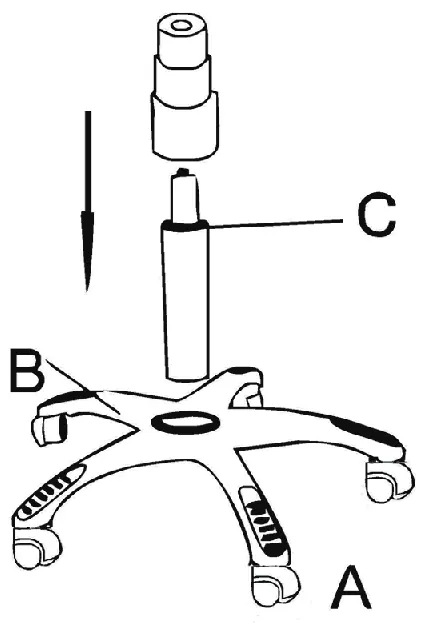
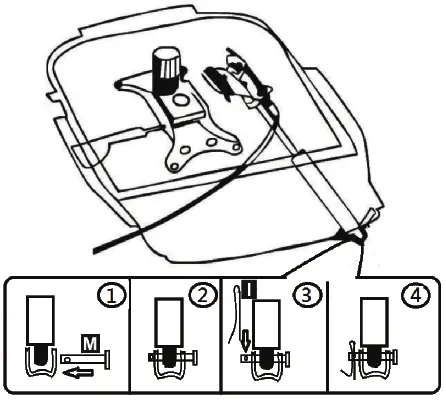
- Base Assembly: Insert the gas lift (C) into the base (A/B).
- Mechanism Attachment: Attach the mechanism (D) to the seat cushion using the provided screws (H).
- Mechanism Pin: Secure the mechanism pin (M) as shown in the diagram.
- Backrest Attachment: Connect the backrest (E) to the seat cushion (F) using the armrests (G) and screws (N/J).
- Final Connection: Connect the remote control (P) to the power supply and the chair's electrical port.
Massage Remote Operation
The remote control allows you to customize your massage experience:
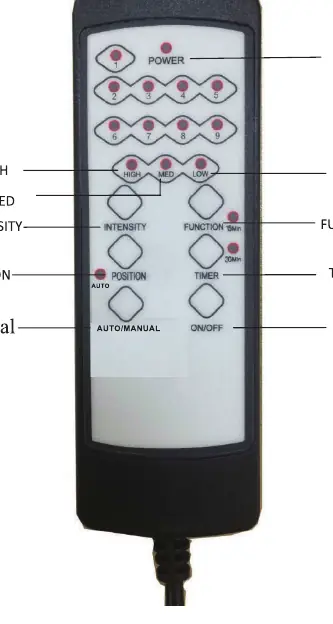
- Power: Turn the unit on or off.
- Intensity: Adjust vibration strength between High, Medium, and Low.
- Function: Select from nine different massage modes.
- Timer: Set the massage duration to 15 or 30 minutes.
- Position: Target specific vibration zones (Back, Lumbar, Thighs).
- Auto/Manual: Switch between automatic cycles and manual control.
Safety and Maintenance
- Usage: Intended for indoor use only. Do not use as a ladder or base.
- Weight: Designed for one person at a time. Ensure weight is evenly distributed.
- Cleaning: Use a vacuum cleaner for dust and a damp cloth for surface cleaning.
- Electrical Safety: Do not use if the power supply or cable is damaged. Keep away from children.
Technical Specifications
The massage unit operates within the following parameters:
- Input Voltage: AC 100-240V
- Input Frequency: 50-60 Hz
- Output Voltage: 12V
- Output Power: 12W
Practical help
Common problems
Chair feels unstable or tips over
Ensure the weight is evenly distributed and the chair is used on a flat, level surface.
Massage function does not start
Check that the power supply is securely connected to both the wall outlet and the chair's electrical port.
Plastic components becoming brittle
Avoid placing the chair in direct sunlight.
Before use
- Verify all parts are included in the box before starting assembly.
- Ensure the chair is used indoors only.
- Check that the power supply unit is compatible and undamaged.
- Confirm the chair is intended for one person only.
Specs in practice
- Input Voltage
- The chair is compatible with standard household power outlets (100-240V).
- Output Power
- The massage unit consumes 12W of power during operation.
Images and diagrams
- The assembly diagrams illustrate the connection of the base, gas lift, seat mechanism, and backrest.
- The remote control diagram identifies buttons for power, intensity, function, timer, and position.
Model compatibility
- Recommended wheels for carpet: rigid nylon wheels.
- Recommended wheels for hard flooring: PU or rubber wheels to prevent scratching.

Manual page author
Emily Carter
User documentation editor
Prepares concise manual descriptions and highlights the most useful setup, operation, and maintenance information for readers.