Software / Apps Services
Wampler Catacombs, Metaverse, and Terraform Plugins Installation and User Guide
Quick guide for installing and using Wampler Catacombs, Metaverse, and Terraform plugins. Learn about DAW compatibility, Rack and Pedal modes, and plugin authorization.
Table of contents
Manual images
Jump to the sectionQuick guide from the manual
To get started with your Wampler plugins, download the latest version from the official website, run the installer, and load the plugin within your DAW. Upon the first launch, you will need to enter your Software License Key or select the 7-day free trial option. The plugins support both Intel and Apple Silicon hardware.
Installation and Setup
Follow these steps to install and authorize your software:
- Download: Visit www.wamplerpedals.com/products/c/plugins/ and select the plugin version compatible with your system (PC or Mac).
- Install: Run the installer package.
- Load in DAW: Open your Digital Audio Workstation (DAW) and locate the plugin in your delay and modulation plugin folder. Each plugin operates as a single container, so you only need to load one plugin to access all programs.
- Authorize: Enter your Software License Key or opt for the 7-day free trial when prompted upon the first run.
Plugin Usage
The plugins offer flexible interfaces and control options:
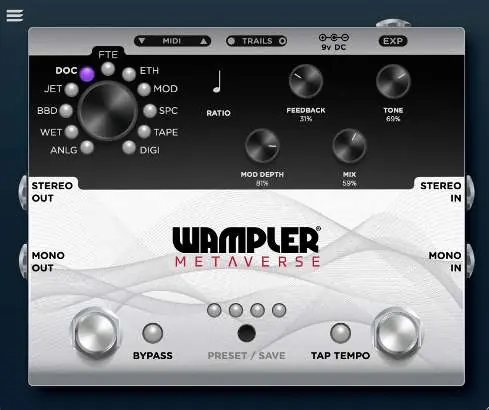
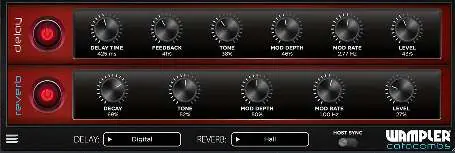
- Interface Modes: Click the hamburger menu in the top-left corner to switch between Rack Mode (compact interface) and Pedal Mode (view and functionality similar to the actual pedal).
- Controls: Each plugin displays controls specific to the selected program. For example, Metaverse offers specific controls for TAPE or ETH settings, while Terraform provides controls for Waveform when U-Vibe is selected.
- On/Off Switch: Use this to enable or disable the effect.
- Host Sync: When active (switch to the right), the delay or modulation syncs to your track's BPM. This makes the Delay Time or Rate controller unnecessary. You can adjust subdivisions by clicking the subdivision indicator (represented by a musical note).
- Trails: The Trails switch disables trails when turned off.
Compatibility
The Wampler plugin suite is compatible with DAWs that support the following formats:
- AAX: Avid Audio Extension (Protools)
- AU: Apple Audio Units (Logic and Garageband)
- VST3: Virtual Studio Technology (Ableton, Cubase, Reaper, Sonar)
Uninstalling
To remove the plugins from your system:
- Windows: Uninstall via the 'add remove programs' interface.
- Mac: Run the Uninstaller app included in the original installer package.
Support
If you encounter any issues, please contact the support team via email at [email protected]. For more information about what each program is based on or sounds like, download the full manual from wamplerpedals.com/downloads.
Official resources from the manual
Practical help
Common problems
Plugin not appearing in DAW
Ensure the installation completed successfully and check the folder where your DAW typically scans for delay and modulation plugins.
Host Sync not working as expected
Ensure the HOST SYNC switch is set to the right (active) position. You can then adjust subdivisions by clicking the musical note indicator.
License activation failure
Ensure you have entered the correct Software License Key. If you do not have a key, you can opt for the 7-day free trial.
Before use
- Download the latest plugin version from the Wampler website.
- Verify your DAW supports AAX, AU, or VST3 formats.
- Ensure your computer hardware (Intel or Apple Silicon) meets requirements.
- Have your Software License Key ready for authorization.
- Check if you need to install the Mac Uninstaller or use Windows Add/Remove programs for future removal.
Images and diagrams
- The interface includes a hamburger menu in the top-left corner for switching between Rack and Pedal modes.
- Controls are dynamic and change based on the selected program (e.g., Tape heads for Metaverse, Waveform for Terraform).
- The HOST SYNC switch is located at the bottom/side of the interface to toggle BPM synchronization.
Model compatibility
- Compatible with AAX (Protools), AU (Logic/Garageband), and VST3 (Ableton, Cubase, Reaper, Sonar).
- Supports both Intel and Apple Silicon hardware.
- Software may be loaded onto a maximum of three computers.

Manual page author
Emily Carter
User documentation editor
Prepares concise manual descriptions and highlights the most useful setup, operation, and maintenance information for readers.