Music / Instruments
Wampler Terraform Multi-Modulation Pedal User Guide
Comprehensive user guide for the Wampler Terraform multi-modulation pedal. Learn about routing, MIDI mapping, expression pedal setup, presets, and troubleshooting.
Table of contents
Manual images
Jump to the sectionQuick guide from the manual
The Wampler Terraform is a digital multi-modulation pedal. Before using, ensure you are using a 9V DC power supply with a center-negative pin. The pedal features a routing switch on the back; ensure this is set to NORMAL for standard mono/stereo setups or PRE/POST if you are using an effects loop or specific signal chain routing. If the effect does not seem to work, check this switch first.
Overview
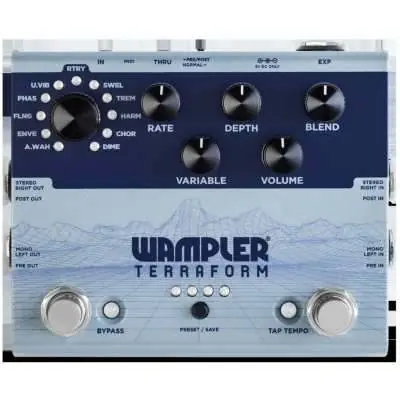
The Terraform contains 11 modulation effects. It is fully programmable, supports true stereo and split mono routing, MIDI control, and expression pedal assignment. It features 8 preset locations for saving your favorite sounds.
Routing
The pedal offers two main routing options:
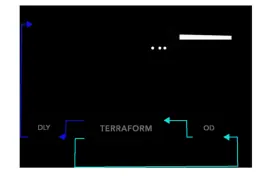
- NORMAL: Use this for standard stereo or mono rigs. If you are running in mono, plug your input into the PRE/L jack and use either output jack to your amp.
- PRE/POST: This allows you to place specific effects before or after your gain stages (e.g., U Vibe before dirt, Chorus after).
To assign effects globally to PRE or POST:
- Disconnect power.
- Hold down both the BYPASS and TAP TEMPO stomps.
- Power up the pedal.
- Turn the PROGRAM CONTROL dial to the desired effect.
- Press BYPASS for "Pre Mode" (LED lights green) or TAP TEMPO for "Post Mode" (LED lights blue).
- Press the Preset Switch to save.
Expression Pedal
You can assign an external expression pedal to control any of the 5 knobs. To configure:
- Hold BYPASS and press TAP TEMPO (LED flashes red).
- Move the desired control to the heel position.
- Press TAP TEMPO.
- Move the control to the toe position.
- Press TAP TEMPO to save.
Presets
The Terraform has 8 preset locations. To save a preset:
- Configure settings and expression pedal (optional).
- Hold the Preset Switch until LEDs blink.
- Press the Preset Switch to select the desired location.
- Hold the Preset Switch until LEDs blink to save.
MIDI
The Terraform supports MIDI program changes (1-128) and tap tempo control. To change the MIDI channel: power off, hold the preset switch, power on, and release. Use the preset switch to cycle through channels (indicated by LEDs in binary+1), then hold for 5 seconds to save.
L.E.D. Guide
- Bypass LED Off: Pedal bypassed, preset unmodified.
- Bypass LED Red: Pedal bypassed, preset modified.
- Bypass LED Green: Engaged, pre/post mode (pre active), preset unmodified.
- Bypass LED Blue: Engaged, pre/post mode (post active), preset unmodified.
Troubleshooting
- Effect not working: Ensure the routing switch is set to NORMAL if using mono.
- Blend control inactive: This control is only active in stereo mode.
- Bypass LED turns red: This indicates the current preset has been modified from the original.
- Factory Reset: Hold BYPASS, TAP TEMPO, and PRESET buttons at power up. Note: This deletes all presets.
Practical help
Common problems
Effect is not producing sound or knobs do not work
If using mono, ensure the routing switch on the back is set to NORMAL, not PRE/POST.
Blend control on tremolo is not doing anything
The blend control is only functional when the pedal is used in stereo mode.
Bypass LED turns red
This is a status indicator showing that the currently loaded preset has been modified from its original saved state.
Before use
- Use a 9V DC power supply with a center-negative pin.
- Ensure the routing switch (NORMAL or PRE/POST) matches your specific rig setup.
- If using an expression pedal, ensure it is wired with a TRS cable in the 'regular' way (Tip=Expression, Ring=5V, Sleeve=Ground).
- If using MIDI, ensure the MIDI channel is configured correctly (default is Omni mode).
Specs in practice
- Power Requirement
- 9V DC, center negative pin only. Do not exceed 9V or use AC power. Draws approximately 130mA.
- Expression Pedal Wiring
- TRS type A: Tip = Expression Output, Ring = 5V, Sleeve = Ground.
- MIDI Control
- Supports program changes (PC) and control changes (CC) for tap tempo.
Images and diagrams
- The pedal features 5 main controls: Rate, Depth, Blend, Variable, and Volume.
- The routing switch on the back toggles between NORMAL (Stereo/Mono) and PRE/POST modes.
- MIDI jacks are provided for external control.
Model compatibility
- The pedal is designed for 9V DC power only.
- Expression pedal must be wired with a TRS cable in the standard 'regular' configuration.

Manual page author
Emily Carter
User documentation editor
Prepares concise manual descriptions and highlights the most useful setup, operation, and maintenance information for readers.