Music / Instruments
User Manual for Wampler The Compulsion Drive
Quick reference guide for the Wampler The Compulsion Drive distortion pedal. Learn about control settings, power requirements, internal DIP switch adjustments, and suggested tone configurations.
Table of contents
Manual images
Click an image to enlargeQuick guide from the manual
The Compulsion Drive (tcd) is a distortion pedal designed by Brian Wampler. This guide provides essential information on operating the controls, power requirements, and internal adjustments to help you achieve your desired tone.
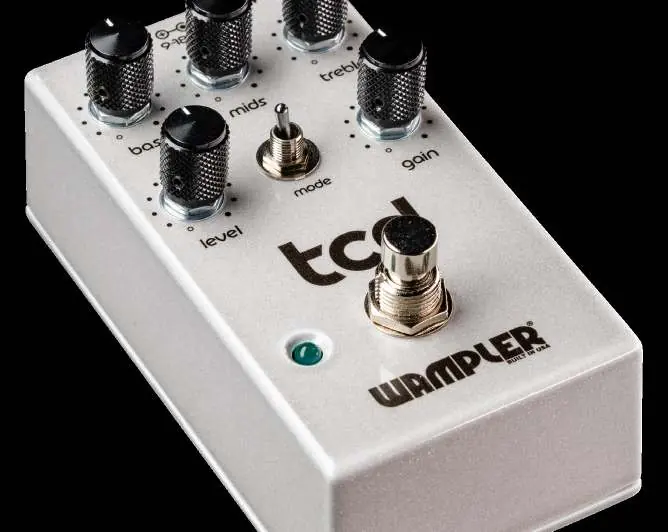
Controls and Connections
The pedal features standard input and output jacks for your instrument and amplifier. The following controls allow you to shape your sound:
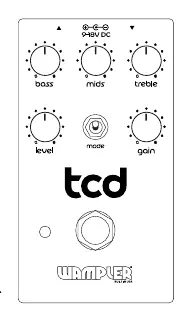
- Level: Controls the output volume. Turning clockwise increases volume.
- Gain: Adjusts the amount of distortion. Turning clockwise increases gain.
- Bass: Adjusts low-end frequencies. Turning clockwise increases low-end presence.
- Mids: Adjusts mid-range frequencies. Turning clockwise increases mid-range presence.
- Treble: Adjusts high-end frequencies. Turning clockwise increases high-end presence.
- Mode Switch: Adjusts clipping and gain staging. Down position provides a traditional gain structure; up position provides a harder-hitting, tube-like sound with cascaded MOSFET gain stages.
Power Requirements
To ensure proper operation and avoid damage, adhere to the following power specifications:
- Voltage: Use a 9-18V DC power source intended for guitar pedals.
- Polarity: Do not use center pin positive adapters.
- AC Power: Do not use AC power.
- Power Draw: The pedal draws approximately 20mA at 9V and 25mA at 18V.
Internal DIP Switches
The pedal contains two internal DIP switches for further sound customization. To access these, carefully unscrew the pedal base. The default setting for both is OFF (left position).
- Fat Switch: Adds extra powerful low-end warmth when set to the right position.
- Diode Switch: Changes the gain profile by adding an extra clipping diode into the circuit when set to the left position.
Suggested Settings
Use these starting points to find your perfect tone:
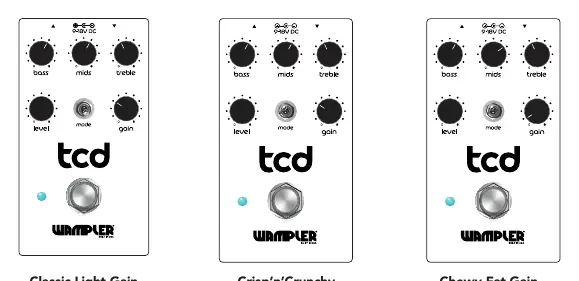
- Classic Light Gain: DIP Switches: Stock.
- Crisp'n'Crunchy: DIP Switches: Stock.
- Chewy Fat Gain: DIP Switches: Fat is right (on), Diode is stock.
- Tube Killer: DIP Switches: Fat is right (on), Diode is stock.
- Tight Gain: DIP Switches: Stock.
- Fuzzy Goodness: DIP Switches: Stock.
Support and Warranty
Wampler offers a 5-year warranty to the original purchaser against defects in material and workmanship. For warranty claims or product questions, contact Wampler support:
Email: [email protected]: (765) 352-8626Website: wamplerpedals.com/warranty-registration
Official resources from the manual
Practical help
Common problems
No sound output
Verify that the instrument is connected to the Input and the amplifier to the Output. Ensure the power supply is connected and active.
Pedal not powering on
Ensure you are using a 9-18V DC power source. Do not use AC power or center pin positive adapters.
Before use
- Ensure power supply is 9-18V DC
- Verify power supply is not center pin positive
- Do not use AC power
- Connect instrument to Input
- Connect amplifier to Output
Images and diagrams
- The pedal features 5 knobs: Bass, Mids, Treble, Level, and Gain.
- The Mode switch toggles between traditional gain and cascaded MOSFET gain stages.
- Internal DIP switches (Fat and Diode) are accessible by unscrewing the pedal base.
Model compatibility
- Designed for guitar pedals.
- Not compatible with AC power adapters.

Manual page author
Emily Carter
User documentation editor
Prepares concise manual descriptions and highlights the most useful setup, operation, and maintenance information for readers.