Home Appliances / Cooktops Hobs
User Manual for Whirlpool 1234X Induction Hob
Comprehensive user guide for the Whirlpool 1234X induction hob. Includes installation instructions, electrical connection diagrams, power management settings, daily operation, Flexicook and 6th Sense functions, cleaning tips, and...
Quick answers from the manual
Quick answer
- This manual provides installation, operation, and maintenance instructions for the Whirlpool 1234X induction hob, including power management settings, cooking functions, and troubleshooting. p. 1, 5, 6, 7
Key actions
- Set power management level p. 6
- Lock control panel p. 7
- Switch acoustic signal on/off p. 6
First start
- Power management configuration p. 6
Show 4 more answers Show less
Problems and fixes
Hob does not switch heat up / functions do not come on
Check if DEMO MODE is on and follow instructions to disable it.
p. 9
Control panel switches off due to high temperatures
Wait for the hob to cool down before using it again.
p. 9Error codes
| Code | Meaning | Action | Pages |
|---|---|---|---|
| F0E1 | Cookware detected but not compatible with requested operation. | Press On/Off button twice to remove code, then try different zone or cookware. | p. 9 |
| F0E7 | Wrong power cord connection. | Adjust power supply connection according to 'ELECTRICAL CONNECTION' paragraph. | p. 9 |
| F0EA | Control panel switches off due to excessively high temperatures. | Wait for the hob to cool down. | p. 9 |
| F0E9 | Cooking zone turns off due to high temperatures. | Wait until the cooking area has cooled off. | p. 9 |
| d E | DEMO MODE on. | Follow instructions in the 'DEMO MODE' paragraph. | p. 9 |
Technical specifications
| Parameter | Value | Meaning | Pages |
|---|---|---|---|
| Available power levels | 2.5 kW, 4.0 kW, 6.0 kW, 7.2 kW | Configurable power limits for the hob. | p. 6 |
| Hob dimensions | 650 mm x 510 mm | Physical size of the cooktop. | p. 1 |
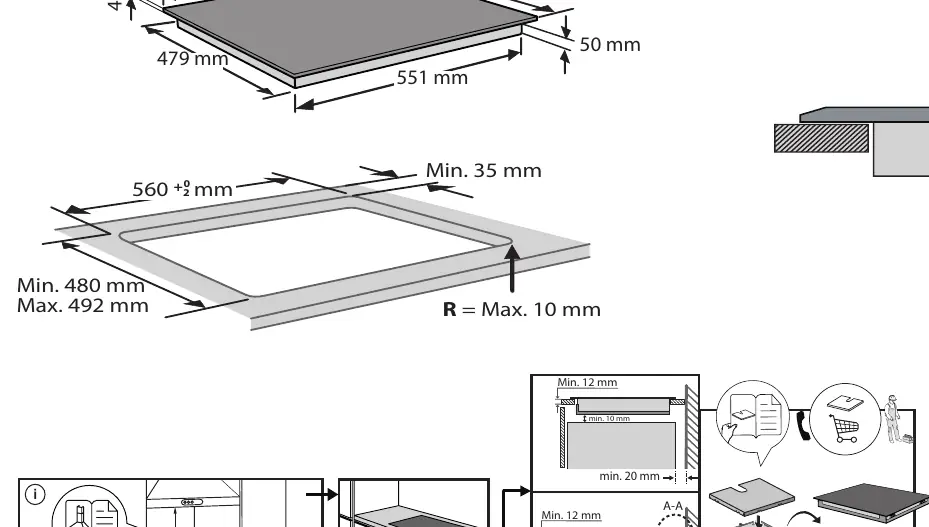
| Cut-out dimensions | 560 mm x 480-492 mm | Required opening size for installation. | p. 1 |
Where to find it in the PDF
- Installation and Dimensions p. 1
- Safety Instructions p. 2
- Electrical Connection p. 4
- Product Description and Controls p. 5
- First Time Use and Power Management p. 6
- Daily Use and Functions p. 7
- Cooking Table p. 8
- Troubleshooting p. 9
Table of contents
Manual images
Click an image to enlargeQuick guide from the manual
This induction hob is designed for household use. Before first use, ensure the appliance is installed by a qualified technician and that the electrical connection matches your home's power supply. The hob features advanced functions like Flexicook and 6th Sense to optimize your cooking experience. Always use induction-compatible cookware with a flat base to ensure proper performance and energy efficiency.
Product description
The hob features a glass-ceramic surface with multiple cooking zones and a touch-sensitive control panel. The control panel includes power adjustment buttons, a timer, a child lock, and dedicated buttons for special functions like Flexicook and 6th Sense.
Installation
Installation must be performed by a qualified technician in compliance with local regulations. Ensure the cabinet is cut to the correct dimensions before fitting the appliance. If the hob is not installed above an oven, a separator panel must be installed in the compartment underneath. The appliance must be properly earthed.
Electrical connection
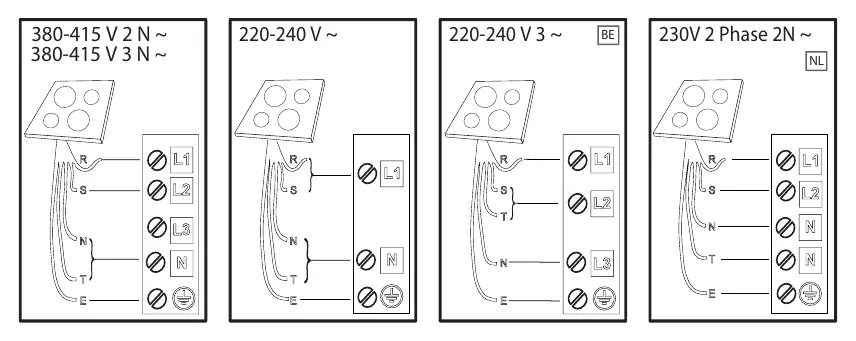
Electrical connection must be made before connecting the appliance to the electricity supply. Ensure the voltage specified on the data plate matches your home's voltage. The appliance must be earthed using conductors of the appropriate size. Refer to the wiring diagrams in the manual for specific connection types (380-415V 2N/3N, 220-240V, etc.).
First time use
Upon initial connection, you have 60 seconds to set the power management level. Press the far right timer '+' button for at least 5 seconds until 'PL' appears on the display. Use the '+' and '-' buttons to select the desired power level (2.5 kW, 4.0 kW, 6.0 kW, or 7.2 kW) and confirm with the OK button.
Daily use
To turn the hob on, press the power button for about 1 second. Select the desired cooking zone and adjust the power level using the '+' or '-' buttons. To deactivate, press the 'OFF' button. You can lock the control panel by holding the OK/Key lock button for 3 seconds to prevent accidental activation.
Functions
- Flexicook: Combines two cooking zones to use them at the same power, ideal for large or oval pots.
- 6th Sense: Activates special functions like Melting, Keep Warm, and Simmering. Select the zone, press the 6th Sense button, choose the function, and confirm with OK.
- Booster: Provides fast heating for rapidly boiling water or heating liquids.
Cleaning and maintenance
Ensure the hob is switched off and cool before cleaning. Do not use abrasive sponges, scouring pads, or steam cleaners. Use a soft cloth or a special hob cleaner. Sugar and high-sugar foods must be removed immediately to prevent damage. If the hob has an iXelium finish, use a soft cloth dampened with water or glass cleaner.
Troubleshooting
If an error code appears (e.g., F0E1, F0E7, F0EA, F0E9), consult the troubleshooting table in the manual. For example, F0E1 indicates incompatible or poorly positioned cookware; F0E7 indicates a connection error. If 'd E' appears, the hob is in Demo Mode; follow the instructions in the manual to deactivate it.
Safety and disposal
People with pacemakers should exercise caution when standing near the induction hob while it is on. Dispose of packaging and the appliance in accordance with local waste regulations. The appliance is marked in compliance with the WEEE directive.
Manufacturer information
Whirlpool Corporation
Practical help
Common problems
F0E1 error code
Cookware is not compatible or not well positioned. Press the On/Off button twice to clear the code and try a different zone or cookware.
F0E7 error code
Wrong power cord connection. Adjust the connection according to the 'Electrical Connection' paragraph.
F0EA or F0E9 error code
Internal temperature is too high. Wait for the hob to cool down before using it again.
d E code when hob is off
Demo mode is active. Follow the instructions in the 'Demo Mode' paragraph to deactivate it.
Before use
- Ensure installation is performed by a qualified technician.
- Verify that the home voltage matches the hob's requirements.
- Ensure the appliance is properly earthed.
- Remove all packaging materials.
- Use only induction-compatible cookware with a flat base.
- Check that the control panel is clean and dry.
Show more Show less
Specs in practice
- Power Management
- Allows setting the maximum power level (2.5kW to 7.2kW) to match your home's electrical system.
Images and diagrams
- Page 1: Installation dimensions and cabinet cutout requirements.
- Page 4: Electrical wiring diagrams for various power configurations.
- Page 5: Control panel layout and button identification.
- Page 6: Cookware suitability guide based on material and base type.
Model compatibility
- Use only ferromagnetic cookware (check for induction symbol).
- Not suitable for thin steel, glass, clay, copper, or aluminum.
- Pots must have a flat base to ensure efficient heat transfer.
- Do not use pots larger than the cooking zone size.

Manual page author
Emily Carter
User documentation editor