Electronics / PA Systems
User Manual for Yamaha TRUE X SUB 100A Subwoofer
Get the most out of your Yamaha TRUE X SUB 100A subwoofer with this comprehensive user guide. Learn how to install, wirelessly connect to your sound bar, interpret status indicators, and troubleshoot common issues.
Table of contents
Manual images
Click an image to enlargeQuick Guide: Wireless Pairing
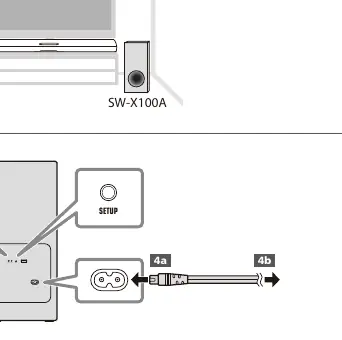
This subwoofer is designed to connect wirelessly to the Yamaha TRUE X BAR 40A (SR-X40A). To pair the devices for the first time:
- Turn on the sound bar.
- Hold down the SETUP button on the sound bar's remote control for at least five seconds.
- The subwoofer will automatically connect to the sound bar.
Installation
To ensure optimal sound quality and prevent reflections:


- Install the subwoofer at least 20 cm (8 in) away from the wall.
- Point the front of the subwoofer slightly inward toward the listening area.
- Avoid placing the unit in confined, poorly-ventilated locations.
- Ensure the unit is not obstructed by metal furniture, which may interfere with the wireless signal.
Power and Connection
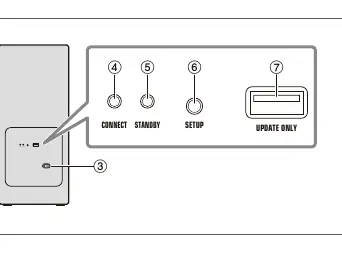
Connect the included power cord to the subwoofer's AC power input jack and then to an AC wall outlet. When connected to power, the STANDBY indicator on the rear will glow red. After about one minute, the CONNECT indicator will flash rapidly, indicating it is waiting for a connection.
Status Indicators
The indicators on the rear panel provide information about the subwoofer's status:
- CONNECT (white) Off / STANDBY (red) Glowing: The unit is turning on or not connected to the sound bar.
- CONNECT (white) Flashing: The unit is searching for the sound bar (slow flash) or waiting for connection (rapid flash).
- CONNECT (white) Glowing / STANDBY (red) Glowing: The unit is powered off but connected to the sound bar.
- CONNECT (white) Glowing / STANDBY (red) Off: The unit is powered on and connected to the sound bar.
- CONNECT (white) Off / STANDBY (red) Flashing: Protection circuitry has been activated. Unplug the unit and contact an authorized Yamaha service center.
Firmware Update
New firmware may be released to improve performance or fix bugs. Check the Yamaha website for the latest firmware update instructions for this product.
Specifications
- Maximum Output Power: 100 W
- Frequency Response: 35 Hz to 100 Hz
- Wireless Frequency Band: 5 GHz
- Dimensions (W x H x D): 187 x 407 x 409 mm
- Weight: 9.4 kg
Manufacturer information
Yamaha
Practical help
Common problems
Subwoofer will not connect to the sound bar
Ensure the sound bar is on. Hold the SETUP button on the sound bar remote for at least 5 seconds. Move the subwoofer and sound bar closer together and ensure they are not obstructed by metal furniture.
Protection circuitry activated (STANDBY indicator flashing red)
The unit has detected an error. Unplug the power cord from the AC outlet immediately and contact your nearest authorized Yamaha dealer or service center.
Wireless connection interrupted
If the connection is interrupted for more than 20 minutes, the subwoofer will enter standby mode. Ensure no other wireless devices (like routers) are causing interference.
Before use
- Place the subwoofer at least 20 cm (8 in) from the wall.
- Point the front of the subwoofer slightly inward.
- Ensure the AC outlet is easily accessible.
- Check that the sound bar is powered on before attempting to pair.
- Read the included Safety Brochure before installation.
Specs in practice
- 35 Hz to 100 Hz
- The frequency range the subwoofer is capable of reproducing.
Images and diagrams
- Page 2 illustrates the rear panel layout, identifying the CONNECT, STANDBY, and SETUP buttons.
- Page 2 provides a visual guide for the wireless pairing process between the sound bar and the subwoofer.
Model compatibility
- This subwoofer is specifically designed to work with the Yamaha TRUE X BAR 40A (SR-X40A) sound bar.

Manual page author
David Miller
Documentation analyst
Organizes user manual content into clear summaries, with attention to model details, product context, and everyday usability.