Electronics / Speakers & Soundbars
Owner's Manual for Yamaha STAGEPAS 100 / STAGEPAS 100BTR mkII Portable PA System
Quick guide and user manual for the Yamaha STAGEPAS 100 and STAGEPAS 100BTR mkII portable PA systems. Includes setup instructions, Bluetooth pairing, battery charging, and troubleshooting.
Table of contents
Manual images
Click an image to enlargeQuick Start Guide
To get started with your Yamaha STAGEPAS 100 or 100BTR mkII, follow these steps:
- Ensure the unit is powered off.
- Set all LEVEL knobs to minimum (zero).
- Set EQ knobs to the center position.
- Connect your microphone, instrument, or audio device.
- Set the MIC/LINE switch to MIC for microphones or LINE for instruments/audio devices.
- Power on your connected devices, then power on the STAGEPAS unit.
- Adjust the LEVEL knobs while playing to set the desired volume.
Controls and Functions
Front Panel:
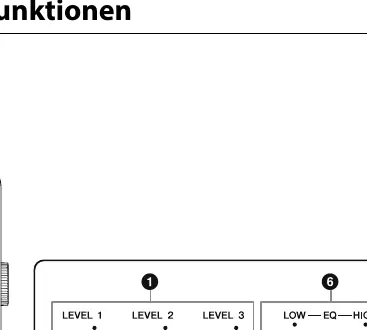
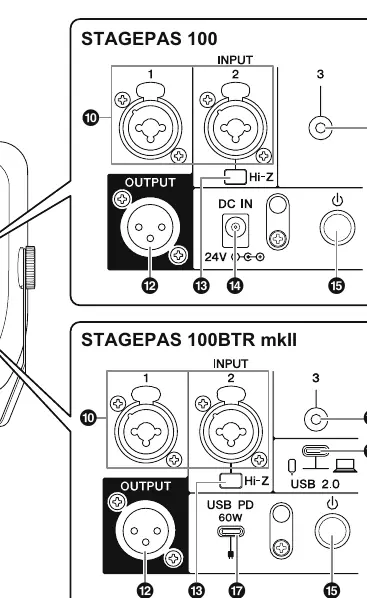
- LEVEL knobs: Adjust volume for channels 1-3.
- MIC/LINE switch: Selects input sensitivity for channels 1 & 2.
- Bluetooth switch/LED: Controls Bluetooth pairing and status.
- BATTERY LED: Indicates battery status (100BTR mkII only).
- POWER LED: Indicates unit is on.
- EQ knobs: Adjust LOW and HIGH frequencies.
Rear Panel:
- INPUT jacks: Combo jacks for XLR/1/4" connectors.
- OUTPUT jack: XLR output for connecting an active monitor.
- USB 2.0 Port: For computer/smartphone audio connection.
- USB PD 60W Port: For charging/powering the 100BTR mkII.
- DC IN: For power adapter connection.
Setup and Connections
Before making connections, always set volume levels to minimum. Use the provided power adapter for the STAGEPAS 100. For the 100BTR mkII, you can use a USB-PD compatible adapter (60W-100W, 20V/3A-5A). Ensure cables are high quality and shielded.
Bluetooth Operation
To pair a device:
- Ensure Bluetooth is off (LED not lit).
- Press and hold the Bluetooth switch for at least 3 seconds until the LED flashes quickly.
- Select STAGEPAS100 or STAGEPAS100BTRmkII on your device.
- The LED will light steadily when connected.
USB Audio (STAGEPAS 100BTR mkII)
You can connect a computer or smartphone via the USB 2.0 port for streaming. The unit is automatically recognized by most devices as an audio interface. Select [USB AUDIO CODEC] in your device's sound settings for input and output.
Installation
The unit can be placed on the floor using the handle as a stand or mounted on a standard microphone stand using the 3/8" screw hole on the handle. Ensure the stand is stable and the height does not exceed 115 cm.
Battery Charging (STAGEPAS 100BTR mkII)
The battery charges automatically when connected to a power source via the USB PD port. The POWER LED flashes green while charging. A full charge takes approximately 2.5 hours. The BATTERY LED indicates charge status: green (full), yellow (sufficient/low), red (very low/error).
Troubleshooting
- Unit won't turn on: Check power cable/adapter connections. For 100BTR mkII, ensure battery is charged or USB-PD adapter is connected.
- No sound: Check input connections, volume levels, and ensure you are not using a condenser microphone (requires dynamic mic).
- Distorted sound: Lower channel LEVEL knobs or switch MIC/LINE to LINE if the input signal is too hot.
- Bluetooth issues: Ensure the unit is not already connected to another device and is away from 2.4GHz interference sources.
Technical Specifications
The system features a 2-way bass-reflex speaker with bi-amping. Frequency response is 70 Hz to 20 kHz. It includes a 3-channel mixer and supports Bluetooth 5.0. The 100BTR mkII model includes a built-in lithium-ion battery providing up to 6 hours of operation.
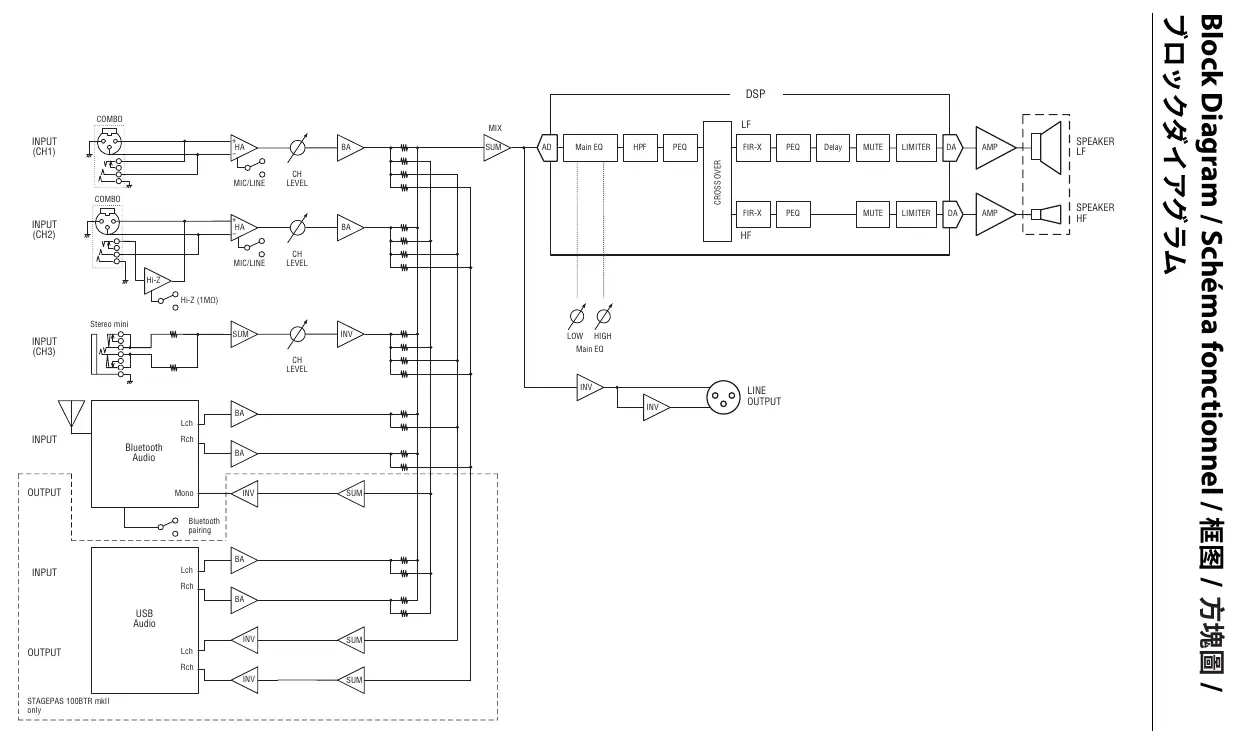
Manufacturer information
Yamaha
Practical help
Common problems
Unit does not turn on
Check power cable/adapter connections. For 100BTR mkII, ensure the USB-PD adapter meets 60W-100W (20V/3A-5A) requirements.
No sound output
Verify input connections, increase channel LEVEL, and ensure you are using a dynamic microphone (condenser mics are not supported).
Distorted sound
Lower the channel LEVEL knob or switch the MIC/LINE selector to LINE if the input signal is too strong.
Bluetooth connection fails
Ensure the unit is not already paired with another device and keep it away from 2.4GHz interference sources like Wi-Fi routers.
Before use
- Set all LEVEL knobs to minimum before connecting devices.
- Ensure power source matches the unit's requirements.
- Use a dynamic microphone; condenser microphones are not supported.
- For 100BTR mkII, ensure battery is charged or a compatible USB-PD adapter is connected.
- Check that the MIC/LINE switch matches the connected device type.
Images and diagrams
- Front Panel: Contains channel level controls, EQ, Bluetooth pairing, and status LEDs.
- Rear Panel: Houses input/output ports, power switch, and USB/DC power connections.
Model compatibility
- STAGEPAS 100BTR mkII supports USB audio and battery operation.
- USB-PD adapter must support 60W-100W (20V/3A to 20V/5A) for proper operation.

Manual page author
Emily Carter
User documentation editor
Prepares concise manual descriptions and highlights the most useful setup, operation, and maintenance information for readers.