Electronics / Video Transmission
User Manual for Accsoon CineView 2 SDI Wireless Video Transmission System
Quick guide for the Accsoon CineView 2 SDI wireless video transmission system. Learn how to install, pair, configure data rates, stream via UVC, and update firmware.
Table of contents
Manual images
Click an image to enlargeQuick Guide
The Accsoon CineView 2 SDI is a wireless video transmission system designed for professional monitoring. Key features include a 1500ft/450m range, latency under 50ms, and dual-band 2.4GHz+5GHz transmission. The system supports SDI and HDMI inputs on the transmitter and SDI, HDMI, and UVC outputs on the receiver.
Product Overview
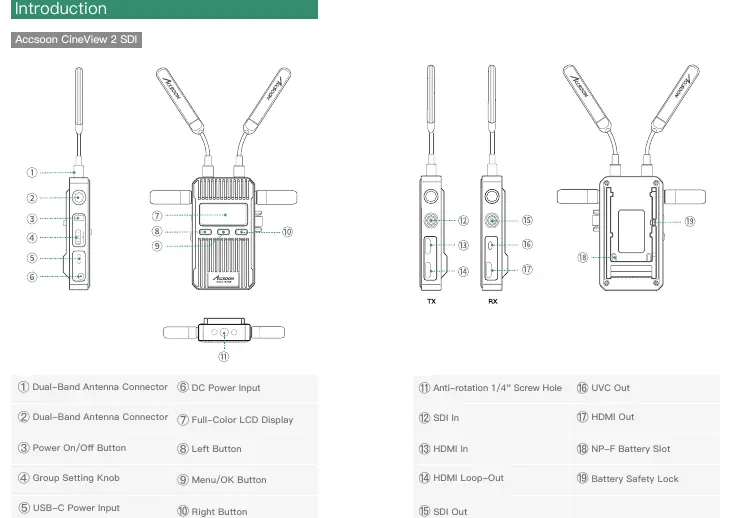
The package includes the transmitter and receiver units, high-gain dual-band antennas (short and long), cold shoe mount adapters, and documentation. The transmitter features SDI/HDMI inputs and HDMI loop-out, while the receiver provides SDI/HDMI and UVC output for direct computer streaming.
Installation and Power
Installation: Attach the antennas to the units. Use the provided cold shoe mount adapters to secure the transmitter and receiver to your camera or cage.
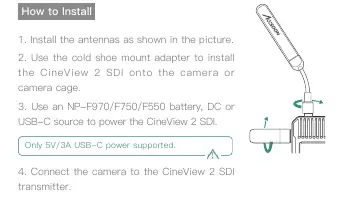
Power: The system can be powered via NP-F series batteries (NP-F970/F750/F550), DC input (7.4-16.8V), or USB-C (5V/3A). Ensure the power source is stable.
Operation and Pairing
Power On/Off: Press the power button to turn on. Press and hold for 2 seconds to turn off.
Group Setting: Use the group setting knob on both the transmitter and receiver. Set both units to the same group number to pair them automatically. To connect multiple receivers (up to 4) to one transmitter, set all units to the same group.
Configuration Settings
Data Rate Setting: Access via the menu button. Options include High Quality (HQ), Normal (NOR - default), and Speed (SPD) for high interference environments.
Channel Setting: The transmitter automatically selects the best channel by default. Manual changes can be made via the menu if necessary.
Network Reset: Use the menu to reset Wi-Fi SSID and password to factory settings.
App Monitoring and Livestreaming
App Monitoring: Download the Accsoon SEE app. Connect your mobile device to the CineView 2 SDI Wi-Fi signal (default password: 12345678) and select the device in the app to start monitoring.
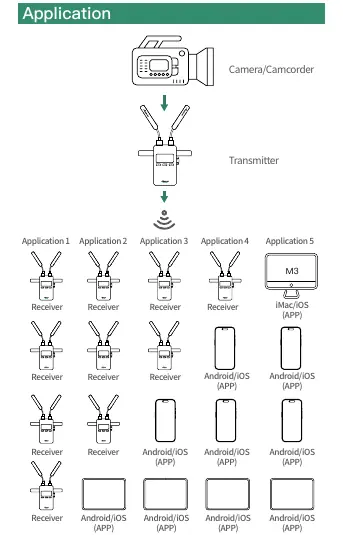
Livestreaming: The receiver supports UVC output. Connect the receiver to a computer via USB-C to use it as a camera source for streaming platforms. Alternatively, use the Accsoon SEE app to stream via RTMP by entering the URL and code in the app's live settings.
Firmware Update
Ensure the battery level is above 50%. Connect your mobile device to the internet, open the Accsoon SEE app, navigate to the device settings, and select Firmware Update. Follow the on-screen instructions to download and install the update.
Specifications
- Transmission Range: 1500ft/450m (line-of-sight)
- Latency: Less than 50ms
- Video Input: HDMI, 3G SDI
- Power Input: NP-F battery, DC, USB-C (5V/3A)
- Operating Temperature: -10 to 40 degrees Celsius
Troubleshooting
If the receiver cannot connect to the transmitter, verify that both are set to the same group. If there is no video, check the SDI/HDMI cable connections and ensure the camera output format is compatible. For choppy video, ensure antennas are securely mounted and free from metal obstructions.
Practical help
Common problems
Receiver cannot connect to transmitter
Ensure both the transmitter and receiver are set to the same group number using the group setting knob.
No video displayed
Check that the SDI/HDMI cable is correctly plugged into the transmitter and that the camera's output format is compatible with the system.
Choppy video
Ensure antennas are securely mounted and that there are no metal objects or cables causing signal blocking near the antennas.
App fails to find firmware
Verify that your mobile device has an active internet connection and is connected to the correct Wi-Fi network.
Before use
- Install antennas on both transmitter and receiver units.
- Mount the units using the provided cold shoe adapters.
- Power the units using a compatible NP-F battery, DC source, or USB-C (5V/3A).
- Set the transmitter and receiver to the same group number.
- Download the Accsoon SEE app for monitoring.
Specs in practice
- Transmission Range
- Up to 1500ft/450m in line-of-sight conditions without obstacles.
Images and diagrams
- The transmitter features SDI In, HDMI In, and HDMI Loop-Out ports.
- The receiver features SDI Out, HDMI Out, and UVC Out ports.
- The group setting knob is located on the side of both units for pairing.
Model compatibility
- Compatible with NP-F550, NP-F750, and NP-F970 batteries.
- UVC output requires support from the streaming platform used on the computer.

Manual page author
Michael Turner
Technical manual editor
Reviews PDF manuals for structure, safety notes, and practical product details so readers can find the right information quickly.