Electronics / Video Transmission
Accsoon CineView SE 4K Wireless Video Transmission System User Manual
Comprehensive user guide for the Accsoon CineView SE 4K wireless video transmission system. Includes setup instructions, transmitter and receiver configuration, app connectivity, firmware updates, and troubleshooting.
Table of contents
Manual images
Click an image to enlargeQuick Guide
The Accsoon CineView SE 4K is a wireless video transmission system. To get started, install the antennas, mount the unit to your camera cage using the cold shoe adapter, and power the device using an NP-F series battery or DC power source. Connect your camera to the transmitter via HDMI or SDI cable. Ensure the transmitter and receiver are set to the same group for pairing.
Product Description
The CineView SE 4K provides dual-band (2.4GHz + 5GHz) wireless transmission with 50ms low latency and a 400-meter range. It supports 4K30 transmission, camera control, and simultaneous monitoring on up to 5 devices (1 wired, 4 wireless) via the Accsoon SEE App.
Installation
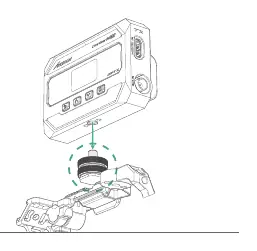
1. Install the antennas onto the device.2. Use the cold shoe mount adapter to attach the unit to your camera cage.3. Connect your camera to the transmitter using an HDMI or SDI cable.
Power Supply
The system supports hot-swapping between power sources:
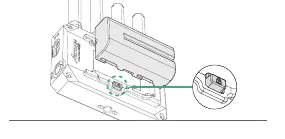
- NP-F Batteries: Insert NP-F970/F750/F550 batteries into the slot on the back until you hear a click. Press the battery lock to remove.
- DC Power: Use a 5.5mm x 2.1mm connector with 7.4-16.8V output. Center positive. Recommended: 9V/2A or 12V/2A adapter.
Connection
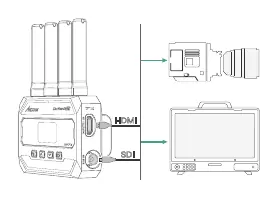
Connect your camera to the transmitter's HDMI or SDI input. Connect your monitor or other devices to the receiver's HDMI or SDI output. For wired video output to mobile devices, use a USB-C to USB-C or USB-C to Lightning cable connected to the VIDEO OUT port.
Transmitter and Receiver Settings
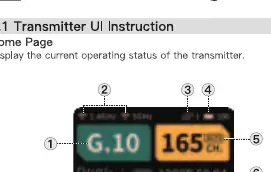
Use the LCD display and buttons (Return, Up, Down, OK) to navigate menus:
- Group Setting: Ensure the transmitter and receiver are set to the same group number to pair.
- Channel Setting: Available on the transmitter. By default, it is set to Automatic (A).
- Region Setting: Set based on your purchase location to comply with local RF regulations.
- Bitrate/Encoding: Adjust wireless bitrate and select H.264 or H.265 codec in the AV INFO menu.
- USB-C Output: Configure for Apple or Android devices in the USB Mode menu.
Accsoon SEE App
Download the Accsoon SEE App from the Google Play Store or iOS App Store. Connect your mobile device to the transmitter's Wi-Fi signal (named 'Accsoon_****') using the default password '123456789'. Use the app for monitoring, live-streaming, and recording.
Firmware Update
1. Ensure the mobile device has internet access and the transmitter battery is above 50%.2. In the Accsoon SEE App, go to the CineView SE 4K settings and select 'FIRMWARE UPDATE'.3. Follow the prompts to download and send the firmware to the transmitter.4. The device will reboot automatically to finalize the update.
Troubleshooting
If the receiver cannot connect to the transmitter, verify that both units are set to the same group. If there is no video, check the SDI/HDMI cable connections and ensure the video format is supported. For choppy video, ensure antennas are securely mounted and not obstructed by metal objects.
Specifications
- Transmission Range: 400 meters (unobstructed).
- Latency:
- Video Input: HDMI, 3G SDI.
- Video Output: HDMI, 3G SDI, USB video out.
- Operating Temperature: -10 to 40°C.
Practical help
Common problems
Receiver cannot connect to transmitter
Ensure both the transmitter and receiver are set to the same group.
No video displayed
Check that the SDI/HDMI cable is correctly plugged in and the video format is supported by the product.
Choppy video
Check that antennas are securely mounted and ensure there are no metal objects or cables causing signal blockage.
App fails to find latest firmware
Check that your mobile device has a stable internet connection and is connected to the CineView SE 4K Wi-Fi.
Before use
- Install all antennas
- Mount the unit to the camera cage using the cold shoe adapter
- Insert a charged NP-F battery or connect a DC power adapter
- Connect the camera to the transmitter via HDMI or SDI cable
- Power on the device by pressing the power button for 1 second
Specs in practice
- Transmission Range
- Up to 400 meters in an unobstructed, interference-free environment.
- DC Power Input
- Requires 7.4-16.8V, center positive, 5.5mm x 2.1mm connector.
Images and diagrams
- Transmitter/Receiver ports: Power, HDMI, SDI, USB-C, Camera Control
- Antenna installation: Screw onto the top ports
- Battery installation: Slide into the back slot until it clicks
Model compatibility
- Compatible with NP-F550, NP-F750, and NP-F970 batteries
- Supports iOS and Android devices via Accsoon SEE App
- Requires specific USB-C to Lightning cable for Apple devices (sold separately)

Manual page author
Emily Carter
User documentation editor
Prepares concise manual descriptions and highlights the most useful setup, operation, and maintenance information for readers.