Electronics / Monitors
Acurite 00309SBDI Humidity Monitor Instruction Manual
Quick guide for the Acurite 00309SBDI Humidity Monitor. Learn how to install batteries, interpret humidity levels, use high/low records, and mount the device for accurate readings.
Table of contents
Manual images
Jump to the sectionQuick guide from the manual
This document provides essential instructions for setting up and operating the Acurite 00309SBDI Humidity Monitor. Key tasks include installing a single AA battery, selecting temperature units (Celsius or Fahrenheit), and placing the device correctly to ensure accurate environmental readings.
Device Overview
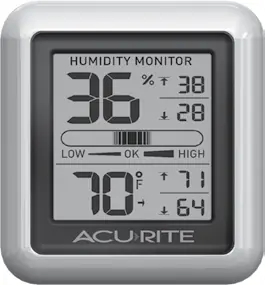
The monitor displays current humidity and temperature, along with high/low records for the past 24 hours. A humidity level indicator provides a visual reference for indoor comfort levels (Low, OK, or High).
Setup and Installation
Before use, remove the protective film from the LCD screen. To install the battery:
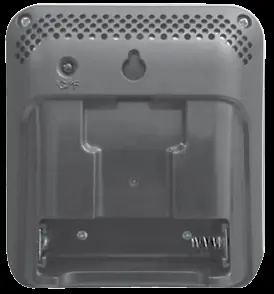
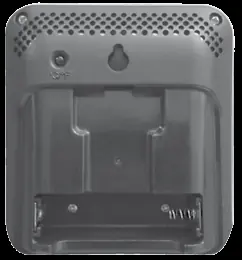
- Slide off the battery compartment cover on the back of the unit.
- Insert 1 x AA alkaline battery, ensuring correct polarity (+/-) as indicated in the compartment.
- Replace the battery cover.
For maximum accuracy, place the monitor in a dry area free of dirt and dust. Avoid direct sunlight, heat sources, and vents. Keep the device away from direct humidity sources to ensure the sensor provides representative readings.
Operation and Settings
The device automatically records the minimum and maximum temperature and humidity values for the last 24 hours, starting from the moment the battery is installed. To switch between Fahrenheit (°F) and Celsius (°C), press the button labeled °C/°F located on the back of the display unit.
Safety and Maintenance
Use only high-quality alkaline or lithium batteries. Do not use rechargeable or heavy-duty batteries. Always follow local regulations for battery disposal. Keep the device clean and dry to maintain sensor performance.
Manufacturer information
AcuRite
Practical help
Common problems
Inaccurate temperature or humidity readings
Ensure the monitor is placed away from direct sunlight, heat sources, vents, or direct humidity sources.
Device not turning on
Check that the battery is installed with the correct polarity and that it is a fresh, high-quality alkaline or lithium AA battery.
Before use
- Remove the protective film from the LCD screen.
- Ensure you have one fresh AA alkaline or lithium battery.
- Select a location away from direct sunlight, heat, or moisture sources.
- Verify battery polarity before closing the compartment.
Specs in practice
- Temperature Range
- 32°F to 122°F (0°C to 50°C).
- Humidity Range
- 16% to 98% relative humidity (RH).
Images and diagrams
- The front display shows current humidity, temperature, and high/low records for the last 24 hours.
- The humidity level indicator bar shows if the environment is Low, OK, or High.
- The back of the unit features the battery compartment, a hang hole for wall mounting, and the °C/°F selection button.
Model compatibility
- Use only alkaline or lithium batteries.
- Do not use rechargeable batteries.
- Do not mix old and new batteries.

Manual page author
David Miller
Documentation analyst
Organizes user manual content into clear summaries, with attention to model details, product context, and everyday usability.