Electronics / Monitors
AcuRite 00828BPDI Weather Forecast Station Instruction Manual
Quick guide for the AcuRite 00828BPDI Weather Forecast Station, covering sensor setup, display configuration, calibration, and troubleshooting steps.
Table of contents
Manual images
Jump to the sectionQuick guide from the manual
This document provides essential instructions for setting up and maintaining your AcuRite 00828BPDI Weather Forecast Station. Key steps include matching the A-B-C switch on both the sensor and display unit, installing batteries, and allowing the system to complete its 14-day Learning Mode for accurate pressure forecasting.
Sensor Setup
The outdoor sensor requires 2 AA batteries. For temperatures below -4°F (-20°C), use lithium batteries. Ensure the A-B-C switch inside the battery compartment matches the setting on the display unit to allow synchronization.
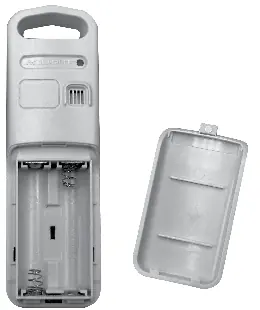
Display Unit Setup
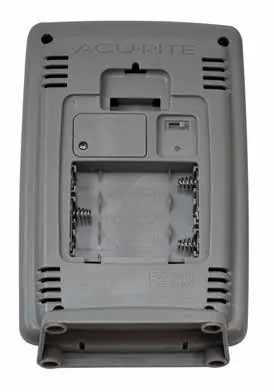
The display unit requires 3 AA alkaline batteries. After inserting batteries, ensure the A-B-C switch matches the sensor. The device features an Intelli-Time clock that automatically updates for Daylight Saving Time.
Calibration
You can calibrate temperature, humidity, and barometric pressure readings. To enter calibration mode, press and hold the UP, DOWN, and SET buttons simultaneously for 5 seconds. Use the UP/DOWN buttons to adjust values and press SET to confirm.
Placement Guidelines
- Place the display unit in a dry area.
- Mount the outdoor sensor 4 to 8 feet above the ground in a shaded area with good airflow.
- Keep units within 330 feet (100 meters) of each other.
- Maintain at least 3 feet (0.9 meters) of distance from electronic devices to avoid interference.
Troubleshooting
- No sensor reception: Ensure units are within range, away from electronics, and batteries are fresh.
- Flashing outdoor temperature: Indicates wireless interference. Bring units indoors, remove batteries, re-sync the A-B-C switches, and restart the connection process.
- Inaccurate forecast: The unit requires a 14-day Learning Mode to calibrate to your specific location.
Manufacturer information
AcuRite
Practical help
Common problems
No outdoor sensor reception (no bars)
Relocate units within 330 ft (100 m), ensure they are 3 ft away from electronics, and verify battery type (alkaline or lithium).
Outdoor temperature flashing or showing dashes
Indicates interference. Bring units indoors, remove batteries, ensure A-B-C switches match, reinstall batteries, and let them sit together for 20 minutes.
Inaccurate weather forecast
The unit is in Learning Mode. Allow it to run continuously for 14 days to calibrate pressure to your altitude.
Before use
- Remove protective film from the LCD screen.
- Set the A-B-C switch to the same letter on both the sensor and display unit.
- Install 2 AA batteries in the sensor (lithium recommended for cold weather).
- Install 3 AA alkaline batteries in the display unit.
- Ensure the Intelli-Time battery (CR2032) is installed if the clock loses memory.
Specs in practice
- Operating Frequency
- 433 MHz, the wireless band used for communication between sensor and display.
- Wireless Range
- Up to 330 ft (100 m) depending on obstacles like walls or metal surfaces.
- Data Reporting
- Outdoor data updates every 16 seconds; indoor data updates every 30 seconds.
Images and diagrams
- The A-B-C switch is located inside the battery compartment of both units and must be set to the same position for synchronization.
- The display unit features a dedicated reset button on the back for troubleshooting.
- The outdoor sensor includes an integrated hanger for easy placement.
Model compatibility
- Use only alkaline or lithium batteries; heavy-duty or rechargeable batteries are not recommended.
- Lithium batteries are required for the outdoor sensor in temperatures below -4°F (-20°C).

Manual page author
David Miller
Documentation analyst
Organizes user manual content into clear summaries, with attention to model details, product context, and everyday usability.