Documents / Warranty Safety
Acurite 00526W Thermometer Instruction Manual
Quick guide for the Acurite 00526W wireless thermometer, covering battery installation, sensor placement, display settings, and troubleshooting.
Table of contents
Manual images
Jump to the sectionQuick guide from the manual
The Acurite 00526W is a wireless thermometer system consisting of a display unit and an outdoor sensor. It provides indoor and outdoor temperature readings, a weather-based clothing suggestion character, and an optional temperature alarm. The system requires 4 AA batteries in total (not included).
Installing Batteries
Wireless Sensor: Remove the battery compartment cover and install 2 fresh AA batteries. Batteries must be installed for the sensor to operate.
Display Unit: Remove the battery compartment cover and install 2 fresh AA batteries.
Battery Choice: In temperatures below -4°F (-20°C), use lithium batteries in the outdoor sensor to ensure continued operation, as alkaline batteries may fail in extreme cold.
Display Unit Settings
To customize your display, press and hold the SET button to enter set mode. The temperature unit will blink. Use the arrow buttons to adjust, then press SET to confirm and move to the next preference. The order is: Temperature Scale (°F or °C) and Weather Character (Boy or Girl). The unit will automatically exit set mode after 30 seconds of inactivity.
Placement
The wireless sensor must be placed outdoors within 165 feet (50 m) of the display unit. To ensure accurate readings and reliable wireless communication:
- Keep both units at least 3 feet (0.91 m) away from electronic appliances like TVs, microwaves, or radios.
- Avoid placing units near large metal surfaces or thick stone walls.
- Place the display unit in a dry area, away from direct sunlight and heat sources.
- Place the outdoor sensor in an area protected from direct weather elements to extend product life.
Using the Thermometer
Temperature Alarm: To turn on the alarm, press the alarm button below the display. The default is 32°F. To change the alarm value, press and hold the alarm button, then use the arrow buttons to adjust. Press ALARM STOP on top of the display to silence a sounding alarm.
MIN/MAX Memory: Press the down arrow to view minimum recorded temperatures and the up arrow for maximums. To clear these values, press and hold the respective arrow button while in the MIN or MAX view mode.
Troubleshooting
If you experience bad wireless sensor reception, relocate the units and ensure they are within the 165-foot range. Note that it may take up to 20 minutes for the display to re-synchronize with the sensor after battery replacement. If the screen is not working, check that batteries are fresh and correctly installed.
Manufacturer information
AcuRite
Practical help
Common problems
Bad wireless sensor reception (no bars)
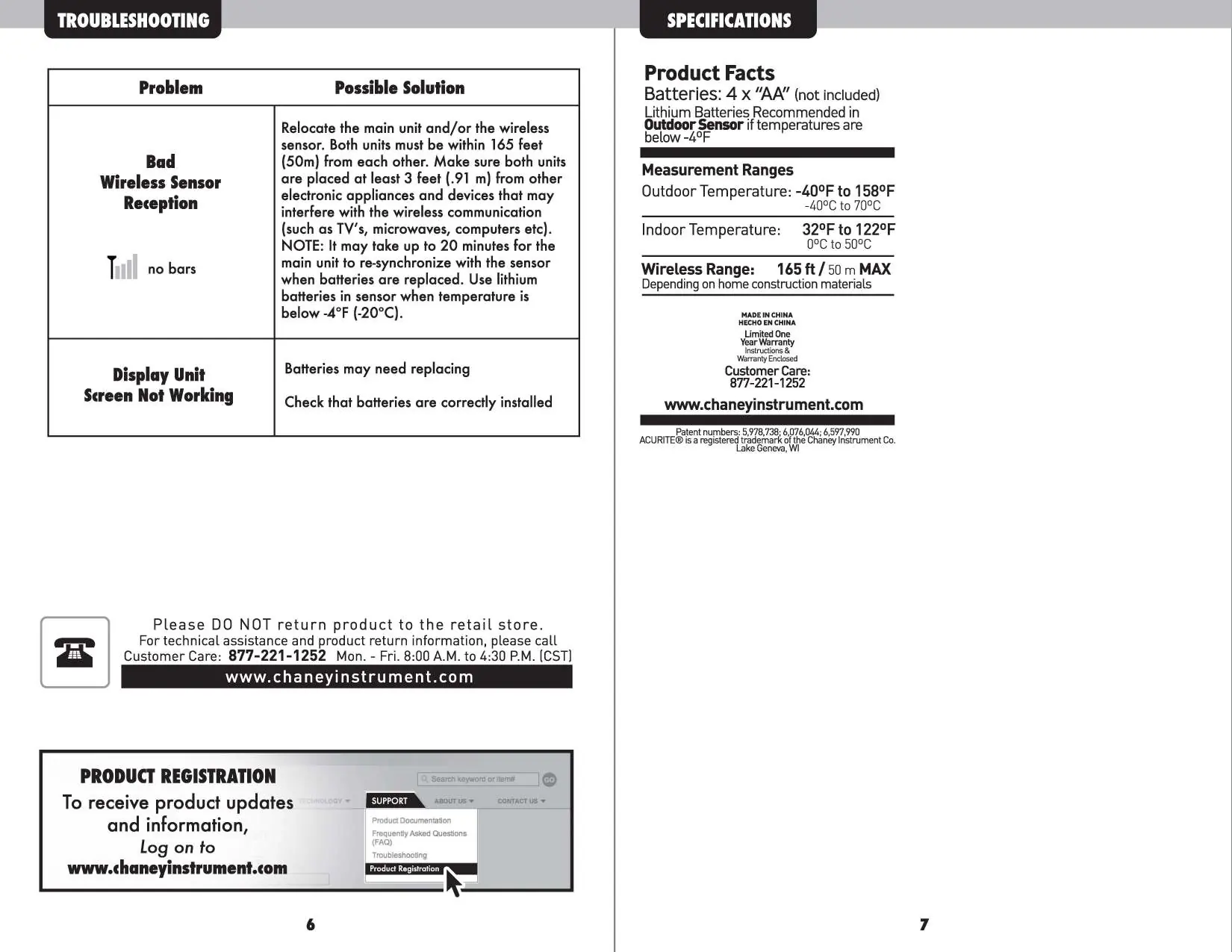
Relocate the main unit and sensor within 165 feet of each other. Ensure they are at least 3 feet away from electronic interference sources like TVs or microwaves. Allow up to 20 minutes for re-synchronization.
Display unit screen not working
Check that batteries are fresh and installed with the correct polarity.
Outdoor sensor stops working in cold weather
Use lithium batteries in the outdoor sensor if temperatures drop below -4°F (-20°C).
Before use
- Purchase 4 AA batteries (not included).
- Install 2 AA batteries in the wireless outdoor sensor.
- Install 2 AA batteries in the display unit.
- Choose a location for the sensor within 165 feet of the display.
- Ensure the sensor is placed away from direct heat sources and direct sunlight.
Specs in practice
- Wireless Range
- Maximum 165 feet (50 m) depending on home construction materials.
- Outdoor Temperature Range
- -40°F to 158°F (-40°C to 70°C).
- Indoor Temperature Range
- 32°F to 122°F (0°C to 50°C).
Images and diagrams
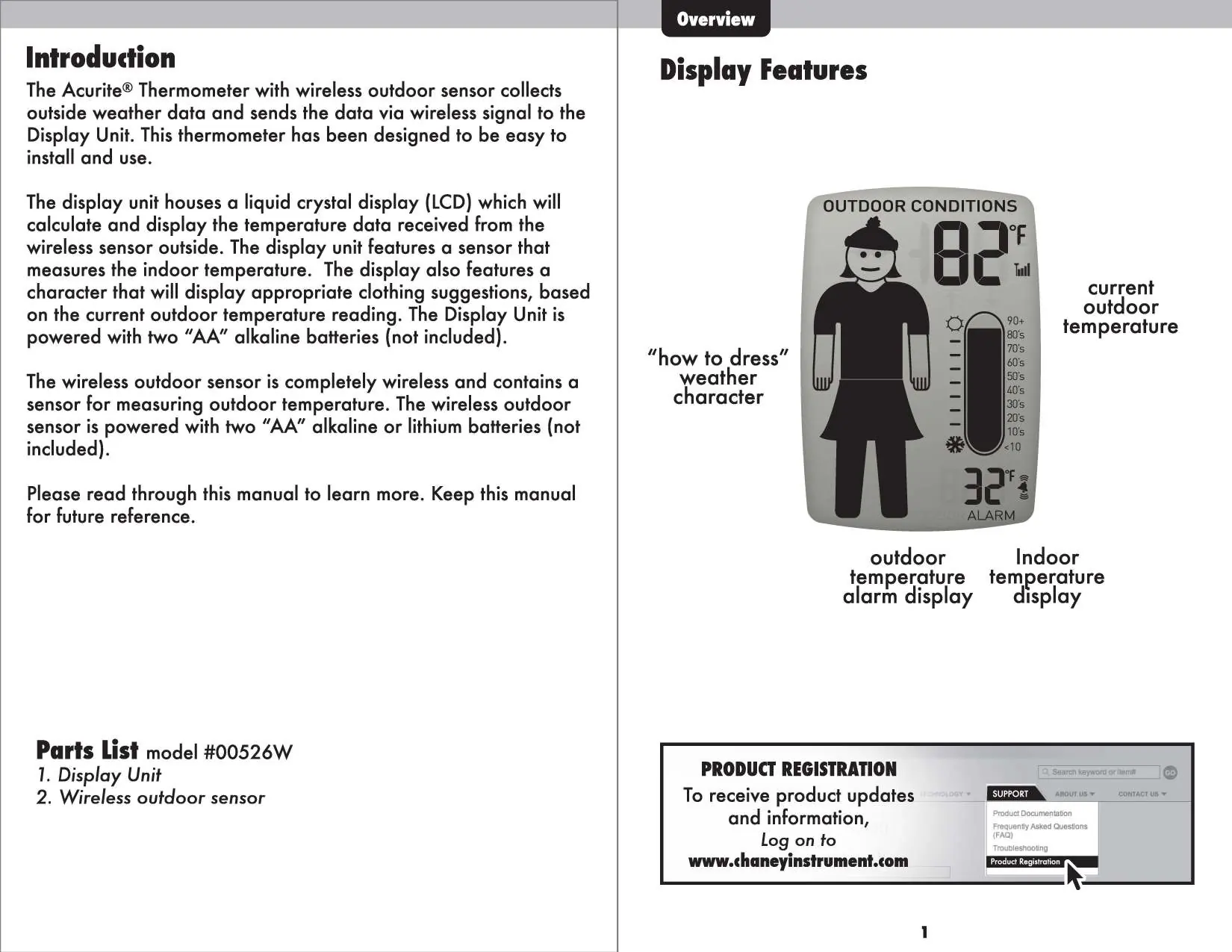
- The display unit features a 'how to dress' character that changes based on the current outdoor temperature.
- The alarm button is located below the display, while the ALARM STOP button is on top of the unit.
Model compatibility
- The device complies with Part 15 of the FCC rules.
- Not for use with rechargeable batteries.

Manual page author
Emily Carter
User documentation editor
Prepares concise manual descriptions and highlights the most useful setup, operation, and maintenance information for readers.