Electronics / Monitors
AcuRite 00277DIX Digital Cooking Thermometer Instruction Manual
Quick guide for the AcuRite 00277DIX digital cooking thermometer, covering setup, meat type selection, target temperature configuration, and troubleshooting.
Table of contents
Manual images
Jump to the sectionQuick guide from the manual
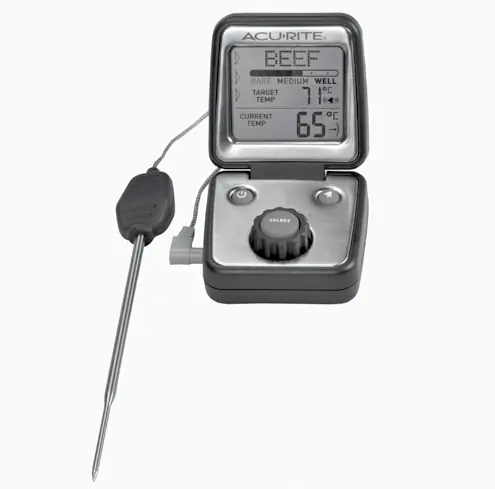
This document provides instructions for the AcuRite 00277DIX digital cooking thermometer. Before first use, remove the protective film from the LCD screen. The device is designed for monitoring internal food temperatures and features a magnet for mounting on oven doors or refrigerators. Note that the probe is not intended for environments exceeding 232°C (450°F).
Setup and Battery Installation
The device requires 2 x AAA alkaline batteries. To install: slide off the battery compartment cover, insert batteries according to the polarity (+/-) diagram, and replace the cover. Use the button on the back of the unit to toggle between Celsius (°C) and Fahrenheit (°F).
Operation
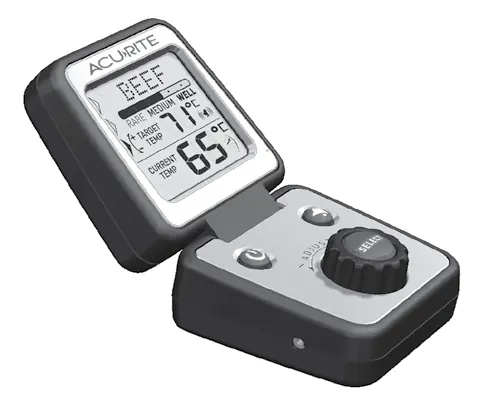
Plug the temperature probe into the display unit. Press the power button to turn the device on. Use the rotary dial to cycle through meat types (Beef, Veal, Chicken, Pork, Poultry, Lamb, Fish, Custom, Boil) and press the SELECT button to confirm. After selecting the meat type, use the dial to select the desired doneness level (Rare, Medium Rare, Medium, Medium Well, Well Done). The target temperature will update automatically based on your selection. To set a custom temperature, adjust the target temperature while it is flashing on the display.
Using the Thermometer
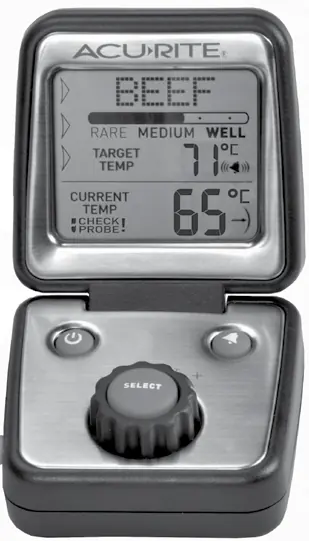
Insert the probe into the thickest part of the food, ensuring it does not touch bone, gristle, or the pan. The display will show the current internal temperature. An audible alarm will sound when the target temperature is reached. You can enable or mute the alarm using the ALARM button.
Care and Maintenance
Store the device in a dry location at room temperature. Clean the display with a soft, damp cloth. Wipe the probe clean with warm water after each use. Do not immerse the unit in water, do not use it in an oven, and do not wash it in a dishwasher. Avoid direct contact between the probe wire and flames or flare-ups.
Manufacturer information
AcuRite
Practical help
Common problems
Display reads 'LO BAT'
Replace the batteries.
Diagnostic code 'No' displayed
The probe cord is not connected; verify the connection is secure or reconnect the cord.
Diagnostic code 'SC' displayed
The probe cord is not functioning properly due to damage or extreme heat; check the wire and replace the cord if necessary.
Inaccurate temperature readings
Ensure you are using standard alkaline batteries; do not use heavy-duty or rechargeable batteries.
Before use
- Remove the protective film from the LCD screen.
- Install 2 x AAA alkaline batteries.
- Plug the temperature probe into the display unit.
- Select preferred temperature units (Celsius or Fahrenheit) using the button on the back.
Specs in practice
- Temperature Range
- 10°C to 232°C (14°F to 450°F); probe cord is heat resistant up to 371°C (700°F).
Images and diagrams
- The front panel features a rotary dial for menu navigation and a SELECT button for confirming settings.
- The display shows current temperature, target temperature, meat type, and doneness level.
- The side of the unit contains the probe plug-in port.
Model compatibility
- Not for use in cooking environments exceeding 232°C (450°F).
- Do not use in an oven.
- Not dishwasher safe.

Manual page author
David Miller
Documentation analyst
Organizes user manual content into clear summaries, with attention to model details, product context, and everyday usability.