Home / Weather Stations & Thermometers
AcuRite 08550W Weather Alert Radio Quick Start Guide
Quick start guide for the AcuRite 08550W Weather Alert Radio. Includes instructions for battery installation, FIPS code setup, channel scanning, and time configuration.
Quick guide from the manual
This quick start guide outlines the initial setup process for the AcuRite 08550W Weather Alert Radio. Follow these steps to prepare your device for operation:
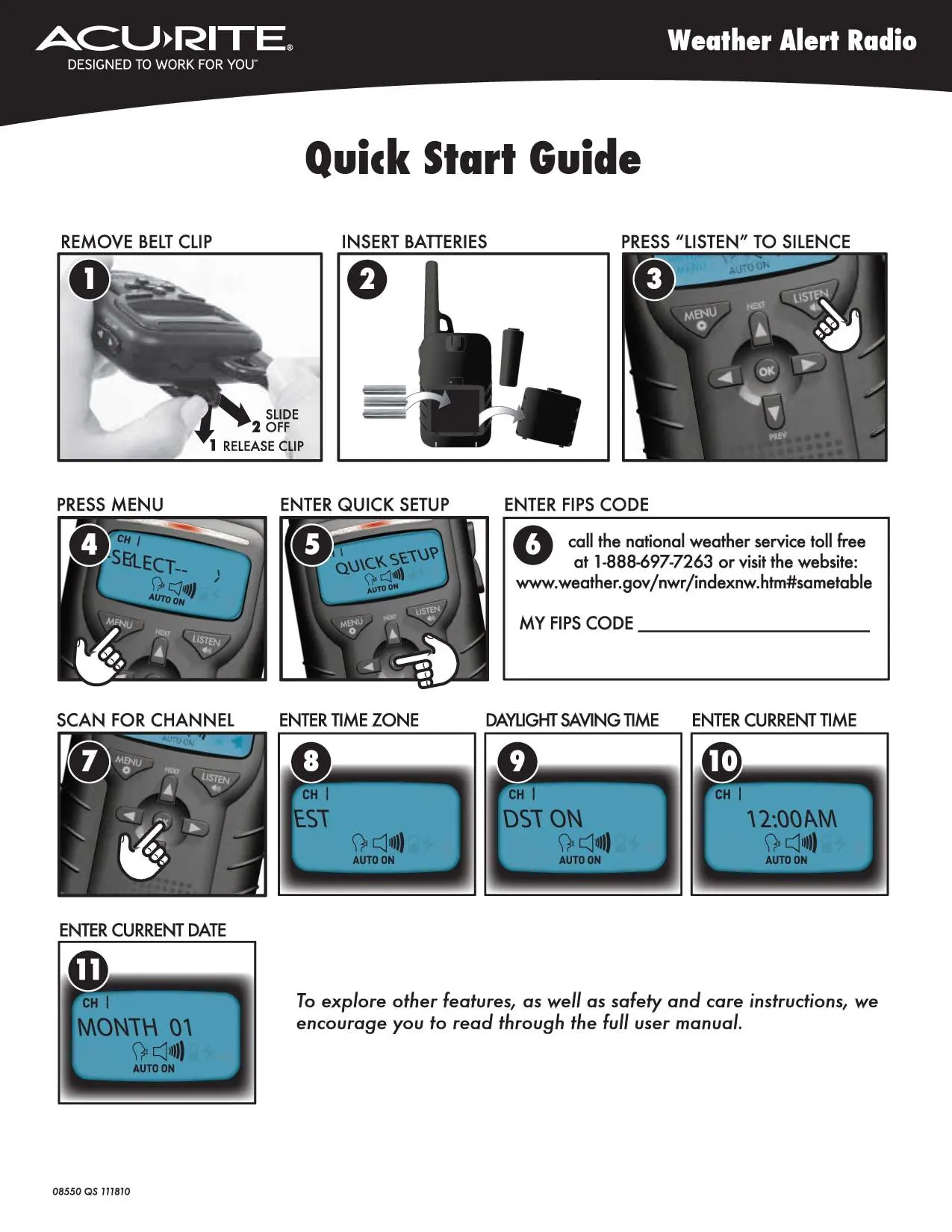
- Remove belt clip: Release the clip to access the battery compartment.
- Insert batteries: Install the required batteries into the compartment.
- Silence the device: Press the LISTEN button to silence any initial alerts.
- Access menu: Press the MENU button to begin configuration.
- Quick Setup: Navigate to the Quick Setup option.
- Enter FIPS code: Input your local FIPS code. If you do not know your code, contact the National Weather Service at 1-888-697-7263 or visit www.weather.gov/nwr/indexnw.htm#sametable.
- Scan for channel: Initiate a channel scan to find the best reception.
- Time settings: Set your time zone, daylight saving time preference, current time, and current date using the menu navigation.
Device Setup and Configuration
The device requires specific local information to function correctly as a weather alert radio. Ensure you have your local FIPS code ready before starting the setup process. The menu system allows you to toggle through settings including time zone, DST, time, and date. Use the navigation buttons to adjust these settings after pressing the MENU button.
Official resources from the manual
Manufacturer information
AcuRite
Practical help
Common problems
Device is making noise
Press the LISTEN button to silence the alert.
Before use
- Remove belt clip
- Insert batteries
- Obtain FIPS code for your area
Images and diagrams
- The quick start guide provides a visual 11-step sequence for initial setup, including battery installation and menu navigation.
Model compatibility
- Requires FIPS code for specific weather alerts in your area.

Manual page author
Michael Turner
Technical manual editor
Reviews PDF manuals for structure, safety notes, and practical product details so readers can find the right information quickly.