Electronics / Monitors
AcuRite 00568SBDI Thermometer with Wired Sensor User Guide
Quick start guide for the AcuRite 00568SBDI thermometer, covering battery installation, display modes, sensor placement, and troubleshooting.
Table of contents
Manual images
Jump to the sectionQuick guide from the manual
This document provides instructions for setting up and operating the AcuRite 00568SBDI thermometer with a wired sensor. Key tasks include installing one AAA battery, selecting temperature units, and properly placing the display and sensor for accurate readings. The device features both manual and auto-cycle display modes for monitoring indoor and outdoor temperature and humidity.
Setup
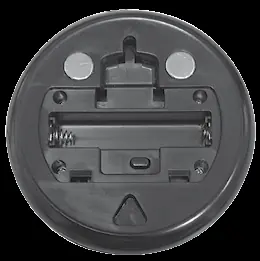
To prepare the device for use, remove the protective film from the LCD screen. Open the battery compartment on the back of the display and install one fresh AAA alkaline battery, ensuring correct polarity as indicated in the compartment. Replace the cover. To select between Fahrenheit (°F) or Celsius (°C), press the button located inside the battery compartment.
Operation
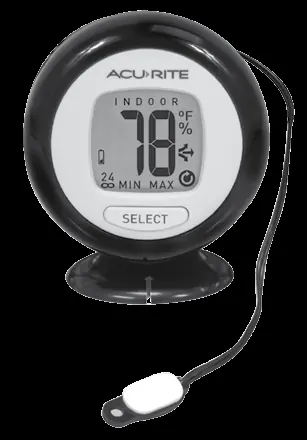
The device operates in two modes: Manual Mode (default), where you press the SELECT button to cycle through readings, and Auto-Cycle Mode, where the display automatically cycles through indoor and outdoor readings every 5 seconds. To enter or exit Auto-Cycle mode, press and hold the SELECT button for 5 seconds.
Placement
For maximum accuracy, place the display in a dry area free of dust. The display can be used on a tabletop, wall-mounted, or attached via integrated magnets. The wired sensor must be placed outdoors. Avoid direct sunlight and heat sources for both the display and the sensor. Note that the wired sensor is not waterproof and should not be submerged in liquid for more than 30 seconds.
High & Low Records
The device tracks high and low temperature and humidity records for the past 24 hours and all-time. To view these, use the SELECT button in Manual Mode. To reset any record, view the record and press and hold the °F/°C button inside the battery compartment for 5 seconds until dashes appear.
Customer Support
For assistance, contact AcuRite at (877) 221-1252 or visit www.AcuRite.com for installation videos, manuals, and support forums.
Official resources from the manual
Manufacturer information
AcuRite
Practical help
Common problems
Inaccurate temperature readings
Ensure both the display and wired sensor are placed out of direct sunlight and away from heat sources or vents.
Display screen not working
Check that the battery is installed correctly and replace it if necessary.
Before use
- Remove protective film from the LCD screen.
- Install one fresh AAA alkaline battery.
- Select preferred temperature units (°F/°C) inside the battery compartment.
- Place the wired sensor outdoors, avoiding direct sunlight.
Specs in practice
- Display Temperature Range
- 32°F to 122°F (0°C to 50°C)
- Wired Sensor Range
- -58°F to 158°F (-50°C to 70°C)
- Humidity Range
- 10% – 99% RH (relative humidity)
Images and diagrams
- The front of the display features the SELECT button, indoor/outdoor indicators, and icons for low battery, min/max records, and auto-cycle mode.
- The back of the display contains the battery compartment, °F/°C unit selection button, integrated magnets, and a hang hole for wall mounting.
Model compatibility
- The wired sensor is not waterproof and should not be submerged in liquids for more than 30 seconds.
- Use only high-quality alkaline batteries; heavy-duty or rechargeable batteries are not recommended.

Manual page author
Emily Carter
User documentation editor
Prepares concise manual descriptions and highlights the most useful setup, operation, and maintenance information for readers.