Electronics / Monitors
AcuRite 00305SBDI Window Thermometer Instruction Manual
Quick guide for the AcuRite window thermometer. Includes setup, suction cup mounting instructions, battery replacement, and temperature record features.
Table of contents
Quick guide from the manual
This document provides instructions for the AcuRite window thermometer (models 00305, 00305SBDI, 00305SBDIA1, 00306, 00423). Key actions include removing the protective film from the LCD, pulling the battery tab to activate the device, and properly mounting it to a surface using the suction cup.
Setup
To activate the thermometer, pull the plastic tab located at the base of the unit. Note that initial temperature readings may be higher than actual due to body heat from handling. For maximum accuracy, place the unit away from direct sunlight and heat sources.
Mounting the Thermometer
The device is water-resistant but should be placed in an area protected from direct weather elements to extend its life. Follow these steps for mounting:
- Clean the target surface with a household cleaner to remove oil, grease, and dust.
- Moisten the suction cup.
- Push the thermometer firmly against the surface to create a strong suction.
- Use only on hard, smooth, non-porous surfaces. Do not use on wood or plaster.
Using the Thermometer
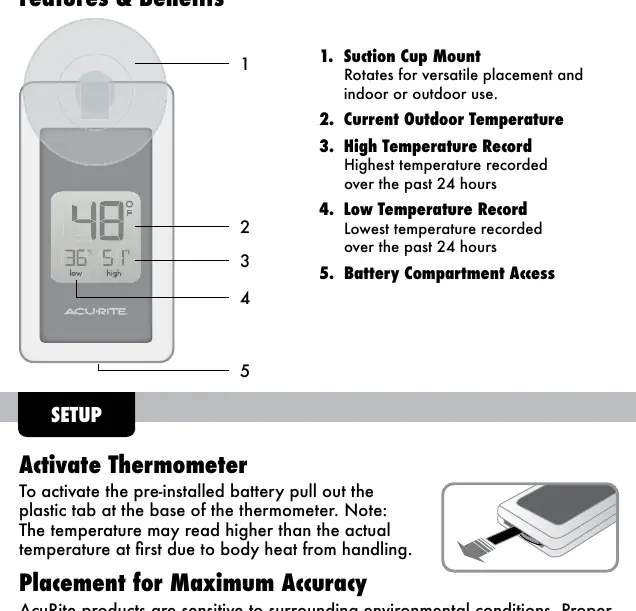
The device displays the current outdoor temperature along with high and low temperature records from the past 24 hours. These records reset automatically every 24 hours, based on the time the battery was originally installed.
Replace the Battery
The device uses one CR-2032 lithium button cell battery. To replace it:
- Gently squeeze the tabs at the base of the thermometer and pull out the battery compartment drawer.
- Remove the old battery and insert a new one, following the polarity (+/-) diagram inside the compartment.
- Push the drawer back into the thermometer.
Care & Maintenance
Clean the device with a soft, damp cloth. Do not use caustic cleaners or abrasives.
Specifications
- Temperature Range: -4°F to 158°F
- Power: 1 CR-2032 battery
Manufacturer information
AcuRite
Practical help
Common problems
Initial temperature reading is too high.
This is likely due to body heat from handling the device during setup. It will normalize once placed.
Suction cup will not hold.
Ensure the surface is clean, smooth, and non-porous. Moisten the suction cup before applying. Do not use on wood or plaster.
Before use
- Remove protective film from the LCD screen.
- Pull the plastic tab at the base to activate the battery.
- Clean the mounting surface thoroughly.
- Ensure the surface is hard, smooth, and non-porous.
Specs in practice
- Temperature Range
- The device operates between -4°F and 158°F.
- Battery Type
- Requires one CR-2032 lithium button cell battery.
Images and diagrams
- The suction cup mount rotates for versatile placement.
- The display shows current temperature, as well as high and low records for the past 24 hours.
- Battery compartment access is located at the base of the unit.
Model compatibility
- Designed for general outdoor use but should be protected from direct weather elements.

Manual page author
Michael Turner
Technical manual editor
Reviews PDF manuals for structure, safety notes, and practical product details so readers can find the right information quickly.