Electronics / Monitors
AcuRite 00419BP / 00421 Wireless Thermometer Instruction Manual
Quick guide for the AcuRite 00419BP / 00421 Wireless Thermometer, covering battery installation, time and unit settings, sensor placement, and troubleshooting.
Table of contents
Manual images
Jump to the sectionQuick guide from the manual
This document provides essential instructions for setting up and maintaining your AcuRite Wireless Thermometer (models 00419BP / 00421). Before first use, remove the protective film from the LCD screen. Ensure you register your product online at www.AcuRite.com to receive 1-year warranty protection.
Install or Replace Batteries
AcuRite recommends high-quality alkaline batteries for optimal performance. Do not use heavy-duty or rechargeable batteries.
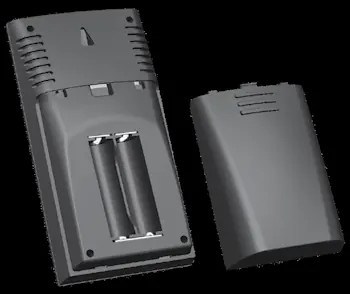
- Outdoor Sensor: Slide off the battery cover and insert 2 x AA batteries, following the polarity (+/-) diagram. Use lithium batteries if temperatures drop below -4°F (-20°C).
- Display Unit: Slide off the battery cover and insert 2 x AA batteries, following the polarity (+/-) diagram.
Set the Time & Units
Press the Setup button to enter SET MODE. The selected item will blink. Use the + or - buttons to adjust, and press Setup to save and move to the next preference.
- Clock Hour
- Clock Minute
- Temperature Units (°F or °C)
The device will automatically exit SET MODE if no buttons are pressed for 10 seconds.
Placement for Maximum Accuracy
Proper placement is critical for accurate readings:
- Place the display unit in a dry area free of dirt and dust.
- The outdoor sensor is water-resistant but should be placed in an area protected from direct weather elements.
- Hang the sensor 4 to 8 feet above the ground in a shaded area with good airflow.
- Keep units within 165 ft (50 m) of each other.
- Avoid placing units near large metallic items or electronic devices (TVs, microwaves) to prevent interference.
Using the Thermometer
The device records daily high and low temperatures, which automatically clear at 12:00 am.
- View Records: Press the - button for low records or the + button for high records.
- Reset Records: Press and hold the corresponding button while viewing the record until dashes appear.
Care & Maintenance
Clean both the display unit and outdoor sensor with a soft, damp cloth. Do not use caustic cleaners or abrasives. Keep ventilation ports on the display unit clear of dust.
Troubleshooting
If the wireless signal indicator shows no bars, relocate the units or ensure they are at least 3 feet away from electronic interference. If the outdoor temperature is flashing, remove batteries from both units, reinstall them, and allow them to sit near each other for 20 minutes to re-synchronize.
Official resources from the manual
Manufacturer information
AcuRite
Practical help
Common problems
No outdoor sensor reception (no bars)
Relocate units within 165 ft (50 m), ensure they are 3 ft away from electronics, and use fresh alkaline batteries (or lithium for cold weather).
Outdoor temperature is flashing or showing dashes
Remove batteries from both units, reinstall them, and place units near each other for 20 minutes to re-establish connection.
Inaccurate temperature readings
Ensure units are placed out of direct sunlight and away from heat sources or vents.
Before use
- Remove protective film from the LCD screen.
- Register product at www.AcuRite.com.
- Install 2 x AA batteries in the display unit.
- Install 2 x AA batteries in the outdoor sensor (use lithium for below -4°F).
- Set time and temperature units in SET MODE.
Specs in practice
- Temperature Range
- Outdoor: -40°F to 158°F (-40°C to 70°C); Indoor: 32°F to 122°F (0°C to 50°C).
- Wireless Range
- Up to 165 ft (50 m) depending on home construction materials.
- Data Reporting
- The sensor updates the display every 30 seconds.
Images and diagrams
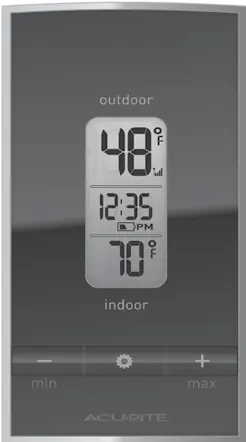
- Display Unit: Shows current indoor/outdoor temperatures, clock, and battery status.
- Outdoor Sensor: Features a wireless signal indicator and integrated hanger.
Model compatibility
- Requires 2 x AA batteries for each unit.
- Lithium batteries are required for the outdoor sensor in temperatures below -4°F (-20°C).

Manual page author
Emily Carter
User documentation editor
Prepares concise manual descriptions and highlights the most useful setup, operation, and maintenance information for readers.