Tools / Measuring Tools
Kelvin Probe Lead Connection Guide for AEMC 6240, 6250, and 6255
Quick guide for connecting Kelvin probe leads to AEMC 6240, 6250, and 6255 micro-ohmmeters. Includes connection diagrams, probe set identification, and compatibility notes for different serial numbers.
Table of contents
Quick Guide for Kelvin Probe Connections
This document provides instructions for connecting Kelvin probe leads to AEMC micro-ohmmeters, specifically models 6240, 6250, and 6255. Proper connection is essential for accurate resistance measurements.
Probe Set Identification
There are several types of probe sets available, distinguished by lead colors and termination types:
- Red/Red and Blk/Blk leads: Compatible with micro-ohmmeters accepting fork terminal termination.
- Red/Blk and Red/Blk leads: Compatible with micro-ohmmeters accepting 4mm banana plugs or fork terminal termination.
- Red/Blk leads with Red Dot on probe tip: Specialized configuration for specific measurement setups.
Connecting Probes to Micro-Ohmmeters
The Kelvin probes utilize four connections to the instrument: C1, P1, C2, and P2. Follow these steps based on your probe type:
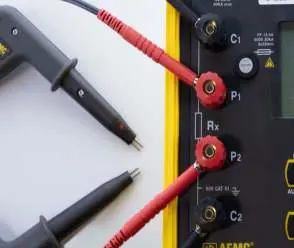
- For Red/Red and Blk/Blk leads: Connect the leads to the corresponding C1, P1, C2, and P2 terminals on the instrument front panel.
- For Red/Blk and Red/Blk leads: Ensure the leads are inserted into the correct terminals as indicated by the instrument's front panel layout.
- For Red/Blk leads with Red Dot: Follow the specific connection diagram to ensure the Red Dot probe tip is correctly oriented.
Compatibility and Serial Number Notes
For instruments with serial numbers lower than 1166339SEDV, the terminal configuration differs: C1 and P1 are red, while C2 and P2 are black. Always verify your instrument's serial number before making connections to ensure proper operation.
Practical help
Common problems
Incorrect probe connection
Ensure leads are connected to the correct C1, P1, C2, and P2 terminals as shown in the diagrams.
Older instrument compatibility
If your instrument has a serial number lower than 1166339SEDV, terminals C1/P1 are red and C2/P2 are black; refer to the specific connection table in the manual.
Before use
- Identify your probe set type (Red/Red or Red/Blk).
- Check your instrument's serial number to determine the correct connection method.
- Verify the probe handle colors match the required configuration.
- Ensure the instrument is powered off before connecting leads.
Images and diagrams
- The diagrams illustrate the physical connection of the Kelvin probe leads to the front panel terminals of the micro-ohmmeter.
Model compatibility
- Compatible with AEMC models 6240, 6250, and 6255.
- Some probes are for use with micro-ohmmeters accepting fork terminal termination, others for 4mm banana plugs.

Manual page author
Michael Turner
Technical manual editor
Reviews PDF manuals for structure, safety notes, and practical product details so readers can find the right information quickly.