Home / Weather Stations & Thermometers
User Manual for Testo Smart Probes
Quick guide for Testo Smart Probes. Learn how to connect via Bluetooth, use the Testo Smart App, maintain your probes, and troubleshoot common issues.
Table of contents
Manual images
Click an image to enlargeQuick guide from the manual
Testo Smart Probes are handheld measuring instruments that communicate with mobile devices via the Testo Smart App. Before use, ensure your mobile device meets the requirements (iOS 13.0+ or Android 8.0+ with Bluetooth 4.0). Always handle the instruments according to safety guidelines, especially when dealing with pressurized refrigerants or lasers.
Product description
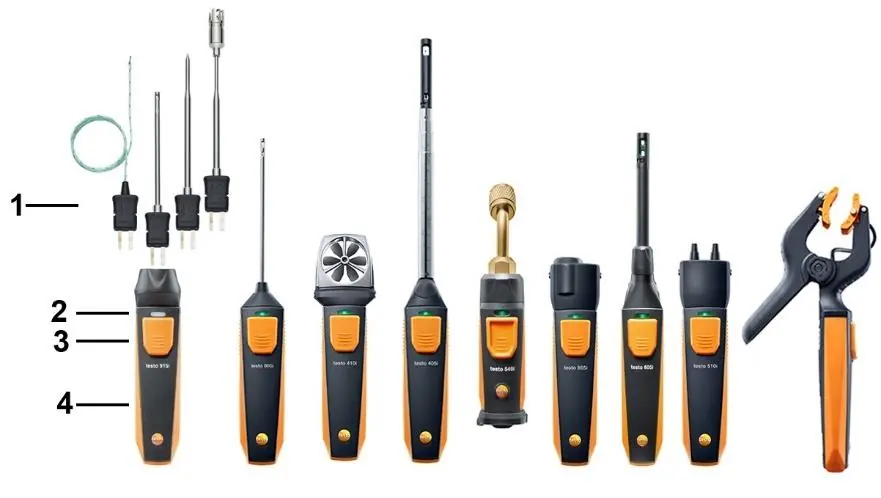
The probes feature a measuring unit, an LED status indicator, a button for operation, and a battery compartment. The LED status indicates the device state: flashing yellow means the device is on and searching for a connection, while flashing green indicates a successful Bluetooth connection. A flashing red LED signals low battery.
First steps
To start using the probe, pull the battery film out of the compartment. Press the button to switch the device on. To establish a connection, ensure the Testo Smart App is installed on your smartphone or tablet. Once the probe is on and connected, readings are automatically transmitted and displayed in the app.
Using the app
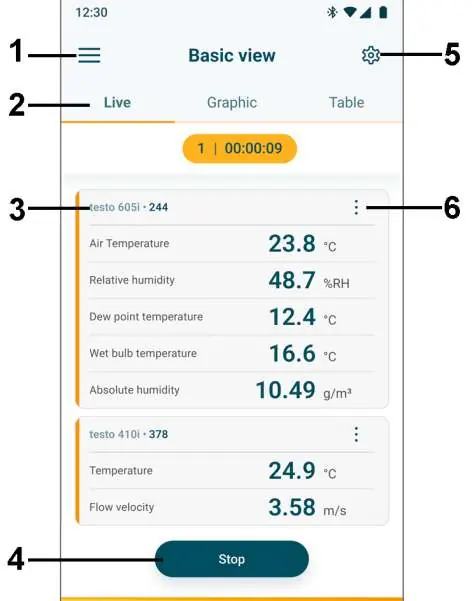
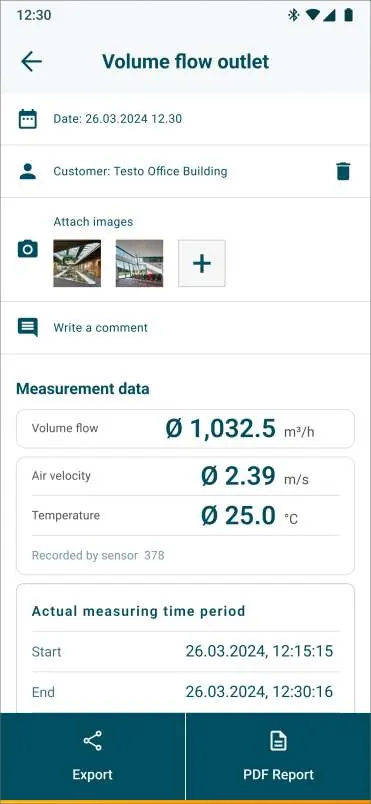
The app allows you to view measurements in list, graphic, or table formats. You can configure settings, select applications, and set favorites. If readings fluctuate, you can enable damping in the Smart Probe settings to stabilize the values. For specific probes like the 115i and 915i, you can apply a surface increment to correct temperature readings. Data can be exported as Excel (CSV) or PDF reports.
Maintenance
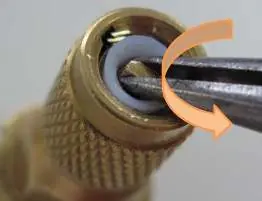
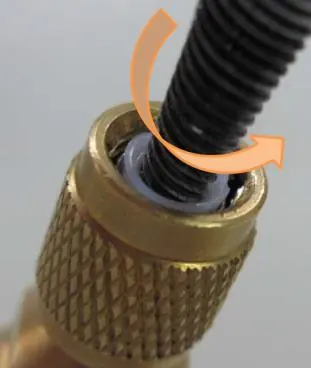
Clean the instrument housing with a damp cloth; do not use aggressive cleaning agents. Keep connections clean and free of grease. For the testo 552i vacuum probe, the middle part can be unscrewed using pliers to clean the sensor opening with rubbing alcohol. Always allow the probe to dry for at least 4 hours after cleaning.
Troubleshooting
If the LED flashes red, replace the batteries. If the instrument switches off, the battery capacity is insufficient. If the display shows dashes instead of parameters, the measurement is outside the permissible range or the sensor is defective. If the app cannot be found, check your search terms or ensure your mobile device meets the minimum technical requirements.
Technical data
The manual provides detailed specifications for all models, including measuring ranges, accuracy, resolution, battery life, and operating temperatures. Always operate within the specified ranges to ensure accuracy and prevent damage.
Manufacturer information
Testo SE & Co. KGaA
Practical help
Common problems
LED flashes red
Batteries are almost spent; replace them.
Instrument switches off automatically
Battery capacity is insufficient; replace the batteries.
--- lights up instead of measurement
Measurement is outside the permissible range or the sensor is defective. Contact Testo service if the sensor is faulty.
App cannot be found in the store
Ensure you are using the correct search terms (e.g., 'testo Smart Probes') or check if your mobile device meets the minimum requirements (iOS 12.0+/Android 6.0+).
Before use
- Remove the battery film from the compartment.
- Install the Testo Smart App on your mobile device.
- Ensure Bluetooth is enabled on your mobile device.
- Check that the probe is within the permissible measuring range.
- For testo 405i, ensure ambient pressure is correctly entered in the app.
Specs in practice
- Surface increment
- A correction factor for 115i/915i probes to compensate for heat withdrawal from the measured surface.
Images and diagrams
- The manual provides step-by-step visual instructions for cleaning the testo 552i vacuum probe, including removing the middle part with pliers and applying rubbing alcohol to the sensor opening.
Model compatibility
- Requires iOS 13.0 or later / Android 8.0 or later.
- Requires Bluetooth 4.0.
- Testo 552i must not be connected if pressure is higher than 5 bar.

Manual page author
Emily Carter
User documentation editor
Prepares concise manual descriptions and highlights the most useful setup, operation, and maintenance information for readers.