Power / Power Supplies
User Manual for Ajax NVR Network Video Recorder
Quick guide for the Ajax NVR Network Video Recorder. Learn about installation, setup via Ajax apps, compatibility with IP cameras, and technical specifications.
Quick answers from the manual
Quick answer
- The Ajax NVR is a network video recorder that integrates third-party IP cameras into the Ajax ecosystem using JetSparrow technology. It supports up to 16 channels in 4K and is configured via the Ajax app. p. 1, 2
Key actions
- Install the NVR using the SmartBracket. p. 2
- Configure the NVR using the Ajax app. p. 2
Problems and fixes
Tamper alarm
Check if the device is properly mounted on the SmartBracket.
p. 2Technical specifications
| Parameter | Value | Meaning | Pages |
|---|---|---|---|
| Resolution | up to 4K (25/30 fps) | Video recording quality | p. 2 |
| HDD Support | up to 16 TB, SATA 3.5” | Storage capacity | p. 2 |
Where to find it in the PDF
- Overview and Features p. 1
- Installation and Specifications p. 2
Table of contents
Manual images
Click an image to enlargeQuick guide from the manual
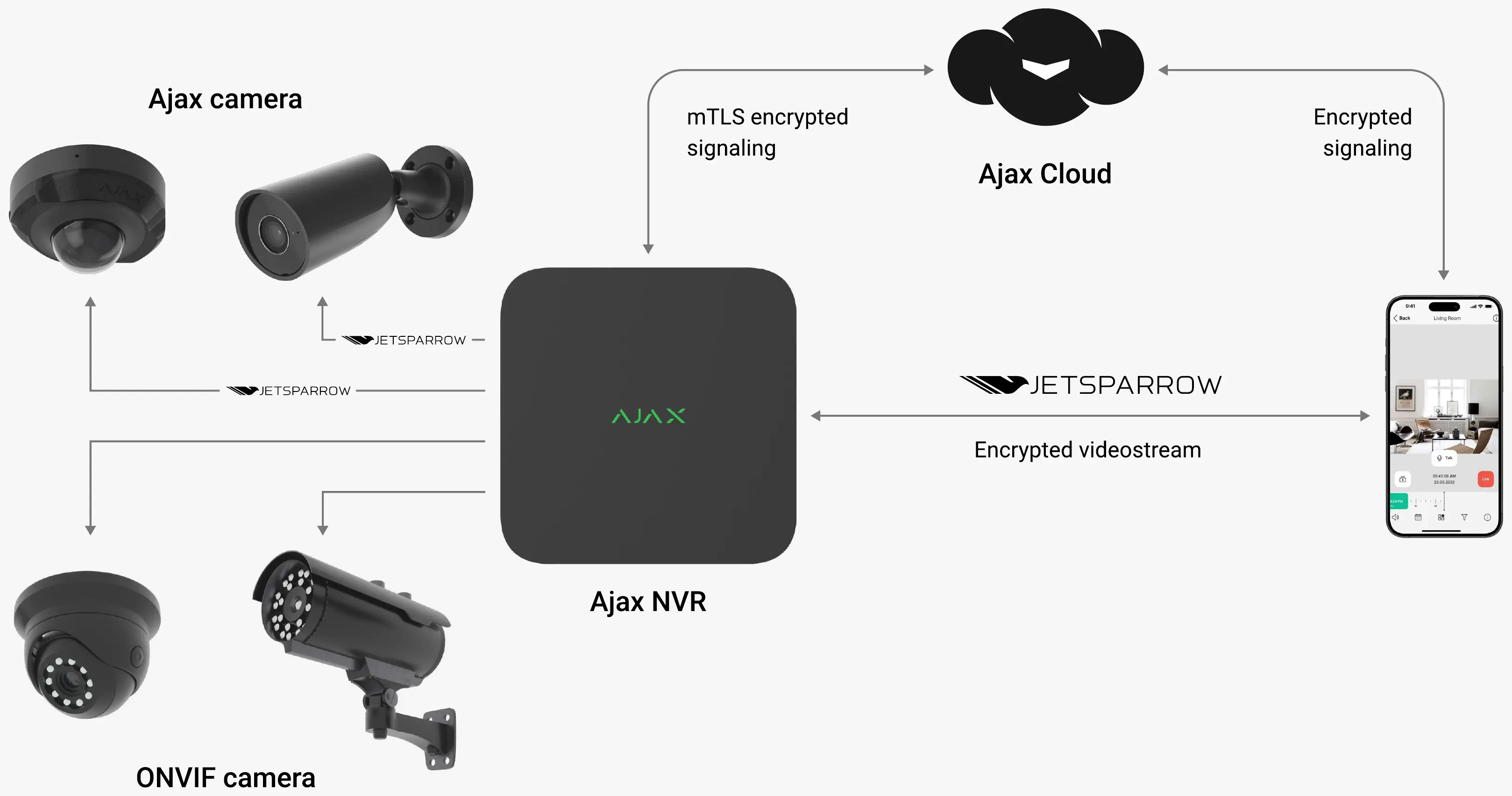
The Ajax NVR is a network video recorder designed to integrate third-party IP cameras into the Ajax system. It utilizes proprietary JetSparrow technology for fast peer-to-peer video transmission and connects to the Ajax Cloud for system events. The device supports up to 16 channels in 4K resolution and is managed entirely through Ajax apps.
How it works
The NVR acts as a bridge, allowing third-party IP cameras to operate within the Ajax video management software (VMS). It ensures encrypted video streams and signaling, providing a seamless user experience that includes smooth archive navigation, instant live view, and synchronization with security modes.
Installation and setup
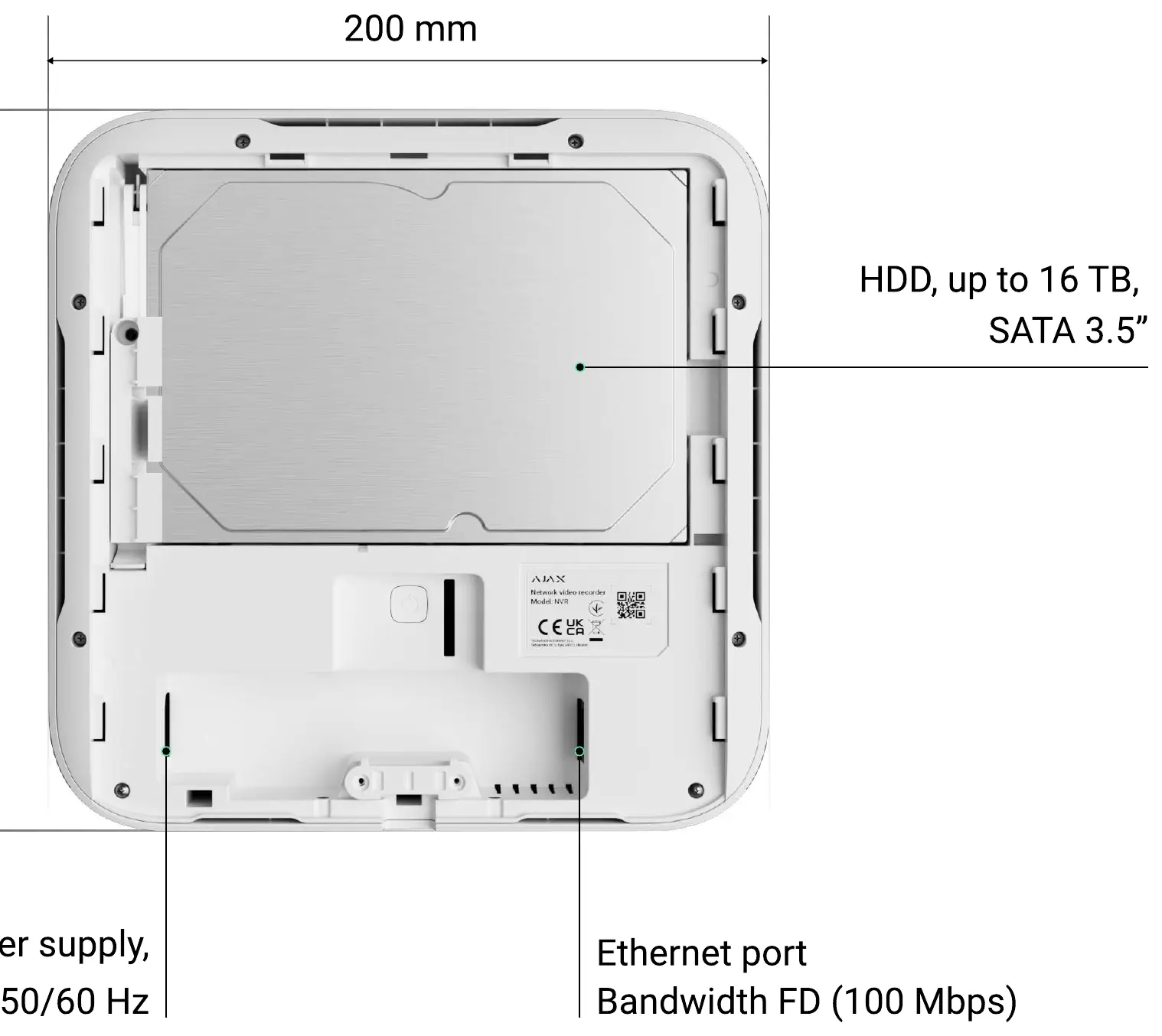
- Mounting: Use the included SmartBracket for fast and secure installation.
- Connection: Connect the device to your network via the Ethernet port.
- Configuration: Use the Ajax app to configure the NVR. Connection is established via QR code.
- Storage: The device supports a 3.5-inch SATA HDD with a capacity of up to 16 TB.
Security and privacy
The system is designed with high security standards, including:
- Video stream with TLS encryption.
- mTLS handshake between Ajax Cloud and NVR.
- Account security using passcodes, biometrics, and two-factor authentication.
- Tamper notification that alerts you if the device is dismantled.
- NDAA compliance.
Technical specifications
- Resolution: Up to 4K (25/30 fps).
- Decoding formats: H.265/H.264.
- Ethernet: 100 Mbps bandwidth.
- Power supply: Built-in, 110–240 V~, 50/60 Hz.
- Operating temperature: 0°C to +40°C.
- Protection class: IP20.
Compatibility
The NVR is compatible with all Ajax hubs. You can connect up to 14 NVRs in a single Ajax system. It supports third-party IP cameras that are ONVIF compliant.
Practical help
Common problems
Camera not connecting
Ensure the IP camera is ONVIF compliant and configured correctly via the Ajax app.
Tamper alarm triggered
Check if the device is properly mounted on the SmartBracket; the tamper button detects if the device is removed from the surface.
Before use
- Ensure you have an Ajax hub installed.
- Verify that your IP cameras are ONVIF compliant.
- Prepare a 3.5-inch SATA HDD (up to 16 TB) for installation.
- Download the Ajax app on your smartphone for configuration.
- Ensure a stable Ethernet connection is available.
Specs in practice
- NDAA Compliant
- Meets specific security standards for government and enterprise use.
- Bandwidth FD
- Full Duplex Ethernet connection speed (100 Mbps).
Images and diagrams
- The wiring diagram illustrates the NVR connecting to the Ajax Cloud via mTLS encrypted signaling and to cameras via JetSparrow technology.
- The rear panel diagram shows the location of the Ethernet port, power supply input, and the tamper button.
Model compatibility
- Compatible with all Ajax hubs.
- Supports up to 14 NVRs in one Ajax system.
- Supports third-party IP cameras via ONVIF.

Manual page author
Emily Carter
User documentation editor
Prepares concise manual descriptions and highlights the most useful setup, operation, and maintenance information for readers.