Electronics / Video Transmission
User Manual for Alfatron ALF-TPUK610 18G HDMI Extender
Comprehensive user guide for the Alfatron ALF-TPUK610 18G HDMI Extender. Learn about installation, DIP switch EDID settings, ARC mode configuration, and system connection diagrams.
Quick answers from the manual
Quick answer
- The Alfatron ALF-TPUK610 is an 18G HDMI 2.0 Extender that transmits 4K video up to 40m and 1080P up to 70m over a single CAT6 cable. It supports ARC, bidirectional IR/RS232, and PoC. p. 4
Key actions
- Configure EDID settings p. 7, 8
- Enable ARC mode p. 6, 9
First start
- Connect the HDMI source to the Transmitter and the display to the Receiver. Link the units with a CAT6 cable and connect the power adapter to either unit. p. 11
Problems and fixes
Audio Breakout port has no output
Check if ARC mode is ON. If ARC mode is ON, the Audio Breakout port has no audio output.
p. 6, 10Maintenance and reset
- Firmware can be upgraded via the Micro-USB port on the transmitter or receiver. p. 5, 6
Technical specifications
| Parameter | Value | Meaning | Pages |
|---|---|---|---|
| Bandwidth | 18Gbps | Maximum data transfer rate. | p. 15 |
| Transmission Distance | 4K@60Hz: 40m, 1080P: 70m | Maximum cable length for signal transmission. | p. 15 |
Where to find it in the PDF
- Transmitter Panel p. 5
- Receiver Panel p. 6
- DIP Switch Operation p. 7
Table of contents
Manual images
Click an image to enlargeQuick Guide from the Manual
The Alfatron ALF-TPUK610 is an 18G HDMI 2.0 Extender designed to transmit 4K video up to 131 feet (40 meters) and 1080P video up to 230 feet (70 meters) over a single CAT6 cable. It supports audio de-embedding, ARC, bidirectional IR, RS232 pass-through, and Power over Cable (PoC), meaning only one power adapter is required for the system.
Safety Precautions
- Do not dismantle the housing or modify the module to avoid electrical shock or burn.
- Install the device in a place with adequate ventilation.
- Do not expose the unit to liquid, moisture, or install near water.
- Always unplug the power before cleaning. Do not use liquid or aerosol cleaners.
- Refer all servicing to qualified service personnel.
Packing List
- 1x TPUK610 Transmitter and 1x TPUK610 Receiver
- Mounting ears and plastic cushions for both units
- 1x 3-pin Terminal Block and 1x RS232 Cable
- 1x Power Adapter (24V DC 1.25A)
Transmitter and Receiver Overview
Transmitter: Features include a Power LED, Test Pattern button, 1080P to 4K up-scaling button, 4-pin DIP switch for EDID/HDCP management, Micro-USB for firmware, HDMI input, ARC Audio Out, IR ports, RS232, HDBT Out, and DC 24V power input.
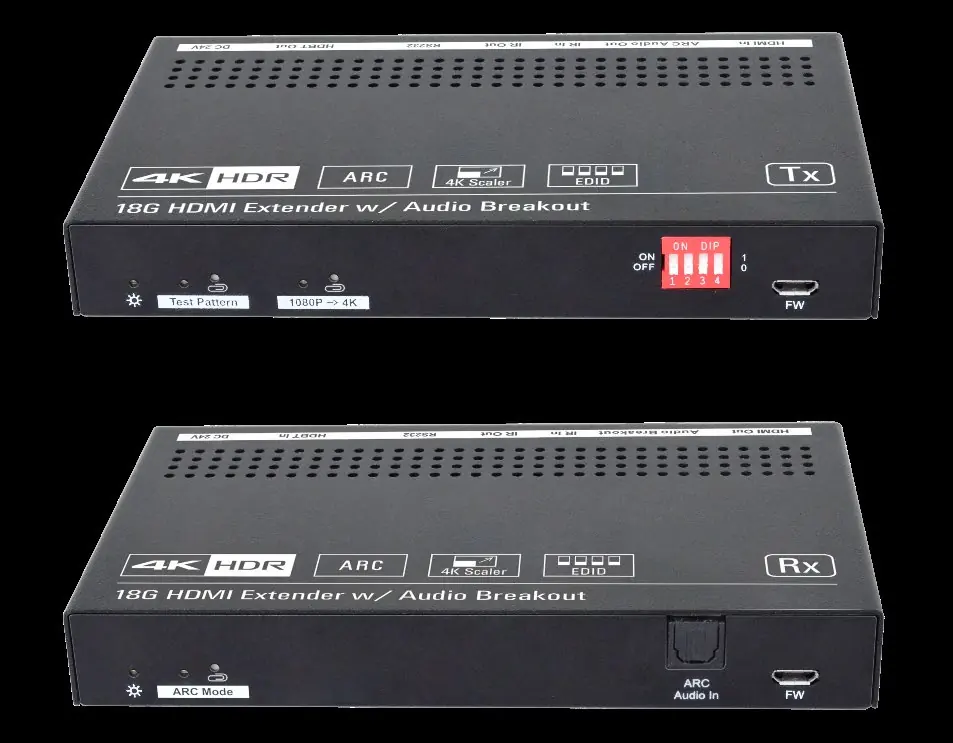
Receiver: Features include a Power LED, ARC Mode button, ARC Audio In, Micro-USB for firmware, HDMI output, Audio Breakout port, IR ports, RS232, HDBT In, and DC 24V power input.
DIP Switch and EDID Management
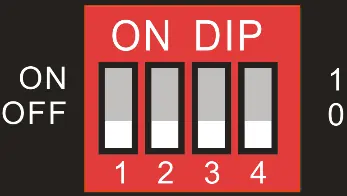
The 4-pin DIP switch on the transmitter allows for EDID and HDCP mode selection. Switches 1-3 control EDID settings (e.g., Pass-Through, 1080p 2CH, 4K/60Hz HDR Multi-CH, User Defined). Switch 4 toggles HDCP mode (ON for Active, OFF for Passive). Refer to the manual's table for specific switch combinations.
ARC Mode Configuration
The ARC mode is controlled via the button on the receiver's front panel. When ARC mode is ON, TV audio is transmitted back to the receiver via HDMI or audio cable and output through the transmitter's ARC Audio Out port. Note that when ARC mode is ON, the Audio Breakout port on the receiver is disabled.

System Connection
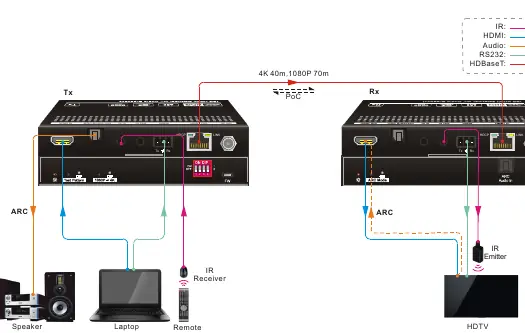
Connect the HDMI source to the Transmitter and the display to the Receiver. Link the two units using a high-quality CAT6 cable. The PoC feature allows you to power the entire system by connecting the power adapter to either the transmitter or the receiver.
Technical Specifications
- Bandwidth: 18Gbps
- HDMI Standard: 2.0
- Transmission Distance: 4K@60Hz up to 40m, 1080P up to 70m
- Power Supply: 24V DC 1.25A
- Operating Temperature: -5 to +55°C
Manufacturer information
Alfatron Electronics
Practical help
Common problems
No audio output from Audio Breakout port
Ensure ARC mode is OFF. If ARC mode is ON, the Audio Breakout port is disabled.
Video resolution issues
Adjust the DIP switches on the transmitter to select the appropriate EDID setting for your display.
No HDBaseT link
Ensure a high-quality CAT6 cable is used and check that the LINK LED is illuminated orange.
Before use
- Verify you have both the Transmitter and Receiver units.
- Use a high-quality CAT6 cable for the HDBaseT connection.
- Ensure the power adapter is connected to either the TX or RX unit (PoC).
- Check DIP switch settings on the transmitter for your specific display requirements.
- Ensure HDMI cables are fully compliant with HDMI 2.0.
Specs in practice
- PoC (Power over Cable)
- Allows the transmitter and receiver to be powered from each other; only one power adapter is needed.
- ARC (Audio Return Channel)
- Allows audio from the TV to be sent back to the transmitter for output via the ARC Audio Out port.
Images and diagrams
- Transmitter Panel: Shows HDMI In, ARC Audio Out, IR, RS232, HDBT Out, and DIP switches.
- Receiver Panel: Shows HDMI Out, Audio Breakout, IR, RS232, and HDBT In.
- System Connection: Illustrates the link between TX and RX via CAT6 and peripheral connections.
Model compatibility
- Requires CAT6 cable for optimal performance.
- Supports HDMI 2.0 and HDCP 2.2.
- Supports 4K@60Hz 4:4:4 HDR.

Manual page author
Emily Carter
User documentation editor
Prepares concise manual descriptions and highlights the most useful setup, operation, and maintenance information for readers.