Electronics / Video Transmission
User Manual for VigilLink VLWP-UHU-TR Wall Plate Transmitter
Quick guide for the VigilLink VLWP-UHU-TR 18G 2x1 HDMI/USB-C Wall Plate. Learn about installation, connection, auto-switching modes, and technical specifications.
Quick answers from the manual
Quick answer
- The VLWP-UHU-TR is a 2x1 HDMI/USB-C wall plate transmitter that extends AV signals via HDBaseT up to 70m (1080p) or 40m (4K). It is powered via PoE from the receiver. p. 3
Key actions
- Switching input sources p. 6, 7
- Connecting HDBaseT cable p. 6, 7
Problems and fixes
Input signal selection issues
Check if the device is in manual or automatic mode. In automatic mode, HDMI is preferred if both are connected.
p. 7Technical specifications
| Parameter | Value | Meaning | Pages |
|---|---|---|---|
| Video Resolution | Up to 4K@60Hz 4:4:4 | Maximum supported resolution and color space. | p. 4 |
| Transmission Distance | 70m (1080p) / 40m (4K) | Maximum cable length over Cat6/6a/7. | p. 4 |
Where to find it in the PDF
- Transmitter Controls p. 6
- Receiver Controls p. 7
- Application Example p. 9
Table of contents
Manual images
Click an image to enlargeQuick guide from the manual
The VigilLink VLWP-UHU-TR is a 2x1 HDMI/USB-C wall plate transmitter designed for HDBaseT extension. It supports 4K@60Hz 4:4:4 video, 18Gbps bandwidth, and features automatic or manual input switching. The unit is powered via PoE (Power over Ethernet) from the receiver, simplifying installation.
Product Overview
This device is a US one-gang wall plate transmitter. It features:
- Inputs: 1x HDMI, 1x USB-C.
- Output: 1x HDBaseT (RJ45).
- Control: USB-B port for KVM functionality.
- Power: PoE (powered by the receiver).
- Compatibility: Supports HDMI 2.0b, HDCP 2.2, and DisplayPort 1.2a.
Specifications
Key technical parameters include:
- Video Resolution: Up to 4K@60Hz 4:4:4.
- Transmission Distance: Up to 230ft (70m) for 1080p or 131ft (40m) for 4K over Cat6/6a/7 cable.
- Audio Formats: Supports Dolby Atmos, TrueHD, DTS:X, and PCM 2-8Ch.
- Operating Temperature: 32 - 104°F (0 - 40°C).
Operation Controls
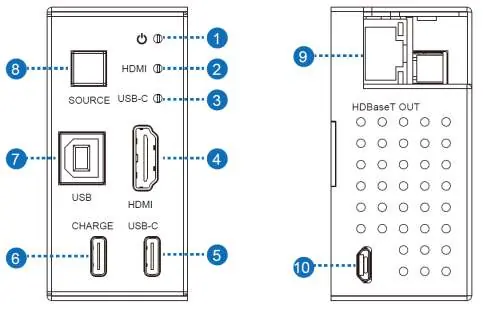
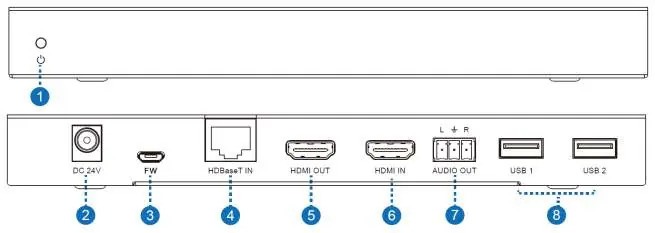
The transmitter features a SOURCE button to toggle between HDMI and USB-C inputs. In automatic mode, the device selects the last connected source; if both are connected, HDMI is preferred. The receiver panel includes the DC power input, HDBaseT input, HDMI output, and audio/USB ports.
Application Example
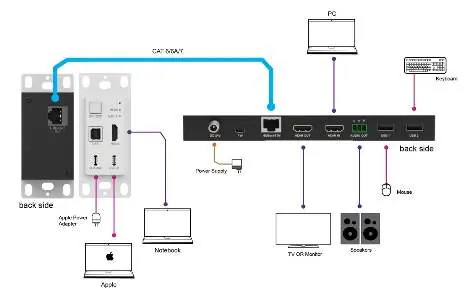
The system is typically installed with the wall plate transmitter connected to a source (PC/Notebook) and the receiver connected to a display (TV/Monitor) and peripherals (Keyboard/Mouse) via HDBaseT cabling. Ensure a high-quality Cat6/6a/7 cable is used for the HDBaseT link.
Practical help
Common problems
No video signal
Check the Cat6/6a/7 cable connection between the transmitter and receiver. Ensure the source device is active and the correct input is selected.
Switching not working as expected
Verify if the device is in manual or automatic mode. In manual mode, press the SOURCE button to toggle inputs.
Device not powering on
Ensure the receiver is connected to the DC 24V power supply, as the transmitter is powered via PoE from the receiver.
Before use
- Use a high-quality Cat6, Cat6a, or Cat7 cable for the HDBaseT connection.
- Ensure the receiver is connected to a power source.
- Verify that the source device (PC/Notebook) supports the required video output.
- Install the wall plate in a standard US one-gang Decora-style opening.
Specs in practice
- HDBaseT Distance
- Maximum cable length is 70m for 1080p and 40m for 4K resolution.
- Video Bandwidth
- 18Gbps, supporting high-quality 4K@60Hz 4:4:4 signals.
Images and diagrams
- Transmitter panel: Shows input ports (HDMI, USB-C), status LEDs, and the SOURCE button.
- Receiver panel: Shows power input, HDBaseT input, HDMI output, and USB/Audio ports.
- Application diagram: Illustrates the connection path from source to display via the HDBaseT link.
Model compatibility
- Compatible with HDMI 2.0b and HDCP 2.2 sources.
- USB-C port supports charging for connected devices.
- Requires Cat6/6a/7 cabling for optimal performance.

Manual page author
David Miller
Documentation analyst
Organizes user manual content into clear summaries, with attention to model details, product context, and everyday usability.