Electronics / Video Transmission
User Manual for BZBGEAR BG-18HBT-B100 HDMI Extender
Quick guide for the BZBGEAR BG-18HBT-B100 HDMI 18Gbps Over HDBaseT 2.0 extender. Includes installation diagrams, connection instructions, technical specifications, and ARC setup.
Quick answers from the manual
Quick answer
- The BG-18HBT-B100 is an HDMI 18Gbps extender over HDBaseT 2.0, supporting 4K@60Hz, ARC, and two-way power over a single Cat5e/6/7 cable. p. 3
Key actions
- Enable ARC function p. 5, 6
- Power the system p. 5, 6
Problems and fixes
LAN port usage
Do not connect the LAN RJ45 port to any HDBaseT port to avoid damage.
p. 6, 7Technical specifications
| Parameter | Value | Meaning | Pages |
|---|---|---|---|
| Max Resolution | 4K2K@60Hz (4:4:4) | Maximum video quality supported | p. 3, 4 |
| Transmission Distance | 330ft / 100m | Max cable length | p. 3, 4 |
Where to find it in the PDF
- Introduction and Features p. 3
- Specifications p. 4
- Operation Controls p. 5, 6, 7
- Connection Diagram p. 8
Table of contents
Manual images
Click an image to enlargeQuick guide from the manual
The BZBGEAR BG-18HBT-B100 is an HDBaseT 2.0 extender designed to transmit 4K@60Hz video, audio, IR, RS-232, and Ethernet over a single Cat5e/6/7 cable up to 100 meters (330ft). It features two-way power (PoC), allowing you to power either the transmitter or receiver unit to power the entire system.
Package Contents
- 1 x HDMI Extender Transmitter
- 1 x HDMI Extender Receiver
- 2 x Wideband IR TX
- 2 x Wideband IR RX
- 1 x 24V1A DC Power Supply
- 4 x Mounting ears
- 1 x User Manual
Operation Controls and Functions
Both units feature status LEDs and an ARC button. The ARC function allows audio from a compatible display to be routed back to the transmitter. When ARC is enabled (LED ON), the transmitter's optical out port outputs the display's audio signal.
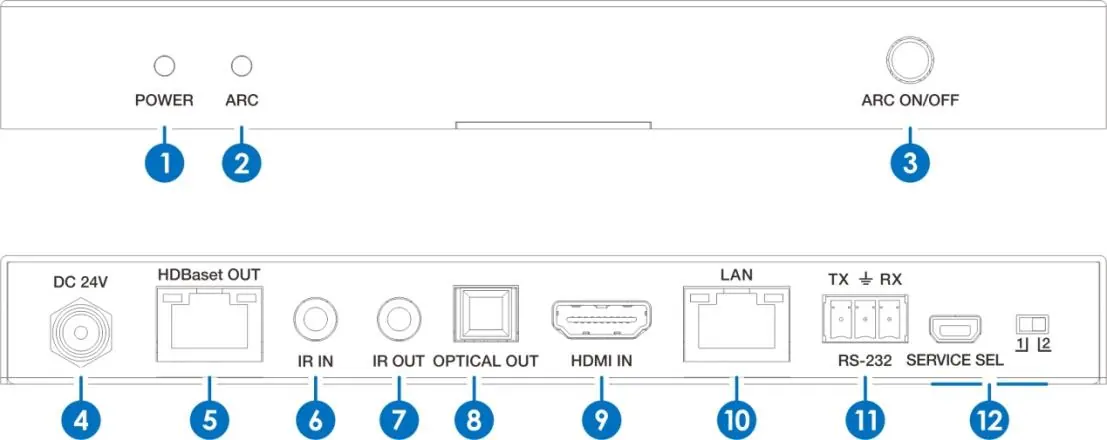
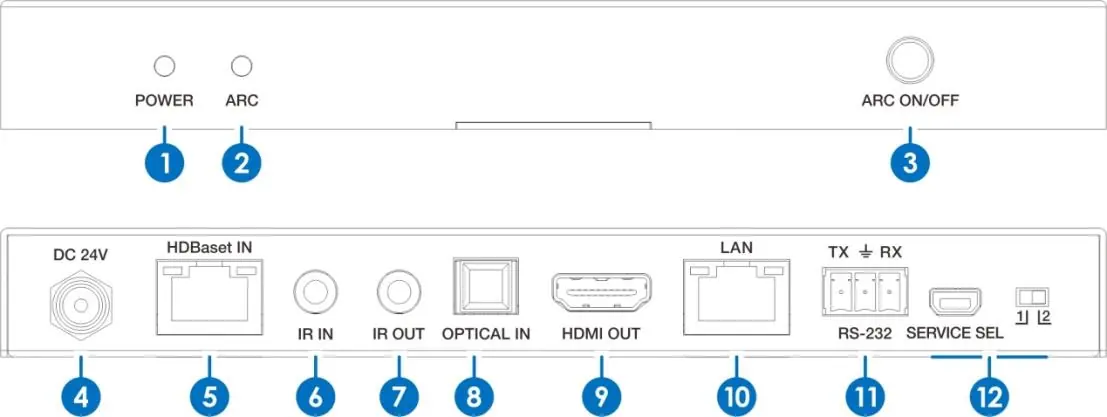
Important Note: Do not connect the LAN RJ45 port to any HDBaseT port, as this may damage the device.
Connection Diagram
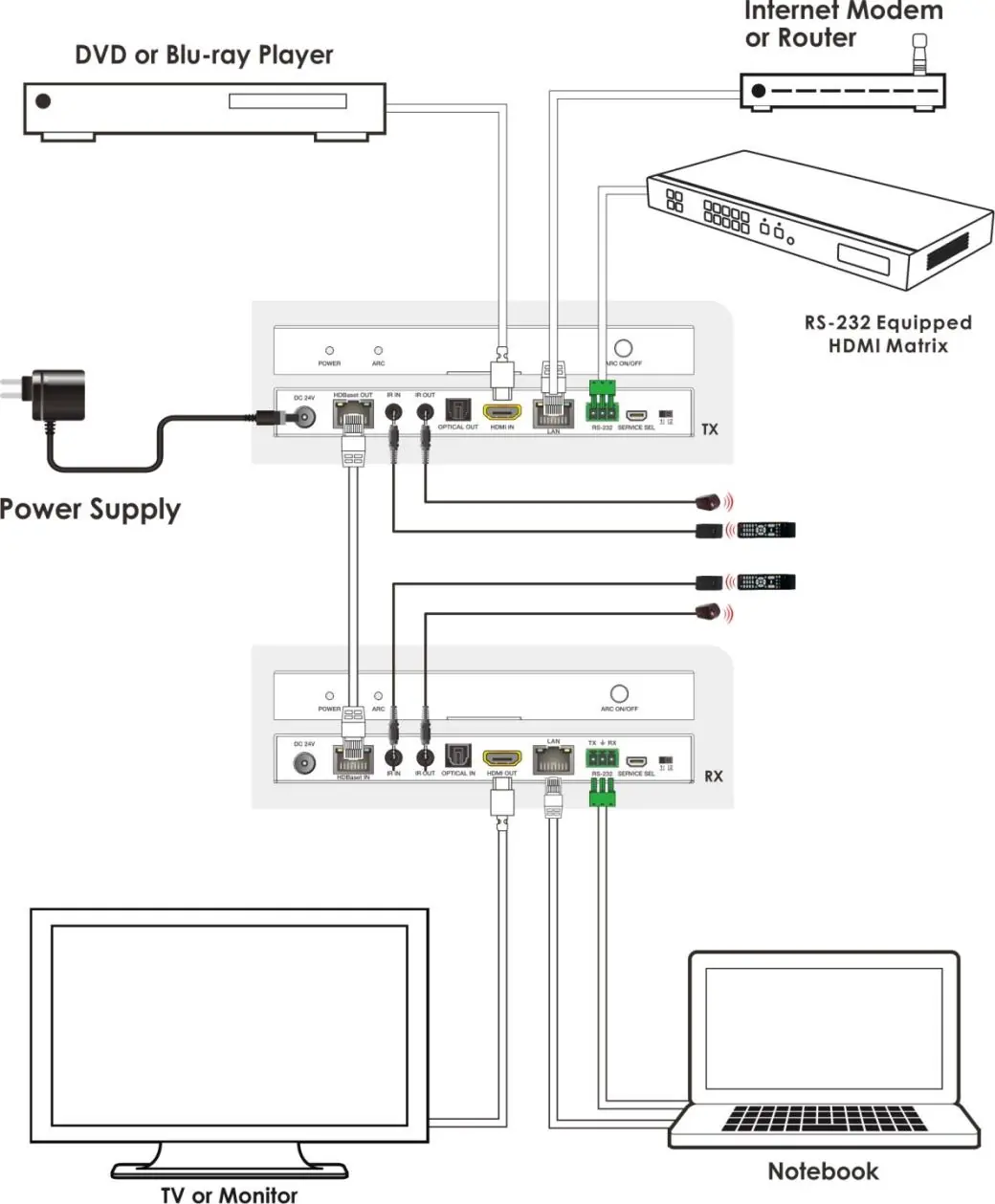
To set up the system, connect your HDMI source to the Transmitter's HDMI IN. Connect the Transmitter and Receiver using a Cat5e/6/7 cable via the HDBaseT ports. Connect your display to the Receiver's HDMI OUT. IR cables should be connected to the respective IR IN/OUT ports for remote control extension.
Technical Specifications
- HDMI Compliance: HDMI 2.0b, HDCP 2.2/1.4
- Video Bandwidth: 18 Gbps
- Max Resolution: 4K2K@60Hz (4:4:4)
- Power Supply: DC 24V/1A
- Power Consumption: 11W (Max)
- Operating Temperature: 32 - 104°F (0 - 40°C)
Warranty Information
The product includes a one-year limited warranty. You can obtain a free second-year warranty coverage by registering your product within 90 days of purchase at BZBGear.com/warranty.
Official resources from the manual
Practical help
Common problems
ARC function not working
Ensure your HDTV supports ARC and that the ARC function is enabled on the transmitter (ARC LED must be ON).
No signal transmission
Verify the Cat5e/6/7 cable connection between the HDBaseT ports. Ensure the cable is not connected to the LAN port.
Device damage
Never connect the LAN RJ45 port to any HDBaseT port.
Before use
- Verify all items in the package are present.
- Use a surge protection device to protect sensitive electrical components.
- Ensure you have a high-quality Cat5e/6/7 cable for the HDBaseT connection.
- Confirm the power supply (24V/1A) is available.
Specs in practice
- ARC (Audio Return Channel)
- Allows audio from the connected display to be sent back to the transmitter's optical output.
- Two-Way Power
- Allows the system to be powered by connecting the 24V adapter to either the transmitter or the receiver.
Images and diagrams
- Connect HDMI source to Transmitter HDMI IN.
- Connect display to Receiver HDMI OUT.
- Connect Transmitter and Receiver via HDBaseT ports using Cat5e/6/7 cable.
- Connect IR cables to IR IN/OUT ports as needed.
Model compatibility
- Supports resolutions up to 4K2K@60Hz (4:4:4).
- Compatible with LPCM 7.1, Dolby TrueHD, and DTS-HD Master Audio.
- Requires Cat5e/6/7 cable for distances up to 100m.

Manual page author
Michael Turner
Technical manual editor
Reviews PDF manuals for structure, safety notes, and practical product details so readers can find the right information quickly.