Electronics / Video Transmission
User Manual for Vigillink VLWP-UHC-TR Wall Plate Transmitter
Quick guide for the Vigillink VLWP-UHC-TR 18Gbps CAT 50M USB-C/HDMI Wall Plate Transmitter. Includes installation, connection diagrams, specifications, and operation instructions.
Quick answers from the manual
Quick answer
- The Vigillink VLWP-UHC-TR is a 2x1 switcher and CAT transmitter that allows you to extend HDMI and USB-C signals up to 50m over a single CAT cable. It supports 4K@60Hz resolution and uses PoC to power the transmitter from the receiver. p. 1, 3
Key actions
- Switching input sources p. 6, 7
- Connecting the system p. 6, 7, 8
First start
- Connect the DC 12V power supply to the Receiver unit. The Receiver will automatically power the Transmitter via the CAT cable. p. 7
Technical specifications
| Parameter | Value | Meaning | Pages |
|---|---|---|---|
| Max Transmission Distance | 50m (164ft) at 4K@24 / 35m (115ft) at 4K@60 | Maximum cable length for reliable signal transmission. | p. 4 |
Where to find it in the PDF
- Transmitter Panel p. 6
- Receiver Panel p. 7
- Application Example p. 8
Table of contents
Manual images
Click an image to enlargeQuick guide from the manual
The Vigillink VLWP-UHC-TR is a 2x1 switcher and CAT transmitter designed for HDMI and USB-C inputs. It supports video resolutions up to 4K@60Hz and extends transmission up to 50m (164ft) over a single CAT5e/6 cable. The system utilizes PoC (Power over Cable), meaning the receiver powers the transmitter, simplifying installation.
Product Overview
This device features a US one-gang enclosure suitable for Decora-style wall plate openings. It includes interchangeable black and white faceplates. The transmitter allows for automatic or manual input signal selection between HDMI and USB-C sources.
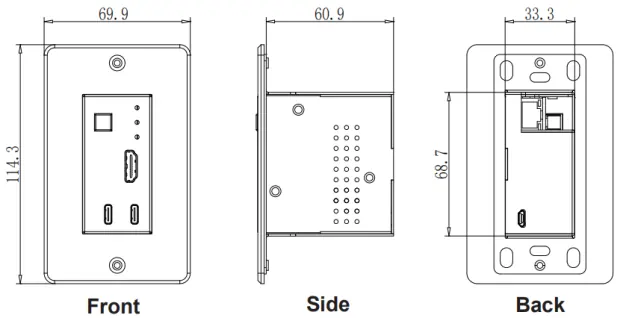
Specifications
- HDMI Compliance: HDMI 2.0b, HDCP 2.2
- Video Bandwidth: HDMI: 18 Gbps, USB-C: 5.4 Gbps
- Resolution: Up to 4K2K@50/60Hz 4:4:4
- Transmission Distance: Up to 50m (164ft) for 4K@24, 35m (115ft) for 4K@60
- Power Supply: PoC (Receiver to Transmitter)
- Operating Temperature: 32 - 104°F (0 - 40°C)
Operation Controls
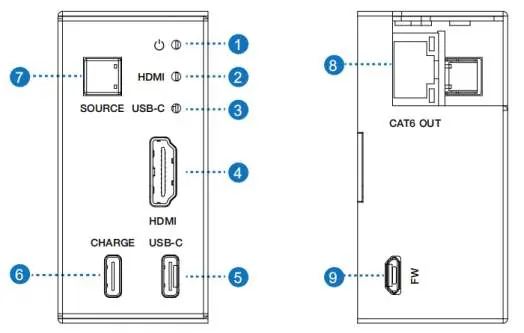
Transmitter Panel: Features a SOURCE button to toggle between HDMI and USB-C inputs. LED indicators show power status and active signal detection. It includes an HDMI input, a USB-C input/charging port, and a CAT6 output port.
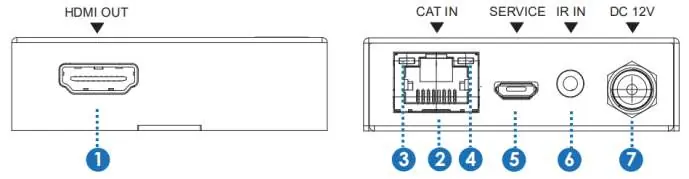
Receiver Panel: Includes an HDMI output for the display, a CAT input for the signal from the transmitter, an IR input for remote control, and a DC 12V power input. The receiver powers the transmitter via the CAT cable.
Application Example
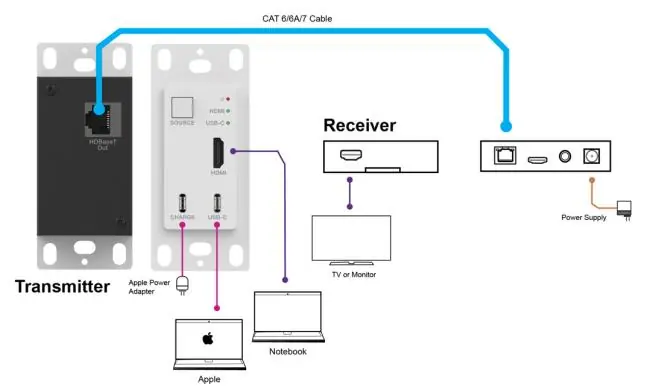
To set up the system, connect the HDMI or USB-C source to the Transmitter. Connect the Transmitter's CAT6 OUT port to the Receiver's CAT IN port using a high-quality CAT5e/6 cable. Connect the Receiver's HDMI OUT to your display device (TV or Projector). Connect the provided DC 12V power supply to the Receiver unit.
Practical help
Common problems
No image on display
Ensure the CAT cable is securely connected and within the 50m range. Verify the source device is active and the correct input is selected.
Transmitter not powering on
The transmitter is powered via PoC from the receiver. Ensure the receiver is connected to the DC 12V power supply and the CAT cable is properly linked.
Before use
- Ensure you have a high-quality CAT5e/6 cable for transmission.
- Verify the display device supports the resolution being sent.
- Check that the power supply is connected to the Receiver unit.
- Ensure the wall plate is installed in a standard US one-gang Decora-style opening.
Specs in practice
- PoC (Power over Cable)
- The receiver provides power to the transmitter through the CAT cable, eliminating the need for a separate power supply at the wall plate.
- 18Gbps Bandwidth
- Supports high-speed data transfer required for 4K@60Hz 4:4:4 video signals.
Images and diagrams
- The application diagram shows the Transmitter connected to a laptop/Apple device via USB-C/HDMI.
- A single CAT6 cable connects the Transmitter to the Receiver.
- The Receiver connects to the display via HDMI and to the power adapter.

Manual page author
Michael Turner
Technical manual editor
Reviews PDF manuals for structure, safety notes, and practical product details so readers can find the right information quickly.