Electronics / Video Transmission
User Manual for Alfatron ALF-IP2HE and ALF-IP2HD HDMI over IP Encoder and Decoder
Quick guide for the Alfatron ALF-IP2HE and ALF-IP2HD. Learn how to set up your HDMI over IP system, configure video walls, use the VDirector app, and troubleshoot common connection issues.
Table of contents
Manual images
Click an image to enlargeQuick guide from the manual
The Alfatron ALF-IP2HE (Encoder) and ALF-IP2HD (Decoder) are designed for networked AV distribution using H.265 compression. To set up your system, connect your devices to a network switch and use the VDirector app on an iPad to manage routing, video walls, and matrix configurations. Ensure your network switch supports broadcasting and that your DHCP settings do not conflict with the devices.
Overview
These units support resolutions up to 1080P@60Hz and offer plug-and-play functionality. They are suitable for sports bars, conference rooms, and digital signage applications. The system allows for fast and seamless switching between sources.
Panel Layout
Encoder: Features a Power LED, Status LED, Power Connector (DC 12V), Audio Out, HDMI In, RS232 port, LAN (PoE) port, Reset LED, and Reset Key.
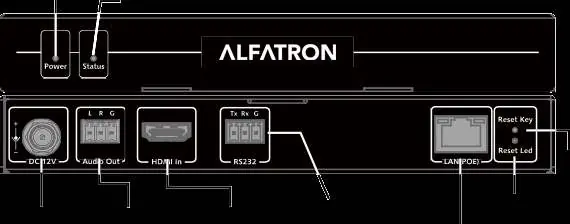
Decoder: Features a Power LED, Status LED, Info/Source (2s) key, Power Connector (DC 12V), Audio Out, HDMI Out, RS232 port, LAN (PoE) port, Reset LED, and Reset Key. The Info/Source key allows you to toggle on-screen information or change the paired encoder by holding it for 2 seconds.
Application and Setup
The system supports three main configurations:
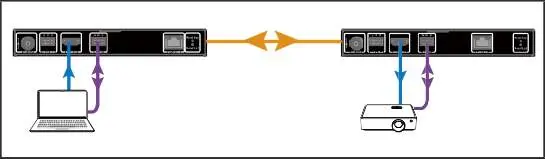
- 1-1 Extender: Direct connection between one encoder and one decoder.
- 1-n Splitter: One encoder distributing to multiple decoders via a network switch.
- m-n Matrix/Video Wall: Multiple encoders and decoders connected via a network switch, managed by the VDirector app.
VDirector App Configuration
To configure matrix and video wall setups:
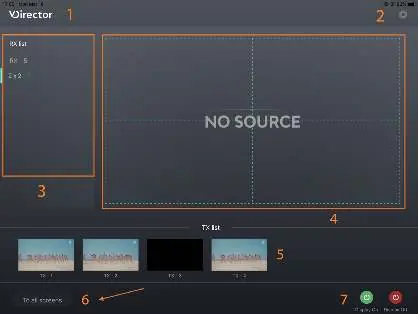
- Install the VDirector app from the Apple App Store on your iPad.
- Connect all encoders, decoders, and a wireless router to the network switch.
- Configure the wireless router and connect your iPad to the Wi-Fi network.
- Launch VDirector to search for online devices.
- Use the app interface to manage naming, sequencing, video wall settings, and source switching.
Troubleshooting
If the VDirector app cannot find devices, ensure the network switch's broadcasting function is enabled. If using DHCP, ensure IP assignments do not start with 169.254. RS232 and audio routing will always follow the video routing.
Specifications
The units support H.265 video compression and MPEG4-AAC/LPCM Stereo audio. Operating temperature is 0°C to +45°C. Power can be supplied via DC 12V 1A or PoE. Each unit weighs 0.60kg.
Safety Precautions
Do not expose the device to moisture or liquids. Ensure proper ventilation and do not install in confined spaces. Keep away from heat sources and naked flames. Use only specified accessories and refer servicing to qualified personnel.
Manufacturer information
Alfatron Electronics
Practical help
Common problems
VDirector app cannot find online devices
Ensure the network switch's broadcasting function is not disabled.
DHCP IP address conflict
Ensure the DHCP IP address assignments do not start with 169.254.
Need to change matched encoder without app
Hold the Info/Source (2s) key on the front panel of the decoder for 2 seconds.
Before use
- Verify all items in the package contents are present (Encoder/Decoder, Power Adapter, Plugs, Phoenix Connectors, Mounting Ears).
- Ensure the network switch supports broadcasting.
- Install the VDirector app on your iPad.
- Connect all encoders, decoders, and the wireless router to the network switch.
- Verify power supply (DC 12V 1A or PoE).
Specs in practice
- Video Resolution
- Supports up to 1080P@60Hz.
- Video Protocol
- Uses H.265 compression technology.
- Power Supply
- DC 12V 1A or PoE (Power over Ethernet).
- ESD Protection
- ±8kV air-gap discharge and ±4kV contact discharge.
Images and diagrams
- 1-1 Extender: Direct connection between one encoder and one decoder.
- 1-n Splitter: One encoder connected to multiple decoders via a network switch.
- m-n Matrix/Video Wall: Multiple encoders and decoders connected via a network switch, managed by the VDirector app.
Model compatibility
- One encoder can be assigned to a maximum of 50 decoders simultaneously.
- Latency increases as the number of assigned decoders increases.
- RS232 and audio routing follow video routing.

Manual page author
Emily Carter
User documentation editor
Prepares concise manual descriptions and highlights the most useful setup, operation, and maintenance information for readers.