Furniture / Bathroom Furniture
Installation and User Manual for allen + roth 22-in Brookview Mirror
Quick guide for installing and maintaining your allen + roth 22-in Brookview mirror. Includes step-by-step mounting instructions for vertical or horizontal orientation, care tips, and parts list.
Quick answers from the manual
Quick answer
- This manual provides installation and maintenance instructions for the allen + roth 22-in Brookview mirror, supporting both vertical and horizontal mounting. p. 1, 4, 5, 6
Key actions
- Mounting the mirror p. 5, 6
First start
- Installation preparation p. 3, 5
Problems and fixes
Missing parts
Call customer service at 866-439-9800.
p. 1, 3, 7Maintenance and reset
- Cleaning and touch-up p. 7
Where to find it in the PDF
- Installation p. 5, 6
Table of contents
Manual images
Click an image to enlargeQuick guide from the manual
This manual provides instructions for the installation and maintenance of the allen + roth 22-in Brookview mirror. The estimated installation time is approximately 10 minutes. Before beginning, ensure you have all parts and the necessary tools: a Phillips screwdriver, utility knife or scissors, a measuring tape, and a level.
Package contents
The package includes the following items:
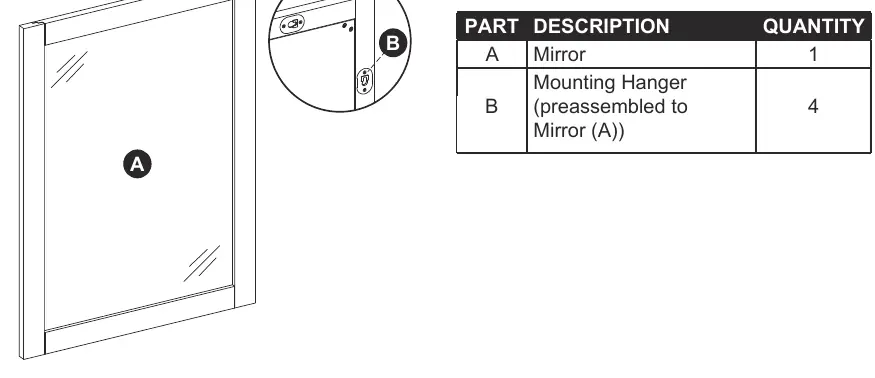
- Mirror (A): 1 unit
- Mounting Hanger (B): 4 units (pre-assembled to the mirror)
- Anchor (AA): 2 units
- Screw (BB): 2 units
- Touch Up Pen (CC): 1 unit
Installation instructions
Before installing, decide whether you want to mount the mirror vertically or horizontally. Follow these steps:
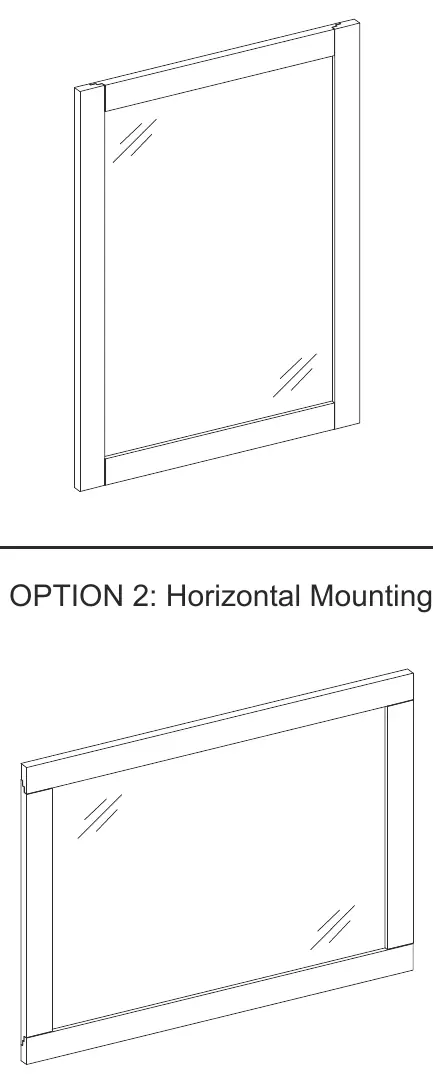
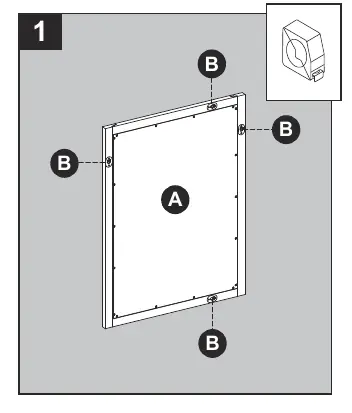
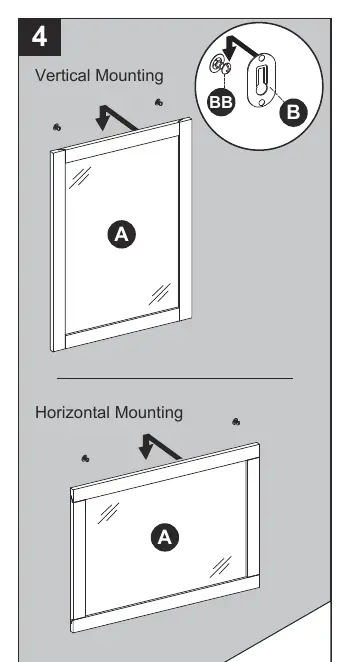
- Measure: Measure the distance between the holes in the mounting hangers (B) on the back of the mirror (A). Ensure you allow height clearance along the bottom of the mirror for your faucet if necessary.
- Mark: Measure and mark the location for the mounting hardware on the wall using the measurement from the previous step. Ensure the marks are level and at the desired height.
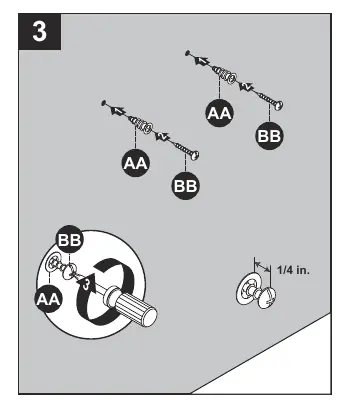
- Install Hardware: If the wall is drywall, screw the anchors (AA) flush into the wall. Insert the screws (BB) into the anchors, leaving approximately 1/4 inch protruding from the wall. If the wall is not drywall, use appropriate mounting hardware for your specific wall type.
- Hang Mirror: With the assistance of another adult, lift the mirror (A) to the wall and hang the mounting hangers (B) on the screws (BB).
Care and maintenance
- Dust the frame regularly with a soft, non-lint producing cloth or household dusting product.
- Clean the mirror frame with a gentle, non-abrasive household cleaner. Dry the wood immediately with a soft cloth or towel.
- Clean the glass using standard household glass cleaning agents.
- Use the included touch-up pen (CC) for scratches or worn areas. Stroke in the direction of the scratch or wood grain and rub off excess colorant promptly with a soft cloth.
Warranty
The manufacturer warrants this item against defects in materials and workmanship for a period of one year from the date of original retail purchase. This warranty applies only to the original purchaser and does not cover damage caused by accident, misuse, modification, or improper installation.
Practical help
Common problems
Missing or damaged parts
Do not attempt to assemble the product. Contact customer service at 866-439-9800.
Wall is not drywall
The provided anchors are for drywall. If mounting on a different surface, use appropriate mounting hardware (not included) for your installation site.
Before use
- Verify all parts are present against the package contents list.
- Ensure you have a Phillips screwdriver, utility knife or scissors, measuring tape, and level.
- Decide on vertical or horizontal mounting orientation.
- Check the wall surface type to determine if provided anchors are suitable.
Specs in practice
- Estimated Installation Time
- Approximately 10 minutes.
- Touch-up Pen (CC)
- Used for repairing scratches or worn areas on the frame; apply in the direction of the wood grain.
Images and diagrams
- The mirror comes with pre-installed mounting hangers on the back.
- Installation requires measuring the distance between the hanger holes to accurately mark the wall.
Model compatibility
- Designed for wall mounting.
- Requires different hardware if mounting on surfaces other than drywall.

Manual page author
Emily Carter
User documentation editor
Prepares concise manual descriptions and highlights the most useful setup, operation, and maintenance information for readers.