Computers / Cooling Systems
Installation Guide for Alphacool GPX-N 1070pro-M07 GPU Cooler
A comprehensive installation guide for the Alphacool GPX-N 1070pro-M07 GPU cooler. Includes step-by-step instructions for disassembly, thermal material application, mounting, and maintenance.
Table of contents
Manual images
Click an image to enlargeImportant Information
This guide provides instructions for installing the Alphacool GPX-N 1070pro-M07 GPU cooler. Please read all safety warnings before beginning. Ensure the cooling system is leak-tested before installation. The maximum water pressure in the cooling loop must not exceed 0.8 bar. Do not operate the cooler without coolant, as this can cause overheating and damage to the hardware.
Preparation
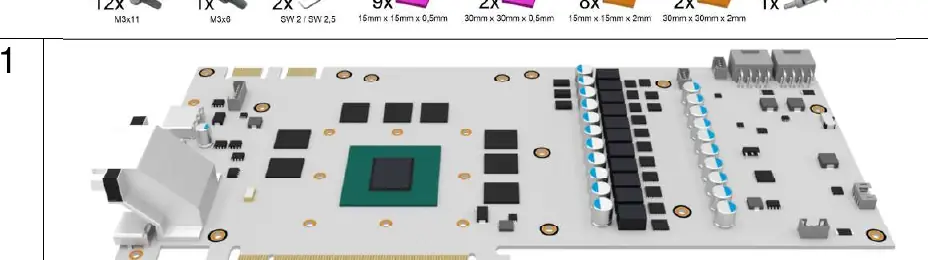
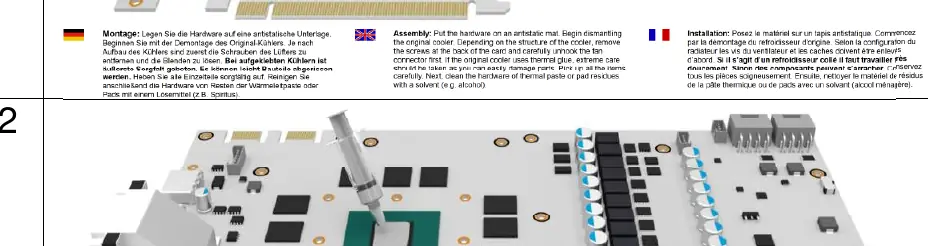
Before starting, place your hardware on an antistatic mat. You will need to dismantle the original cooler carefully. If the original cooler uses thermal glue, exercise extreme caution to avoid damaging components. Clean all hardware surfaces of old thermal paste or pad residues using a solvent such as alcohol.
Installation Steps
- Dismantling: Remove the original cooler, including fan screws and shrouds. Clean the GPU and memory surfaces thoroughly.
- Thermal Paste Application: Apply a thin, even layer of thermal paste to the GPU using a plastic strip or spreader. The layer should be less than 1mm thick to avoid contaminating surrounding components.
- Thermal Pad Placement: Apply the provided thermal pads to the memory modules and voltage converters. Ensure you remove the protective film from both sides of the pads. Some pads (30mm x 30mm) may need to be trimmed to size.
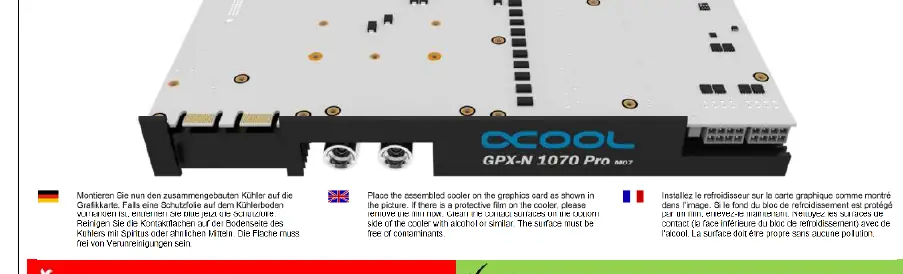
- Mounting the Cooler: Place the assembled cooler onto the graphics card. Ensure any protective film on the cooler base is removed. Clean the contact surfaces with alcohol.
- Securing the Cooler: Install the screws with washers as shown in the diagrams. Keep the screws slightly loose initially.
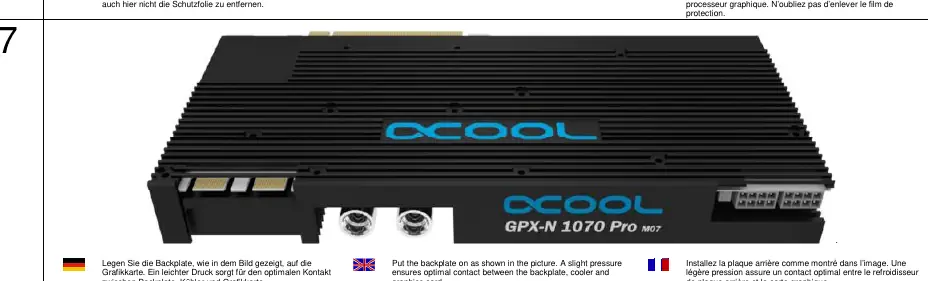
- Backplate Installation: Place the backplate on the graphics card. Apply slight pressure to ensure optimal contact between the backplate, cooler, and graphics card.
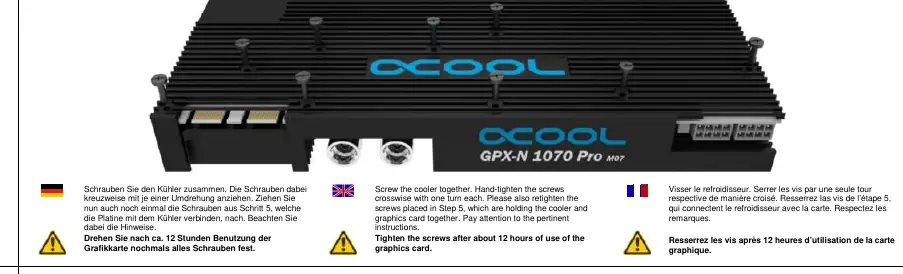
- Final Tightening: Tighten the screws crosswise with one turn each. Retighten the screws from step 5 that hold the PCB to the cooler.
Maintenance
After approximately 12 hours of use, retighten all screws to ensure the cooler remains securely mounted and maintains optimal contact.
Safety Warnings
- Do not use tools like wrenches or pliers to tighten connectors; hand-tightening is sufficient.
- Over-tightening screws can cause the knurled nuts to loosen or damage the cooler's pressure distribution.
- Ensure the pump is functioning immediately upon switching on the hardware.
- Not suitable for children under 6 years due to small parts.
Practical help
Common problems
Cooler not making proper contact
Ensure thermal paste is spread evenly and thermal pads are of the correct thickness and placed correctly.
Leaking coolant
Check that all connectors are hand-tightened only. Do not exceed 0.8 bar water pressure.
Damaged components during disassembly
If the original cooler uses thermal glue, use extreme care when removing it to avoid tearing off components.
Before use
- Prepare an antistatic mat.
- Ensure you have a solvent (e.g., alcohol) for cleaning.
- Verify all thermal pad sizes (15x15x0.5mm, 30x30x0.5mm, 15x15x2mm, 30x30x2mm).
- Check that the pump is functional.
- Perform a leak test before final installation.
Specs in practice
- Max Water Pressure
- 0.8 bar. Exceeding this may cause leaks.
- Thermal Pad Thickness
- 0.5mm and 2mm pads are included; ensure the correct thickness is used for the specific component.
Images and diagrams
- Steps 1-3: Disassembly and application of thermal materials.
- Steps 4-7: Mounting the cooler, backplate, and initial screw placement.
- Steps 8-9: Final tightening sequence and readiness.
Model compatibility
- Designed specifically for the GPX-N 1070pro-M07 model. Verify GPU compatibility before installation.

Manual page author
Emily Carter
User documentation editor
Prepares concise manual descriptions and highlights the most useful setup, operation, and maintenance information for readers.