Computers / Cooling Systems
Gamemax Ice Force CPU Cooler Installation Guide
Installation guide for the Gamemax Ice Force CPU Cooler. Includes step-by-step instructions for mounting on Intel (115X/1700/1366) and AMD (AM5/AM4) sockets, thermal paste application, and cable connection.
Table of contents
Manual images
Click an image to enlargeQuick guide from the manual
This document provides installation instructions for the Gamemax Ice Force CPU Cooler. It covers mounting procedures for Intel and AMD platforms. Before beginning, ensure your motherboard socket is compatible (Intel 115X/1700/1366 or AMD AM5/AM4) and that you have all necessary components.
Intel Installation
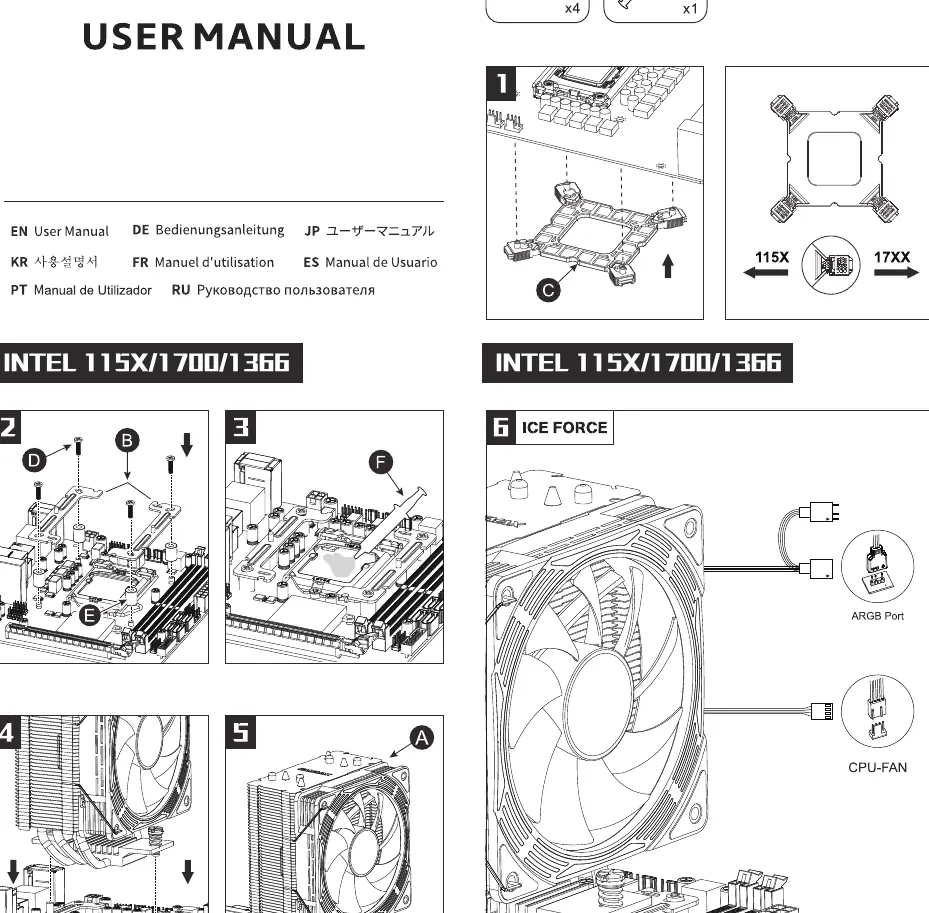
- Prepare the backplate (C) and align it with the motherboard mounting holes.
- Install the mounting brackets (B) using the provided screws (D) and spacers (E).
- Apply a small amount of thermal paste (F) to the center of the CPU heat spreader.
- Place the cooler (A) onto the mounting brackets and secure it firmly.
AMD Installation
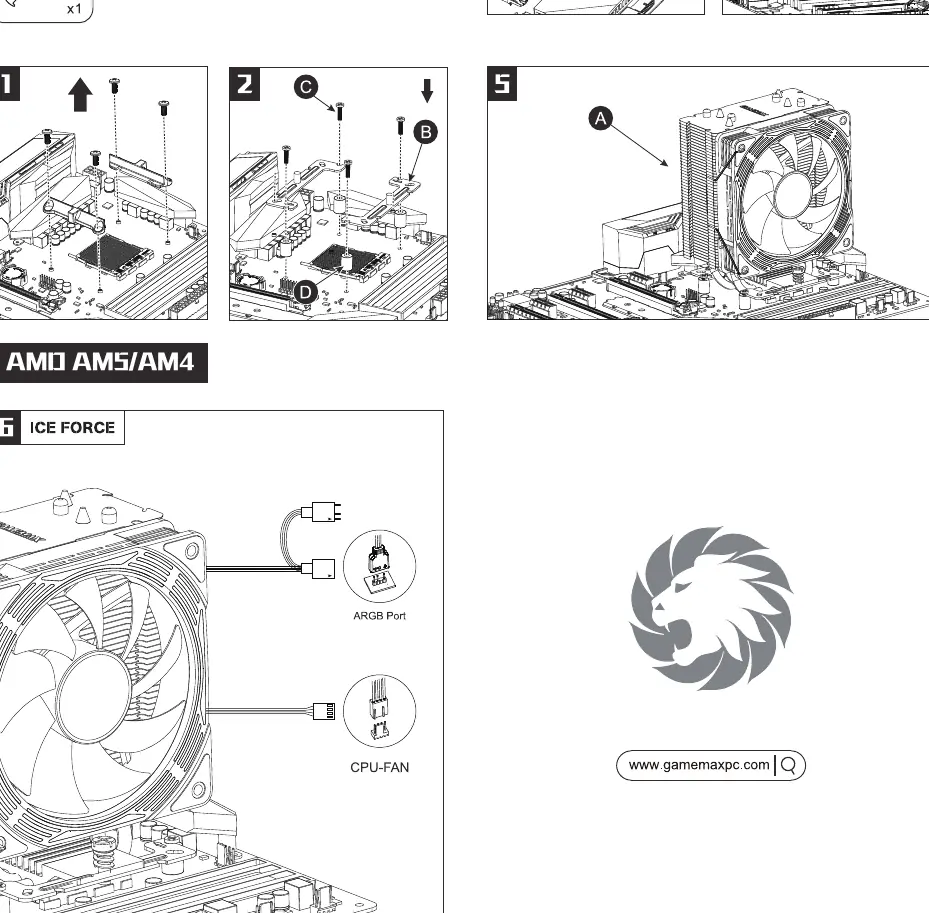
- Remove any existing stock mounting hardware if necessary.
- Install the mounting brackets (B) using the provided screws (C) and spacers (D).
- Apply a small amount of thermal paste (E) to the center of the CPU heat spreader.
- Place the cooler (A) onto the mounting brackets and secure it firmly.
Cable Connections
Proper connection is required for fan operation and lighting control:
- CPU-FAN: Connect the 4-pin fan cable to the motherboard CPU_FAN header.
- ARGB Port: Connect the ARGB cable to the motherboard's 5V ARGB header to control lighting effects.
Practical help
Common problems
Cooler not fitting
Ensure you are using the correct mounting brackets for your specific socket (Intel vs AMD) as shown in the respective installation sections.
Fan not spinning or lighting not working
Verify that the CPU-FAN cable is connected to the CPU_FAN header and the ARGB cable is connected to the motherboard ARGB header.
Before use
- Verify CPU socket compatibility (Intel 115X/1700/1366 or AMD AM5/AM4).
- Ensure all parts (A-F) are present.
- Clean the CPU surface of old thermal paste.
- Have thermal paste ready (included).
Images and diagrams
- Step 1 (Intel): Aligning the backplate with the motherboard.
- Step 6 (Intel/AMD): Connecting the ARGB and CPU-FAN cables.
Model compatibility
- Supports Intel: 115X, 1700, 1366.
- Supports AMD: AM5, AM4.

Manual page author
Michael Turner
Technical manual editor
Reviews PDF manuals for structure, safety notes, and practical product details so readers can find the right information quickly.