Computers / Cooling Systems
User Manual for Alphacool Core 10x 4-Pin PWM Splitter
Quick guide for the Alphacool Core 10x 4-Pin PWM Splitter. Includes installation steps, wiring instructions, and technical specifications for connecting up to 10 fans.
Table of contents
Manual images
Click an image to enlargeQuick guide from the manual
This document provides installation and connection instructions for the Alphacool Core 10x 4-Pin PWM Splitter. Before starting, ensure the computer is powered off and disconnected from the wall socket. The power switch on the computer does not cut off power to the system; you must unplug the power cord.
Accessories
- 1x Mainboard Cable
- 1x Velcro fastener
Mounting
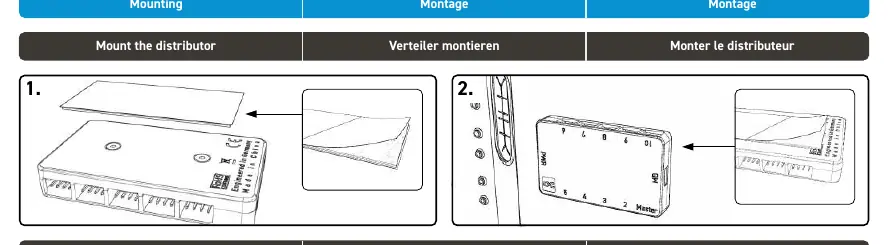
- Remove the upper protective film of the adhesive tape and stick it under the Controller.
- Remove the second protective film of the adhesive tape and stick the Controller to the computer case. The Controller can be detached again through the Velcro layer.
Connecting the cables
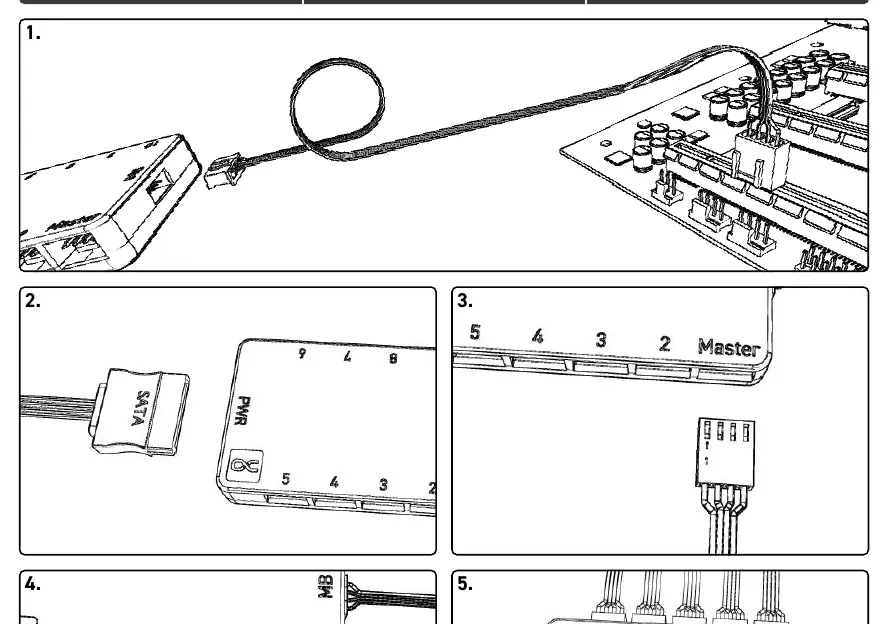
- Plug the mainboard cable into the socket (MB) on the controller and a free fan connector on the mainboard.
- Connect the SATA power plug from your power supply unit to the socket (PWR) on the controller.
- Connect the first fan to the socket labeled Master. The speed is read from this fan.
- Connect the remaining fans to sockets 2-10. The speed of these fans is controlled by the master fan.
Technical Specifications
- Maximum capacity: 10 fans.
- Total power consumption limit: 54W (4.5A).
Practical help
Common problems
Fan speed not reading
Ensure the fan is connected to the 'Master' port. Only the fan connected to this port reports speed to the motherboard.
Controller not powering on
Check that the SATA power cable is securely connected to your power supply unit.
Before use
- Ensure the computer is turned off and unplugged from the wall.
- Verify you have the mainboard cable and velcro fastener.
- Identify a free fan header on your motherboard.
- Check that the total power consumption of all connected fans does not exceed 54W.
Images and diagrams
- The controller features 10 ports: one 'Master' port for speed monitoring and nine ports (2-10) for additional fans.
- The 'MB' port connects to the motherboard for signal, and the 'PWR' port connects to SATA power.
Model compatibility
- Supports up to 10 PWM fans.

Manual page author
David Miller
Documentation analyst
Organizes user manual content into clear summaries, with attention to model details, product context, and everyday usability.