Power / Batteries & Chargers
User Manual for Anker PowerLab 10W Wireless Charger 10411PL
Quick guide for the Anker PowerLab 10W Wireless Charger (10411PL). Learn how to set up your charger, understand LED status indicators, and follow placement guidelines for optimal wireless charging performance.
Table of contents
Manual images
Click an image to enlargeQuick guide from the manual
To set up your Anker PowerLab 10W Wireless Charger, follow these steps:
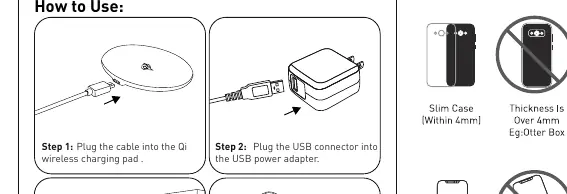
- Plug the provided cable into the Qi wireless charging pad.
- Connect the USB connector of the cable into your USB power adapter.
- Plug the AC power adapter into a wall power socket.
- Place your Qi-compatible device on top of the pad to begin wireless charging.
LED Status Indicators
The LED light on the pad provides status updates regarding the charging process:
- Blue LED light ON: Wireless charging is active.
- Blue LED off: Device is fully charged.
- Blue LED Flicker: Low voltage detected.
- Red LED always ON: Abnormal working condition.
- Red LED Flicker: Foreign body detected on the pad.
Placement Guidelines
For optimal charging performance, please adhere to the following placement rules:
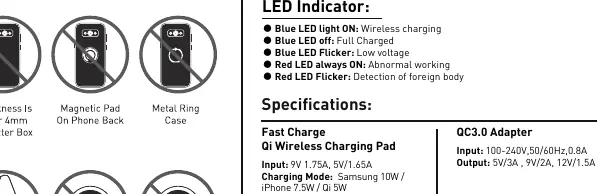
- Ensure your phone case is slim (within 4mm thickness).
- Do not use cases thicker than 4mm.
- Do not place magnetic pads or metal rings on the back of the phone.
- Place the device centrally on the charging pad.
- Do not place metal or foreign objects on the pad.
Specifications
Qi Wireless Charging Pad:
- Input: 9V 1.75A, 5V 1.65A
- Charging Modes: Samsung 10W / iPhone 7.5W / Qi 5W
- Dimensions: 90mm diameter, 7mm thickness
- Weight: 70g ±3g
QC3.0 Adapter Requirements:
- Input: 100-240V, 50/60Hz, 0.8A
- Output: 5V/3A, 9V/2A, 12V/1.5A
Safety and Maintenance
- Use a standard QC 2.0 or QC 3.0 AC adapter for power input; using an un-normal adapter may cause the pad to work improperly.
- We strongly recommend using a branded AC adapter.
- Do not attempt to disassemble the product to avoid short-circuit or damage.
- Keep the product in a dry and ventilated environment; avoid high humidity and high temperature.
- Do not use organic solvents to clean the product surface.
Manufacturer information
Anker
Practical help
Common problems
Red LED always ON
Indicates an abnormal working condition. Ensure the adapter is compatible and the environment is not too hot.
Red LED Flicker
Foreign body detected. Remove any metal objects or magnetic pads from the back of the phone.
Blue LED Flicker
Low voltage input. Ensure you are using a QC 2.0 or QC 3.0 adapter.
Charging pad works improperly
Ensure you are using a branded QC 2.0 or QC 3.0 AC adapter.
Before use
- Verify your phone case is within 4mm thickness.
- Remove any magnetic pads or metal rings from the phone back.
- Use a branded QC 2.0 or QC 3.0 AC adapter.
- Ensure the charging environment is dry and ventilated.
- Place the device centrally on the pad.
Specs in practice
- Charging Modes
- Supports Samsung 10W, iPhone 7.5W, and standard Qi 5W.
Images and diagrams
- The usage diagram illustrates the 4-step connection process from the pad to the power source.
- The placement diagram highlights correct centering and warns against using thick cases or metal objects.
Model compatibility
- Requires QC 2.0/3.0 adapter for fast charging.
- Not compatible with cases thicker than 4mm.
- Do not place metal objects on the pad.

Manual page author
David Miller
Documentation analyst
Organizes user manual content into clear summaries, with attention to model details, product context, and everyday usability.