Electronics / Gaming Peripherals
User Manual for ANKO Remote Control Dino
Quick guide for the ANKO Remote Control Dino. Learn how to install batteries, pair the remote, operate the dinosaur, and use the mist spray function.
Quick answers from the manual
Quick answer
- To pair the remote, turn on the dinosaur first, then press the ON/OFF button on the transmitter. If pairing multiple dinosaurs, do so one by one. p. 1
Key actions
- Install batteries p. 1
- Use mist spray p. 1
First start
- Install batteries in both the dinosaur and the remote control, then follow the pairing procedure. p. 1
Problems and fixes
Pairing issues
Turn off both the dinosaur and transmitter, then restart the pairing process.
p. 1Technical specifications
| Parameter | Value | Meaning | Pages |
|---|---|---|---|
| Battery (Dinosaur) | 3 x AAA | Power source for the dinosaur | p. 1 |
| Battery (Remote) | 2 x AAA | Power source for the remote control | p. 1 |
Where to find it in the PDF
- Instruction Sheet p. 1
Table of contents
Manual images
Click an image to enlargeQuick guide from the manual
This guide provides essential instructions for operating your ANKO Remote Control Dino. Ensure you have the required batteries and water for the mist function before starting. The toy is designed for children aged 3 years and older and requires adult supervision.
Battery installation
The toy requires batteries for both the dinosaur and the remote control. Batteries are not included.
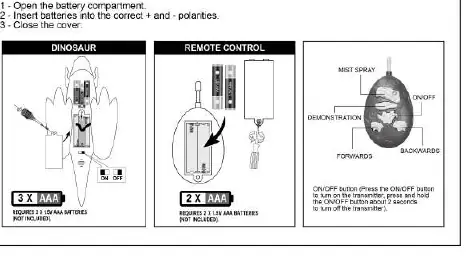
- Dinosaur: Open the battery compartment and insert 3 x AAA batteries, ensuring correct polarity (+ and -). Close the cover.
- Remote Control: Open the battery compartment and insert 2 x AAA batteries, ensuring correct polarity (+ and -). Close the cover.
Pairing and operation
Follow these steps to connect the remote to the dinosaur:
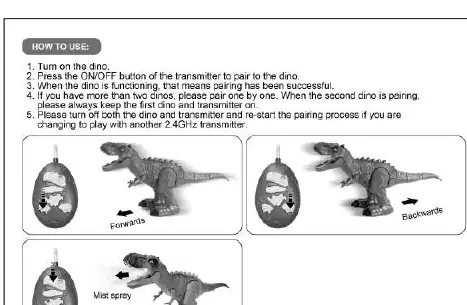
- Turn on the dinosaur.
- Press the ON/OFF button on the transmitter (remote) to pair with the dinosaur.
- Successful pairing is indicated when the dinosaur is functioning.
- If using multiple dinosaurs, pair them one by one. Always keep the first dinosaur and transmitter on while pairing the second.
- To change to another 2.4GHz transmitter, turn off both the dinosaur and the transmitter, then restart the pairing process.
Mist spray function
The dinosaur features a mist spray function:
- Open the lid on the dinosaur's head.
- Fill the reservoir with water using the included dropper.
- Close the lid.
- Press the mist spray button on the remote to activate the mist.
Safety information
- Choking Hazard: Contains small parts. Not suitable for children under 3 years.
- Adult Supervision: Required at all times.
- Battery Safety: Do not mix different types of batteries or new and used batteries. Non-rechargeable batteries are not to be recharged. Remove batteries from the toy when not in use for an extended period.
- Epilepsy Warning: This toy produces flashes that may trigger epilepsy in sensitized individuals.
Manufacturer information
Anko
Practical help
Common problems
Dinosaur does not respond to the remote
Ensure batteries are fresh and correctly installed. Turn off both the dinosaur and the transmitter, then restart the pairing process.
Pairing multiple dinosaurs
Pair them one by one. Keep the first dinosaur and transmitter turned on while pairing the second.
Before use
- 3 x AAA batteries for the dinosaur
- 2 x AAA batteries for the remote control
- Water for the mist spray function
- Included dropper for filling the water reservoir
- Screwdriver (for battery compartments)
Images and diagrams
- Battery installation: Shows the location of battery compartments on both the dinosaur and the remote.
- Mist spray: Illustrates opening the lid and using the dropper to fill the water tank.
- Remote controls: Identifies buttons for Forward, Backward, Mist Spray, and ON/OFF.
Model compatibility
- Requires 2.4GHz compatible transmitter.
- Not suitable for children under 3 years due to small parts.

Manual page author
Emily Carter
User documentation editor
Prepares concise manual descriptions and highlights the most useful setup, operation, and maintenance information for readers.