Computers / Keyboards Input
User Manual for Anko 2.4GHz Wireless Mouse & Keyboard Combo 43249053
Quick guide for the Anko 2.4GHz Wireless Mouse & Keyboard Combo (43249053). Learn how to install batteries, connect the USB receiver, and pair the keyboard.
Table of contents
Quick guide from the manual
This manual provides instructions for setting up and operating the Anko 2.4GHz Wireless Mouse & Keyboard Combo. The primary setup involves installing batteries and connecting the USB receiver to your computer. If the keyboard fails to connect, a manual pairing procedure is available.
Product overview
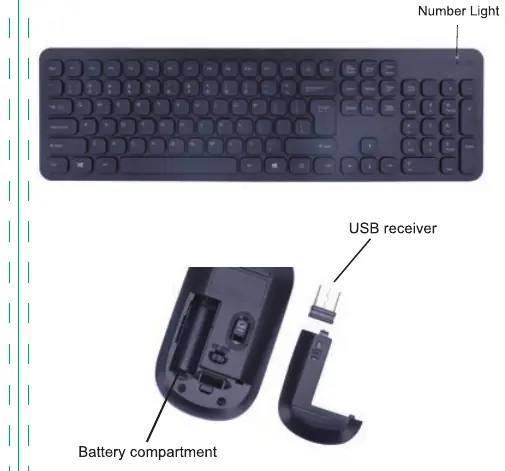
The set includes a wireless keyboard and a wireless mouse. The keyboard features a number light indicator. The mouse contains a battery compartment and a storage slot for the USB receiver.
Setup and installation
Follow these steps to prepare the device for use:
- Keyboard: Remove the battery compartment cover and insert 1x 1.5V AAA battery. Ensure correct polarity.
- Mouse: Remove the battery compartment cover and insert 1x 1.5V AA battery. Ensure correct polarity.
- Connection: Remove the USB receiver from the mouse compartment and plug it into a free USB port on your computer. Ensure the mouse switch is set to 'on'.
- Operation: The mouse and keyboard should connect automatically.
Keyboard connection
If the keyboard does not match the receiver automatically, perform the following steps:
- Ensure the keyboard has batteries installed.
- Plug the USB receiver into the computer.
- Keep the keyboard within 30cm of the receiver.
- Press the ESC and K keys simultaneously until the number light in the top right corner flashes.
- Complete the connection within 15 seconds.
Battery safety
Use only top-quality batteries. If batteries leak, remove them with a cloth and dispose of them properly. Do not mix old and new batteries. If the device is not to be used for an extended period, remove the batteries. Expired batteries must be disposed of in an environmentally friendly way.
Safety instructions
- For indoor use only.
- Keep the appliance away from hot surfaces and naked flames.
- Always place the appliance on a level, stable, clean, and dry surface.
- Protect the appliance from extreme heat, cold, dust, direct sunlight, humidity, and drops or jets of water.
- Do not open the housing or introduce objects into the interior.
Manufacturer information
Anko
Practical help
Common problems
Keyboard does not connect to the receiver.
Ensure batteries are installed. Press the 'ESC' and 'K' keys simultaneously within 30cm of the receiver until the number light flashes.
Before use
- Install 1x 1.5V AAA battery in the keyboard.
- Install 1x 1.5V AA battery in the mouse.
- Check battery polarity.
- Remove the USB receiver from the mouse compartment.
- Plug the USB receiver into a USB port on the computer.
- Ensure the mouse power switch is set to 'on'.
Specs in practice
- Wireless technology
- 2.4GHz wireless connection.
- Working distance
- Up to 10 meters without obstructions.
Images and diagrams
- The keyboard includes a number light indicator in the top right corner.
- The mouse features a battery compartment and a dedicated storage slot for the USB receiver.
Model compatibility
- Compatible with Windows operating systems.

Manual page author
Michael Turner
Technical manual editor
Reviews PDF manuals for structure, safety notes, and practical product details so readers can find the right information quickly.