Lighting / Fixtures
Artika Atomic LED Flush Mount Light 15FM-ATO5C-BW
Installation guide for the Artika Atomic LED Flush Mount Light (15FM-ATO5C-BW). Includes step-by-step wiring instructions, mounting procedures, and color temperature settings.
Table of contents
Manual images
Click an image to enlargeQuick guide from the manual
This document provides installation and setup instructions for the Artika Atomic LED Flush Mount Light. Before beginning, ensure the main electrical supply is turned off at the circuit breaker. This product is intended for indoor, residential use only. If you are using a dimmer switch, it must be compatible with LED lighting.
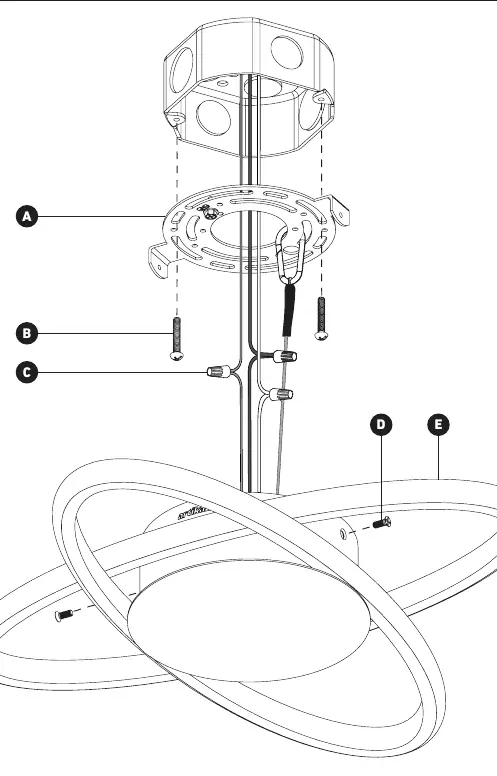
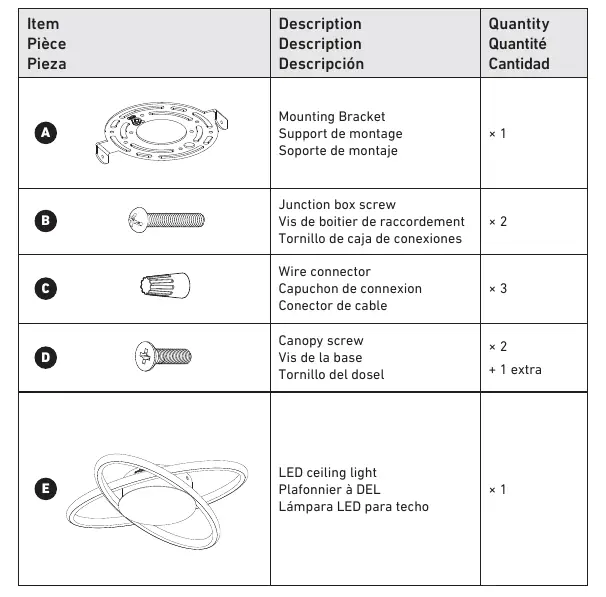
Included hardware
- A: Mounting Bracket (x1)
- B: Junction box screw (x2)
- C: Wire connector (x3)
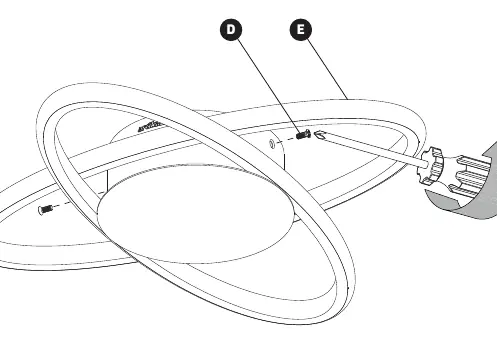
- D: Canopy screw (x2 + 1 extra)
- E: LED ceiling light (x1)
Required tools: Screwdriver.
Mounting bracket installation
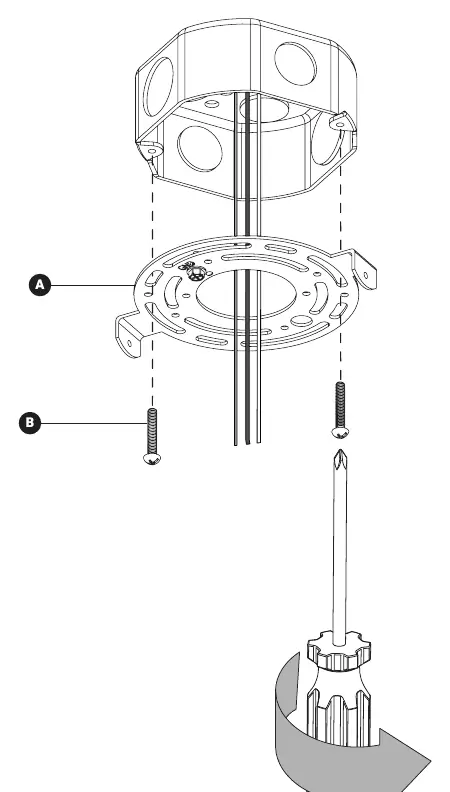
- Ensure the power is off at the circuit breaker.
- Attach the mounting bracket (A) to the junction box using the junction box screws (B).
Wires connection
Connect the wires from the ceiling to the fixture wires using the wire connectors (C):
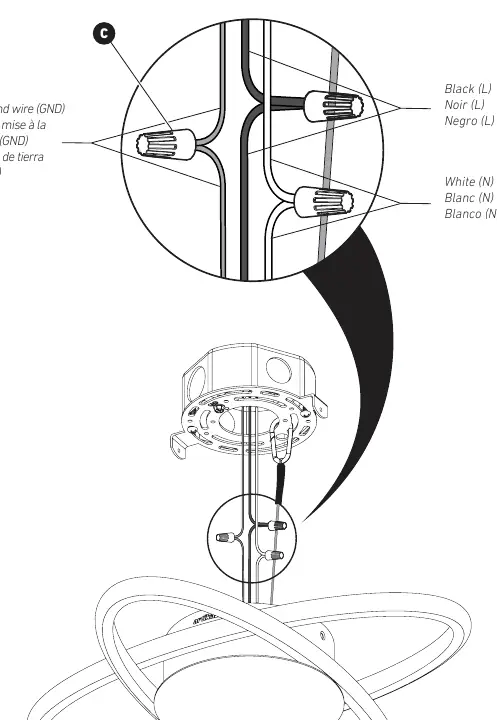
- Black (L): Connect the black wire from the ceiling to the black wire from the fixture.
- White (N): Connect the white wire from the ceiling to the white wire from the fixture.
- Ground (GND): Connect the ground wire from the ceiling to the ground wire from the fixture.
Final installation
Once the wiring is secure, align the fixture (E) with the mounting bracket and secure it using the canopy screws (D).
Selectable white technology
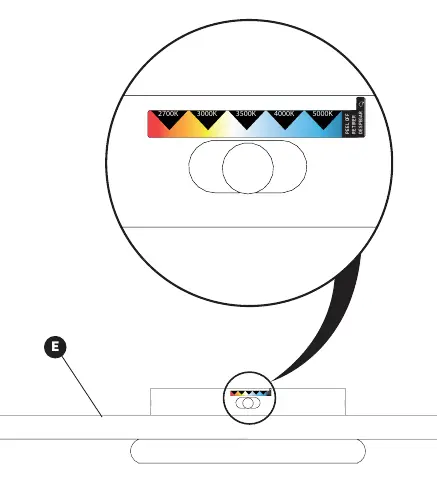
The fixture features selectable white technology. You can adjust the color temperature by accessing the switch on the fixture. The available settings range from 2700K (warm) to 5000K (cool).
Safety and maintenance
This product should be installed by a certified electrician in accordance with local building and electrical codes. Do not use abrasive cleaners, alcohol, or organic solvents to clean the fixture, as this may damage the surface.
Manufacturer information
Artika
Practical help
Common problems
Light does not turn on
Check that the circuit breaker is on and verify that all wire connections are secure and properly connected.
Flickering or buzzing
Ensure that the dimmer switch being used is compatible with LED lighting.
Before use
- Turn off the main electrical supply at the fuse box or circuit breaker.
- Verify all hardware (A, B, C, D) is included in the package.
- Ensure you have a screwdriver ready.
- Confirm the junction box is properly installed and suitable for the fixture.
Specs in practice
- Selectable White Technology
- Allows the user to choose between different color temperatures (2700K to 5000K) via a switch on the fixture.
Images and diagrams
- Wiring: Connect black to black (L), white to white (N), and ground to ground (GND) using the provided wire connectors.
Model compatibility
- For indoor use only.
- For residential use only.
- Requires an LED-compatible dimmer switch.

Manual page author
Emily Carter
User documentation editor
Prepares concise manual descriptions and highlights the most useful setup, operation, and maintenance information for readers.