Electronics / AV Switchers
User Manual for av link 128.841UK 4K HDMI 2.0 Switch
Quick guide for the av link 128.841UK 4K HDMI 2.0 Switch. Learn how to connect your devices, use the remote control, and understand technical specifications and safety guidelines.
Table of contents
Manual images
Click an image to enlargeQuick guide from the manual
The av link 128.841UK is a slimline HDMI switch designed to connect up to 3 HDMI sources to a single display. It supports HDMI v2.0 signals, including 4K resolutions at 60Hz. The device features smart switching, allowing it to automatically select the latest live device, or manual selection via the IR remote control or the button on the unit.
Technical Specifications
- HDMI version: 2.0b
- Video format: Up to 3840 x 2160 @ 60Hz
- Audio format: DTS-HD, Dolby-trueHD, DTS, Dolby-AC3 and DSD
- Max. bandwidth: 600 MHz
- Transmission distance: 16m max for 4K @ 30Hz/FHD; 8m max for 4K @ 60Hz
- Power adaptor: Input: AC 100-240V, Output: DC 5V/1A
- Dimensions: 102 x 79 x 22 mm
- Weight: 90g
Connection Instructions
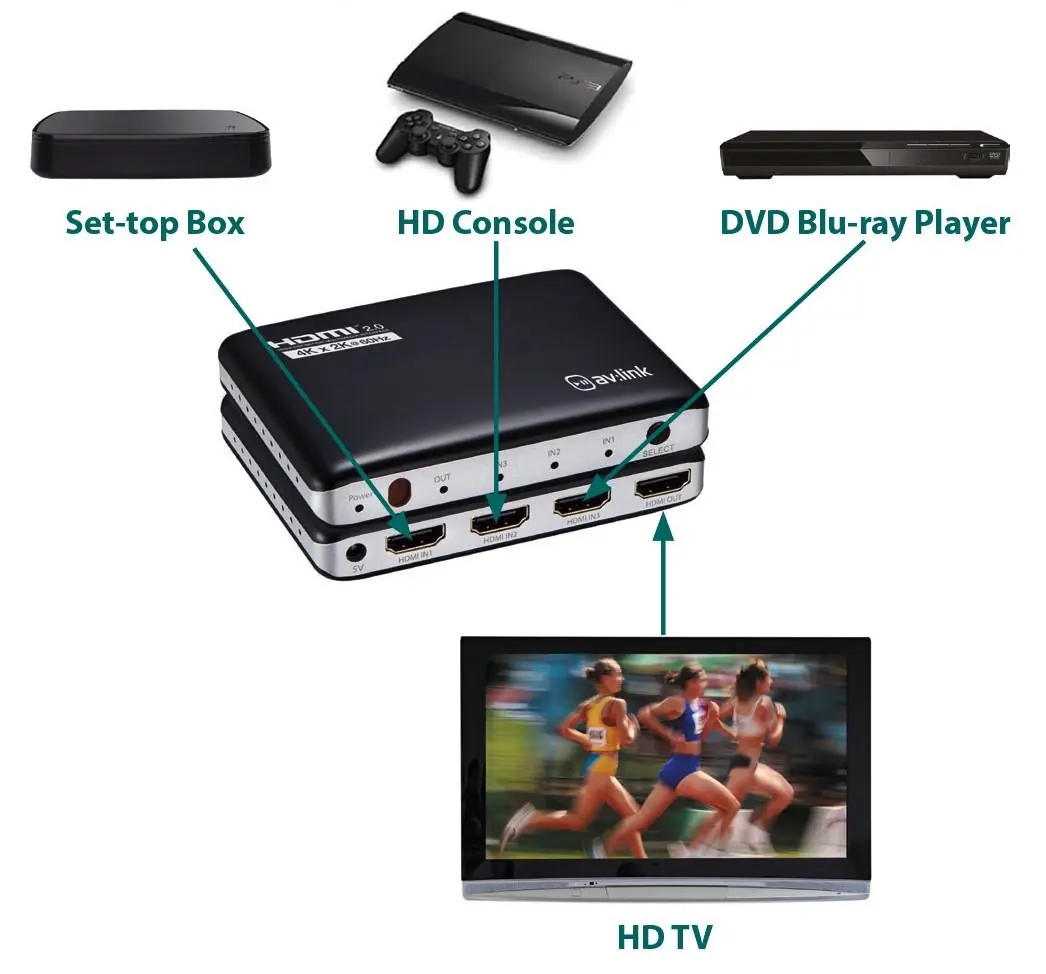
- Connect an HDMI cable from the switch's output port to your display device. Note: Always use 4K certified HDMI leads to maintain 4K resolution.
- Connect up to 3 source devices to the input ports on the switch using additional HDMI cables.
- Connect the supplied 5V power adaptor to the unit and switch on.
- The switch will automatically select the latest live device when powered on.
Operation
You can select the active input using the IR remote control provided or by pressing the Select button on the front of the unit. The blue input LEDs on the front panel indicate which device is currently live.
Safety and Maintenance
- Do not immerse the device in water or expose it to damp conditions.
- Do not use excessive force on the unit.
- Only use the power supply provided by the manufacturer.
- If the device is damaged, do not use it.
- Disconnect the power supply from the mains when not in use for long periods.
- Do not attempt to repair or take apart the device, as this will invalidate the warranty.
Practical help
Common problems
No signal or poor image quality
Ensure you are using 4K certified HDMI cables. Check that the total cable length does not exceed 16m for 4K@30Hz/FHD or 8m for 4K@60Hz.
Device not switching inputs
Ensure the power adaptor is connected and the unit is powered on. Check the battery in the IR remote control.
Before use
- Ensure you have 4K certified HDMI cables for high-resolution setups.
- Verify the power adaptor is connected to a 5V power source.
- Check that your HDMI source devices are powered on.
- Confirm that the total cable length is within the specified limits (8m for 4K@60Hz).
Specs in practice
- Max. bandwidth (600 MHz)
- Required capacity to handle high-speed data for 4K @ 60Hz signals.
- Transmission distance
- The maximum combined length of HDMI cables allowed; exceeding this may result in signal loss.
- Auto select feature
- The switch automatically detects and selects the most recently powered-on HDMI source.
Images and diagrams
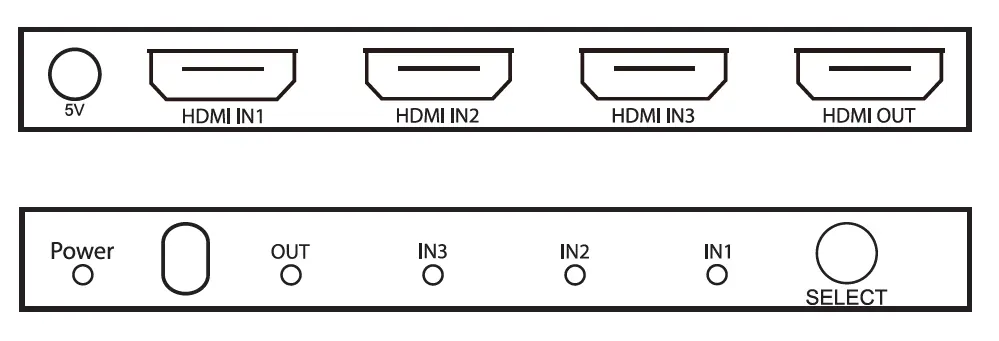
- The front panel contains the 'Select' button and LEDs indicating active inputs (IN1, IN2, IN3) and power status.
- The rear panel houses the 5V power input, three HDMI inputs, and one HDMI output.
Model compatibility
- Compatible with 4K digital TV boxes producing 3840 x 2160 @ 60Hz.
- Supports DTS-HD, Dolby-trueHD, DTS, Dolby-AC3, and DSD audio formats.

Manual page author
Michael Turner
Technical manual editor
Reviews PDF manuals for structure, safety notes, and practical product details so readers can find the right information quickly.