Electronics / AV Switchers
User Manual for Av:link 128.826UK 4K HDMI Splitter
Quick guide for the Av:link 128.826UK 4K HDMI Splitter. Learn how to connect your HDMI source to two displays, understand cable length limitations for 4K and HD, and view technical specifications.
Table of contents
Manual images
Click an image to enlargeQuick guide from the manual
The Av:link 128.826UK is a 1x2 HDMI splitter designed to distribute a single HDMI source signal to two displays simultaneously. It supports resolutions up to 3840 x 2160 at 30Hz. To ensure optimal performance and signal integrity, it is critical to adhere to the recommended cable length limits: a combined maximum of 25m for HD resolution or 16m for 4K resolution. Always use 4K certified cables when transmitting 4K signals.
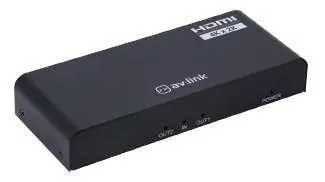
In the box
- 1x HDMI Splitter 1x2
- 1x 5V DC Power Adaptor
- 1x User Manual
Connection instructions
Follow these steps to set up your device:
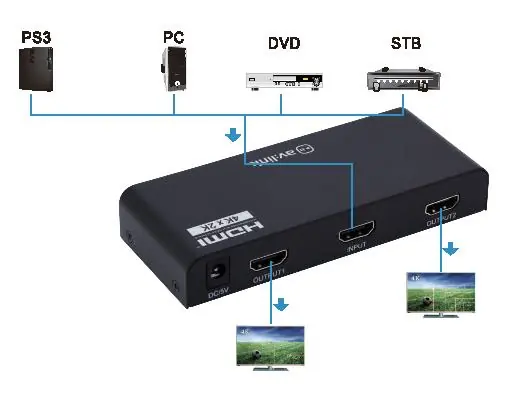
- Connect the output of your HDMI source device (e.g., PC, DVD player, STB) to the input port of the splitter. Use an HDMI cable of up to 10m for HD signals or 8m for 4K signals.
- Connect the outputs of the splitter to the inputs of your display devices. Use HDMI cables of up to 15m per output for HD signals or 8m per output for 4K signals.
- Connect the supplied 5V power adaptor to the splitter, plug it into a mains outlet, and switch it on.
- The green LEDs on the back of the splitter will illuminate once the source and display devices are connected and powered on.
Technical specifications
- HDMI Version: 1.4b
- Video Resolution: Up to 3840 x 2160 @ 30Hz
- Display Colours: 8/10/12bit deep colour
- Audio Format: DTS-HD, Dolby True, DTS, Dolby-AC3, and DSD
- Max. Bandwidth: 340 MHz
- Max. Baud Rate: 3.4Gbps
- Dimensions: 105 x 50 x 20mm
- Weight: 120g
Safety warnings
- Do not immerse the device in water or expose it to damp conditions.
- Do not subject the device to excessive force.
- Do not use the device if it appears damaged.
- Use only the power supply provided by the manufacturer.
- Disconnect the power supply from the mains when not in use for long periods.
- Do not attempt to repair or disassemble the device, as this will invalidate the warranty.
Practical help
Common problems
No signal on display
Check that cable lengths do not exceed the maximum limits (16m for 4K, 25m for HD) and ensure all connections are secure.
4K resolution not displaying correctly
Ensure you are using 4K certified HDMI cables. Standard cables may not support the required bandwidth for 4K.
Device does not power on
Verify that the supplied 5V power adapter is properly connected to the splitter and the mains outlet is switched on.
Before use
- Verify you have the 1x2 HDMI splitter and the 5V power adapter.
- Ensure you have high-quality HDMI cables.
- Check that your source device and displays support the required resolution.
- Confirm cable lengths do not exceed the recommended limits (16m for 4K, 25m for HD).
Specs in practice
- HDMI Version 1.4b
- Supports resolutions up to 3840 x 2160 @ 30Hz.
- Max. Bandwidth 340 MHz
- The data capacity for signal transmission; ensures high-quality video and audio.
- Transmission Distance
- Maximum cable length for signal integrity; varies by resolution (shorter for 4K).
Images and diagrams
- The connection diagram illustrates the HDMI source (e.g., PS3, PC, DVD, STB) connected to the 'Input' port.
- Two displays are connected to 'Output 1' and 'Output 2' ports.
- The 5V power supply connects to the DC/5V port.
Model compatibility
- Requires 4K certified cables for 4K resolution.
- Not suitable for outdoor use or damp environments.

Manual page author
David Miller
Documentation analyst
Organizes user manual content into clear summaries, with attention to model details, product context, and everyday usability.