Electronics / Audio
Av Link 122.380UK Bluetooth Receiver Wallplate
Quick guide for the Av Link 122.380UK Bluetooth Receiver Wallplate. Learn how to pair devices, connect audio and power, and understand LED status indicators.
Table of contents
Manual images
Click an image to enlargeQuick guide from the manual
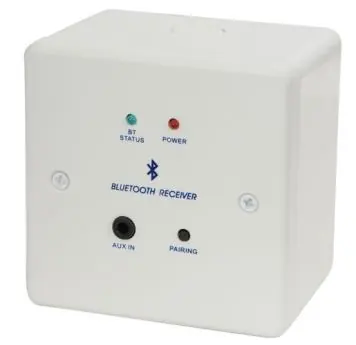
The Av Link 122.380UK is a Bluetooth receiver housed in a standard 1gang wallplate. It is designed for use in classrooms, boardrooms, kitchens, or home studies to allow wireless audio streaming from smartphones, tablets, and other Bluetooth-enabled devices. The unit is powered by a supplied UK power supply or a 2-pin screw terminal.
Technical Specifications
- Bluetooth version: 5.0
- Bluetooth range: Up to 10m (in clear line of sight)
- Audio input: Bluetooth or stereo line level (3.5mm jack)
- Audio output: Stereo 3.5mm jack or 3-pin screw terminal
- Power in: 5VDC/1A via UK PSU (supplied) or 2-pin screw terminal
- Dimensions: 87 x 87 x 35 mm (wallplate only)
- Weight: 48g
Bluetooth Pairing Instructions
- First-time pairing: Press and hold the Pairing button for around 5 seconds until the BT status light flashes quickly.
- Connect: Open the Bluetooth device list on your smart device and select "Music BT".
- Confirmation: When connected, the BT status light will stay illuminated.
- Re-pairing: If pairing times out (90 seconds limit), press and hold the Pairing button for 1 second to re-enter pairing mode.
- Power control: To turn the unit on or off, press and hold the Pairing button for around 3 seconds.
Note: The unit can only be connected to one smart device at any time and will automatically repair with the closest device if it is within range and discoverable.
Bluetooth LED Status
- Pairing mode: Fast flash (approx. 1 every second)
- Discoverable mode: Slow flash (approx. 1 every 5 seconds)
- Paired mode: LED on
Connection Diagram
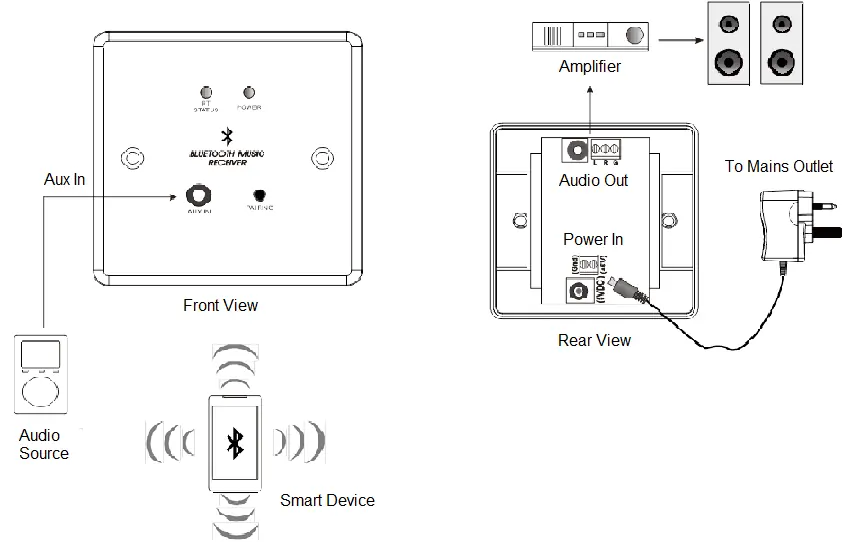
The unit features an Aux In on the front panel. The rear panel provides connections for Audio Out (3-pin screw terminal) to an amplifier and Power In (2-pin screw terminal) for the power supply. Ensure all wiring is performed correctly according to the diagram.
Safety Warnings
- Do not immerse the device in water or expose it to damp conditions.
- Do not use the device if it is damaged.
- Do not attempt to repair or take the device apart, as this will invalidate the warranty.
- Only use the recommended power supply provided. If connecting to mains power internally, consult a qualified electrician.
- Do not locate the device close to a source of heat or expose it to high temperatures.
Practical help
Common problems
Pairing timed out
Press and hold the Pairing button for 1 second to re-enter pairing mode.
Device not connecting
Ensure the device is within 10m range and set to discoverable. The unit only connects to one device at a time.
Before use
- Ensure you have the supplied UK power supply.
- Verify the wall box is a standard 1gang size.
- Check that the audio output is connected to an amplifier or speakers.
- Ensure the device is within 10m of the audio source.
Specs in practice
- Bluetooth 5.0
- Latest standard for stable, efficient wireless audio streaming.
Images and diagrams
- Front View: Shows status LEDs, Aux In, and Pairing button.
- Rear View: Shows Audio Out (3-pin screw terminal) and Power In (2-pin screw terminal).
Model compatibility
- Compatible with Bluetooth-enabled devices like smartphones, tablets, and iPods.
- Only one smart device can be connected at any time.

Manual page author
David Miller
Documentation analyst
Organizes user manual content into clear summaries, with attention to model details, product context, and everyday usability.