Electronics / Audio
User Manual for Av Link 100.598UK Multifunction Audio Convertor and Bluetooth Receiver
Quick guide for the Av Link 100.598UK Multifunction Audio Convertor and Bluetooth Receiver. Learn how to connect devices, use Bluetooth, play USB audio, and understand the connection ports.
Table of contents
Manual images
Click an image to enlargeQuick guide from the manual
The Av Link 100.598UK is a versatile USB-powered unit designed to convert Bluetooth and various digital audio formats into analogue audio. It is ideal for connecting devices like games consoles, TVs, projectors, and Blu-Ray players to audio systems that lack RCA or 3.5mm outputs.
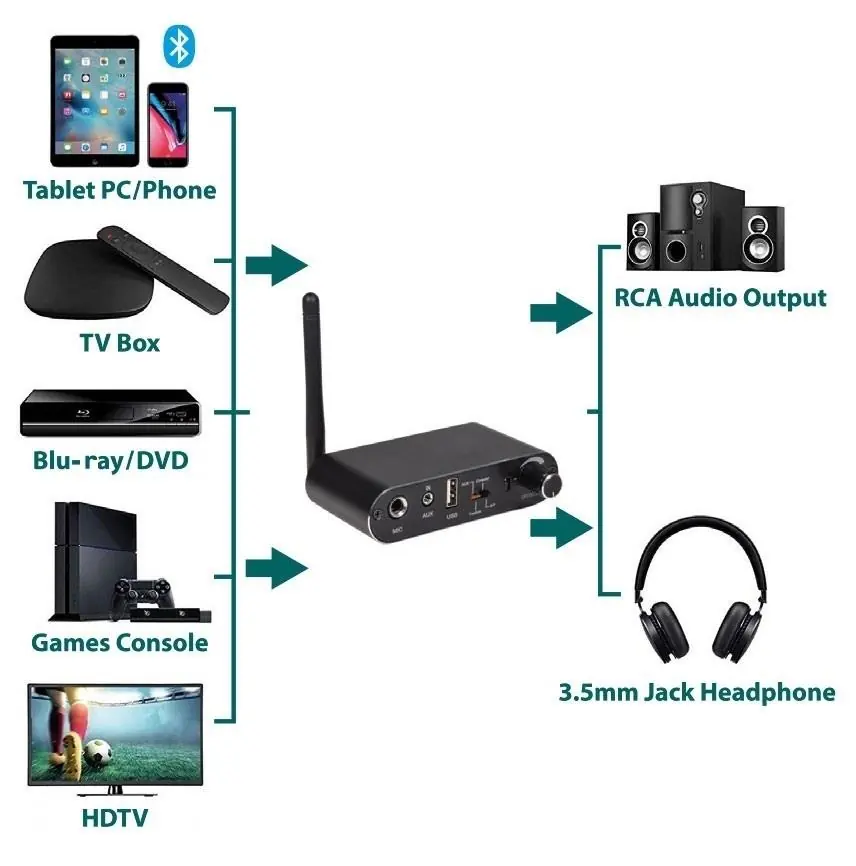
In the Box
- Main unit
- IR Remote Control
- DC jack to USB power lead (1m)
- Fibre optic Toslink lead (1m)
- AUX (3.5mm) to RCA lead (1m)
- AUX (3.5mm) to AUX (3.5mm) lead (1m)
- Coaxial to Coaxial lead (1m)
- User Manual
Connections
Front Panel: Features a Microphone input, AUX input, USB port, Input mode switch, and a Power/Volume knob.
Back Panel: Features the Power supply interface, Optical input, Coaxial input, AUX output, and RCA outputs.
Standard Operation
- Connect the unit to your input and output devices using the provided leads.
- Connect the unit to a suitable 5V USB power supply using the provided power lead.
- Turn the Power/Volume knob on the front of the unit clockwise to power on.
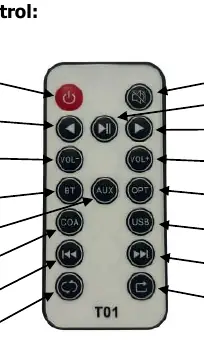
- Select the required input protocol using the Input mode switch on the front panel or the corresponding button on the remote control.
- Adjust the volume using the knob on the unit or the remote control.
Bluetooth Connection
- Ensure the unit is powered on and Bluetooth is enabled on your smart device.
- Select Bluetooth mode using the Input mode switch or the BT button on the remote.
- The blue LED on the front will flash, indicating pairing mode.
- Search for "T02" in your device's Bluetooth list and connect.
- If prompted for a pairing code, enter "0000".
- The blue LED will remain lit once successfully connected.
USB Playback
- Insert a compatible USB flash drive into the front USB port.
- The unit will automatically scan and play the first compatible MP3 track.
- If the drive is not detected, press the USB button on the remote control.
- Use the remote control buttons to manage playback.
Note: Ensure the USB flash drive is no larger than 32MB and formatted in FAT32.
Technical Specifications
- Bluetooth Version: V5.1
- Bluetooth Range: 15m (obstruction free)
- Bluetooth Profile: A2DP and AVRCP
- Input Connections: Bluetooth, Mic, Aux (3.5mm), USB, Toslink, Coaxial
- Output Connections: AUX (3.5mm), RCA (L&R)
- Power Input: DC/5V (USB lead supplied)
- Dimensions: 110 x 25 x 85mm
- Weight: 125g
Safety Warnings
- Never immerse the device in water or expose it to damp conditions.
- Do not use the device if it is damaged.
- Only use the power lead provided by the manufacturer.
- Disconnect from the power supply when not in use for long periods.
- Do not attempt to repair or take apart the device, as this will invalidate the warranty.
Practical help
Common problems
Unit fails to detect USB drive
Ensure the drive is formatted in FAT32 and is no larger than 32MB. Try pressing the USB button on the remote control.
Bluetooth pairing issues
Ensure the unit is in pairing mode (blue LED flashing) and search for 'T02' on your device. Use pairing code '0000' if prompted.
No sound output
Ensure the correct input protocol is selected on the unit or remote, and verify all cables are securely connected.
Before use
- Ensure the USB power supply provides 5V.
- Verify all audio cables are connected to the correct input/output ports.
- Check that the USB flash drive is formatted to FAT32.
- Ensure the Bluetooth device is within 15m of the unit.
Specs in practice
- Bluetooth V5.1
- Provides stable wireless connectivity with a range of up to 15m.
- Power Input DC/5V
- Requires a standard 5V USB power source.
- USB Compatibility
- Supports MP3 playback from drives up to 32MB formatted in FAT32.
Images and diagrams
- The front panel contains the Microphone input, AUX input, USB port, Input mode switch, and Power/Volume knob.
- The back panel contains the Power supply interface, Optical input, Coaxial input, AUX output, and RCA outputs.
Model compatibility
- Bluetooth pairing code: 0000
- USB drive format: FAT32
- USB drive size limit: 32MB

Manual page author
Emily Carter
User documentation editor
Prepares concise manual descriptions and highlights the most useful setup, operation, and maintenance information for readers.