Accessories / Mounts & Stands
Av Link 124.157UK Magic Eye IR Remote Extender
Quick guide for the Av Link 124.157UK Magic Eye. Learn how to install the IR remote extender, connect your satellite receiver, and troubleshoot common setup issues.
Table of contents
Quick guide from the manual
The Av Link Magic Eye is designed to allow control of a SKY Digital satellite receiver from another room. It is compatible with UK digital satellite receivers that feature an RF-OUT2 output, which provides both a second TV output and a 9V DC power supply. Ensure your satellite decoder supports this feature before installation.
Installation
Follow these steps to connect the Magic Eye to your system:
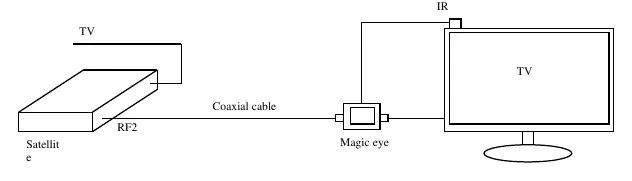
- Power down: Unplug both the TV and the Satellite Decoder from the mains power supply.
- Connect to TV: Plug the Magic Eye's coaxial lead into the aerial socket of the TV.
- Connect to Decoder: Connect the Decoder's RF2 outlet to the Magic Eye's input socket using a male-to-male IEC connector coaxial cable.
- Power up: Plug the mains power back into both the TV and the Decoder, then switch both devices on.
- Verify: Ensure the red light on the Magic Eye is illuminated.
- Positioning: Place the IR receiver in a location where it can be clearly seen by your remote control, typically on top of or by the side of the TV.
Troubleshooting
If the Magic Eye does not function after installation, please check the following:
- RF2 Activation: Ensure that the RF2 output is correctly activated in your Satellite Decoder's settings. Refer to your decoder's specific user manual for instructions on how to enable this output.
- Tuning: If you are having issues with the signal, refer to your TV manual for instructions on tuning satellite channels.
Technical Specifications
- Input Signal Frequency: 38kHz Carrier (Infra Red System)
- Output Signal Frequency: On-Off Keyed 6MHz Carrier
- Line Power Requirement: 9V DC @15mA
- Infra Red Sensor Lead Length: 0.9m
- Connectors: IEC Male (Output), IEC Female (Input)
- Operating Temperature: 0°C to +40°C
Practical help
Common problems
Magic Eye is not functioning after installation.
Check your Satellite Decoder settings to ensure the RF2 output is activated. Refer to the decoder's manual for specific instructions.
Remote control is not responding.
Ensure the IR receiver is placed in a position where it can be clearly seen by the remote control (usually on top or by the side of the TV).
Before use
- Verify your satellite receiver has an RF-OUT2 output.
- Ensure you are using a good quality coaxial cable.
- Avoid installing the cable near mains cables to prevent interference.
- Avoid sharp bends in the coaxial cable.
- Unplug both the TV and Decoder from the mains before starting the installation.
Specs in practice
- Input Signal Frequency
- 38kHz Carrier (Infra Red System) used for remote signal transmission.
- Line power Requirement
- Requires 9V DC @15mA, typically supplied by the satellite decoder's RF2 output.
- Operating Temperature
- The device is designed to operate between 0°C and +40°C.
Images and diagrams
- The wiring diagram illustrates the signal path: Satellite Decoder (RF2 output) connects via coaxial cable to the Magic Eye, which then connects to the TV aerial socket.
Model compatibility
- Compatible with UK digital satellite receivers that provide a 9V DC supply via an RF-OUT2 output.
- If installing with an amplifier, splitter, or isolated outlet plate, consult your dealer for advice.

Manual page author
Emily Carter
User documentation editor
Prepares concise manual descriptions and highlights the most useful setup, operation, and maintenance information for readers.