Home Appliances / Food Processing Equipment
User Manual for Avantco 177MT64 Electric Meat Tenderizer
Quick guide for the Avantco 177MT64 Electric Meat Tenderizer. Includes assembly, operation, cleaning, safety warnings, and troubleshooting steps.
Quick answers from the manual
Quick answer
- The Avantco 177MT64 is an electric meat tenderizer. To operate, ensure the blade attachment is locked in place, connect to a 120V power source, turn on the motor, and feed meat slowly into the chute. Always use cut-resistant gloves when handling blades. p. 4, 5
Key actions
- Assemble the unit by lifting the shield, inserting the blade attachment, and locking it with the switch. p. 4
- Clean the unit by washing parts in warm soapy water, rinsing, and drying thoroughly. Coat metal parts with food-grade silicone spray. p. 7
First start
- Ensure the machine is unplugged, assemble the blade attachment, verify alignment, connect to power, and press the green 'I' button. p. 4, 5
Problems and fixes
Meat jammed in blades
Turn motor OFF, disconnect power, lift shield, and clear jam using steel tongs.
p. 8Maintenance and reset
- Coat all metal parts with a food-grade silicone spray after cleaning to prevent corrosion. p. 7
Technical specifications
| Parameter | Value | Meaning | Pages |
|---|---|---|---|
| Voltage | 120V | Required power supply | p. 3 |
| Power | 350W | Motor power | p. 3 |
Where to find it in the PDF
- Assembly Instructions p. 4
- Operating Instructions p. 5
- Cleaning p. 7
- Parts Diagram p. 8, 9
Table of contents
Manual images
Click an image to enlargeQuick guide from the manual
This manual provides essential instructions for the safe operation and maintenance of the Avantco Electric Meat Tenderizer. Always ensure the machine is unplugged before performing any assembly, disassembly, or cleaning tasks. Wear cut-resistant gloves when handling the blades, as they are extremely sharp.
Safety Information
- Sharp Blades: Always wear cut-resistant gloves when handling the blade assembly.
- Operation: Never reach into the tenderizer while it is running. Do not use fingers to scrape food away.
- Meat Preparation: Do not tenderize meat with bones, thick veins, or meat thicker than 3/4 inch.
- Personal Safety: Tie back loose hair, roll up long sleeves, and remove jewelry before operating. Do not operate under the influence of drugs or alcohol.
Assembly Instructions
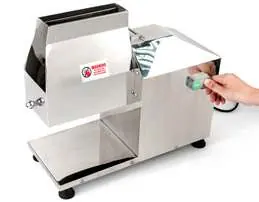
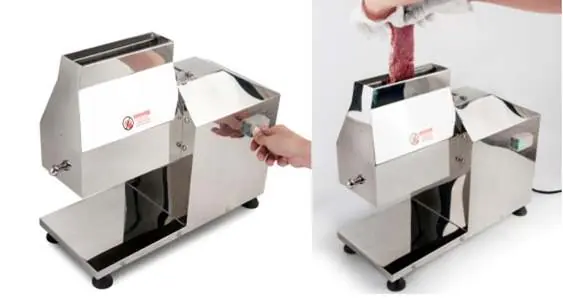
- Ensure the machine is switched off and unplugged.
- Lift the shield by pulling up the knob.
- Insert the blade attachment and align it within the machine.
- Use the wrench tool to adjust the blade shafts into the firing position.
- Lock the attachment by pushing down the switch.
- Verify all connections are tight before use.
Operating Instructions
Before connecting to power, verify that the electrical specifications on the unit's serial plate match your local power supply.
- Prepare meat by removing all skin and bones, and cutting into appropriately sized pieces.
- Turn the motor unit ON using the green button.
- Feed meat into the tenderizer chamber slowly by hand. Allow the blades to pull the meat through.
- Do not force the meat or press it down with fingers. Use stainless steel tongs if the meat piece is too short.
- Place a plate under the opening to catch the processed meat.
- Turn the motor unit OFF when finished and disconnect from the power supply.
Disassembly Instructions
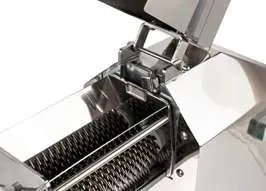
- Switch off and unplug the machine.
- Lift the shield by pulling up the knob.
- Unlock the attachment by pulling up the switch.
- Remove the blade attachment carefully, wearing cut-resistant gloves.
Cleaning and Maintenance
Always unplug the appliance and allow it to cool before cleaning.
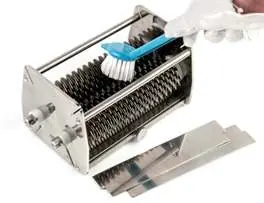
- Wash all parts thoroughly with warm, soapy water. A long-bristle brush is recommended.
- Rinse with clear water and sanitize as necessary.
- Dry all parts thoroughly before re-assembling.
- It is highly recommended to coat all metal parts with a food-grade silicone spray to prevent corrosion.
Troubleshooting
- Meat Jammed: Turn the motor OFF and disconnect from the power source. Lift the stainless steel shield and clear the jam using steel tongs.
- Poor Cutting: Check that the knives on both sides are aligned so the blades overlap and make contact with the blades on the other rack. Note that meat with excessive cartilage or gristle may not slice cleanly.
Specifications
All models (177MT64, 177MT64KT12, 177MT64KT316, 177MT64KT34, 177MT64KT38) share the following specifications:
- Voltage: 120V
- Watts: 350W
- HP: 0.5HP
- RPM: 75 RPM
- Dimensions: 18.25" L x 9.25" W x 18.25" H
- Weight: 31.5 lbs
Manufacturer information
Avantco Equipment
Practical help
Common problems
Meat jammed in blades
Turn motor OFF, disconnect power, lift shield, and clear jam using steel tongs.
Meat not cutting cleanly
Check that knives on both sides are aligned and blades are overlapping/contacting the other rack. Avoid meat with excessive cartilage or gristle.
Before use
- Unplug the machine before assembly or disassembly
- Wear cut-resistant gloves when handling blades
- Remove jewelry, watches, and rings
- Tie back loose hair and roll up long sleeves
- Clean all food-contact parts before first use
- Verify local power matches unit specifications
Images and diagrams
- Parts Diagram (Page 8-9): Exploded view of the unit with numbered parts list for maintenance.
- Circuit Diagram (Page 10): Wiring schematic for the motor and control board.
Model compatibility
- Do not use accessories from other manufacturers; this voids the warranty.
- Only use meat without bones or thick veins.
- Meat should not exceed 3/4 inch thickness.

Manual page author
Emily Carter
User documentation editor
Prepares concise manual descriptions and highlights the most useful setup, operation, and maintenance information for readers.