Home Appliances / Coffee Equipment
User Manual for Avantco 177CU30ETL Stainless Steel Coffee Urn
Quick guide for the Avantco 177CU30ETL Stainless Steel Coffee Urn. Includes setup, brewing instructions, cleaning, maintenance, and troubleshooting for boil-dry protection.
Quick answers from the manual
Quick answer
- The Avantco 177CU30ETL is a 30-cup stainless steel coffee urn. It requires a 120V grounded outlet and should be used with medium-coarse ground coffee to prevent flooding. p. 1, 4, 5
Key actions
- Brewing coffee p. 5
- Resetting after boil dry p. 6
First start
- Remove packaging, boil water, and discard before first use. p. 5
Problems and fixes
Unit stops working
Check boil dry protection. Unplug, cool, and press the manual reset button.
p. 6Maintenance and reset
- Manual reset button is located under the plastic bottom. p. 6
Technical specifications
| Parameter | Value | Meaning | Pages |
|---|---|---|---|
| Power | 950W | Power consumption | p. 4 |
| Voltage | 120V/60Hz | Electrical requirements | p. 4 |
Where to find it in the PDF
- Safety Information p. 3
- Specifications p. 4
- How to Use p. 5
- Boil Dry Protection p. 6
Table of contents
Manual images
Click an image to enlargeQuick guide from the manual
This manual provides instructions for the Avantco 177CU30ETL Stainless Steel Coffee Urn. Key operations include proper filling, brewing, and maintenance. Always ensure the unit is used on a flat, stable surface and connected to a grounded 120V AC socket. Never operate the unit without at least 3 cups of water in the tank.
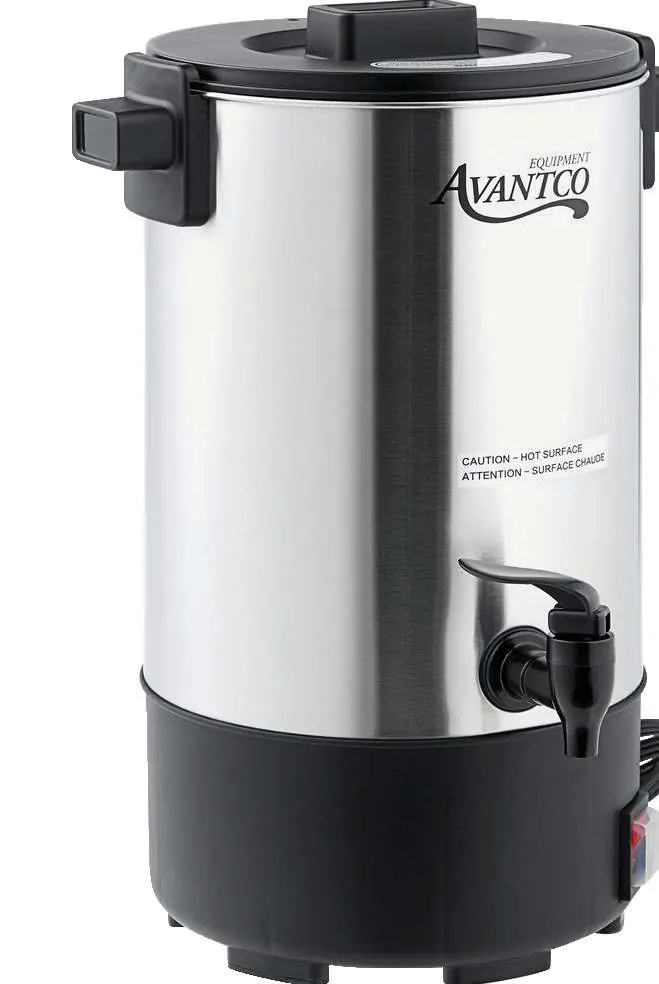
Specifications
- Model: 177CU30ETL
- Power: 950W
- Voltage: 120V/60Hz
- Volume: 30 cups
Coffee Measuring Guide
For best results, use the following ratios:
- 12-15 cups: 3/4 cup of ground coffee
- 20-25 cups: 1 1/2 cups of ground coffee
- 30 cups: 2 cups of ground coffee
How to Use
- Place the urn on a flat, level surface.
- Turn the lid counter-clockwise to open.
- Pour in water, ensuring it is between the MIN and MAX indicators.
- Place the lid on top and turn clockwise to lock.
- Plug in the urn.
- To brew, insert the percolator tube and filter basket, then add the desired amount of coffee grounds.
- Switch the unit ON. The HEATING light will indicate the process has begun.
- Tilt the faucet lever to dispense coffee.
Boil Dry Protection & Manual Reset
If the water boils away completely, the unit will turn itself off to prevent damage. To reset:
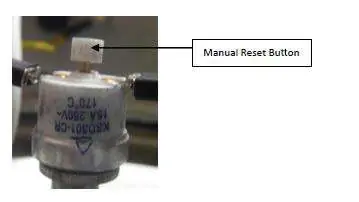
- Unplug the appliance and allow it to cool down.
- Open the plastic bottom of the coffee urn.
- Locate the reset switch in the control section.
- Press the button.
- Replace the plastic bottom, plug in the appliance, and switch it on.
Cleaning and Maintenance
- Daily Cleaning: Unplug and allow to cool. Rinse with hot water until the faucet runs clear. Clean the filter unit and lid with non-abrasive detergent.
- Exterior: Wipe with a soft cloth. Do not use benzene, thinners, or harsh abrasives.
- De-Scaling: If scale builds up, use a supermarket de-scaling agent or a natural method: place sliced lemons in the urn, fill to MAX, boil, let sit for 1 hour, then scrub and rinse.
Safety Information
- Always switch OFF before unplugging or moving.
- Never immerse the urn in water.
- Keep hands and face clear when removing the lid after use.
- Do not use soft water, drip grind, or finely ground coffee, as these may cause the basket to flood.
Manufacturer information
Avantco Equipment
Practical help
Common problems
Urn turns off unexpectedly
Boil dry protection may have triggered. Unplug, let cool, and press the manual reset button located under the plastic bottom.
Coffee basket floods
Avoid using soft water, drip grind, or finely ground coffee. Use medium-coarse ground coffee.
Before use
- Remove all packaging from inside and outside.
- Boil water and discard to clear any packaging residue.
- Ensure you have a grounded 120V AC socket.
- Place on a flat, stable surface.
Images and diagrams
- Manual Reset Button: Located inside the plastic bottom control section.
- Electrical Circuit: Includes thermal fuse and heating elements.
Model compatibility
- Indoor use only.
- Requires grounded 120V AC socket.

Manual page author
Michael Turner
Technical manual editor
Reviews PDF manuals for structure, safety notes, and practical product details so readers can find the right information quickly.